
To get started with developing using the Express framework, you need
to have Node and npm(node package manager) installed. If you don’t
already have these, head over to Node setup
to install node on your local system. Confirm that node and npm are
installed by running the following commands in your terminal.
node --version
npm --version
You should get an output similar to:
v5.0.0
3.5.2
Now that we have Node and npm set up, let us understand what npm is and how to use it.
Node Package Manager(npm)
npm is the package manager for node. The npm Registry is a public collection of packages of open-source code for Node.js, front-end web apps, mobile apps, robots, routers, and countless other needs of the JavaScript community. npm allows us to access all these packages and install them locally. You can browse through the list of packages available on npm at npmJS.How to use npm?
There are 2 ways to install a package using npm: globally and locally.- Globally: This method is generally used to install development tools and CLI based packages. To install a package globally, use:
npm install -g <package-name>
- Locally: This method is generally used to install frameworks
and libraries. A locally installed package can be used only within the
directory it is installed. To install a package locally use the same
command as above without the -g flag.
npm install <package-name>
- Fire up your terminal/cmd, create a new folder named hello-world and cd into it:

- Now to create the package.json file using npm, use the following.
npm initIt’ll ask you for the following information:
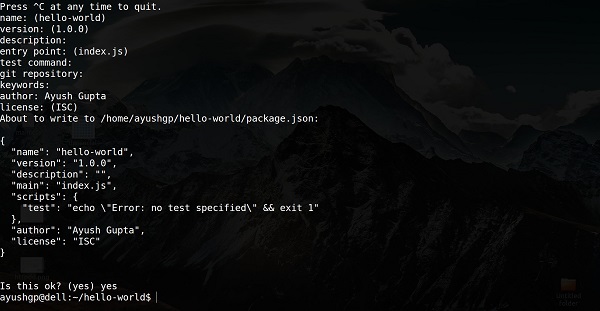 Just keep pressing enter, and enter your name at the “author name” field.
- Now we have our package.json file set up, we’ll install express.
To install express and add it in our package.json file, we use the
following command:
npm install --save express
To confirm express installed correctly, run
ls node_modules #(dir node_modules for windows)
Tip: The --save flag can be replaced by -S flag. This flag ensures that express is added as a dependency to our package.json file. This has an advantage, the next time we need to install all the dependencies of our project we just need to run the command npm install and it’ll find the dependencies in this file and install them for us.
npm install -g nodemonNow we are all ready to dive into express!


No comments:
Post a Comment