
In this chapter, we will study about Drupal error handling for managing error messages on Drupal site.
Error Handling is a process of detection and finding the resolutions for the errors, this can be programming application errors or communicable errors.
The below steps describe managing error messages in Drupal:
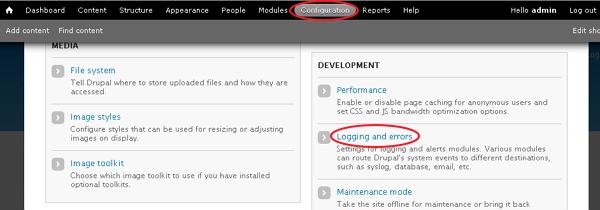
Step (1): Go to Configuration and click on Logging and errors.
 Step (2): Next, Logging and errors page will get displayed as shown below.
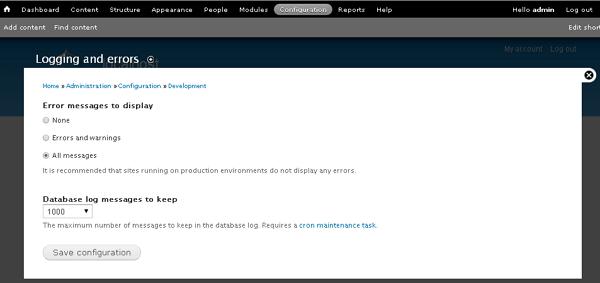 The fields as seen the above screen are discussed below:
The code for _drupal_exception_handler will be shown as below:
There are two string references to _drupal_exception_handler such as _drupal_bootstrap_configuration() present in the bootstrap.inc file and _drupal_get_last_caller present in the errors.inc file. Both these files are present in the includes folder.
Error Handling is a process of detection and finding the resolutions for the errors, this can be programming application errors or communicable errors.
The below steps describe managing error messages in Drupal:
Step (1): Go to Configuration and click on Logging and errors.
Step (2): Next, Logging and errors page will get displayed as shown below.
The fields as seen the above screen are discussed below:- Error messages to display: It specifies error messages to be displayed on the Drupal site.
- None option doesn't display any error message.
- Errors and warnings option displays only messages related to errors and warnings.
- All messages option specifies all the error messages such as errors, warnings etc to be displayed on the site.
- Database log messages to keep: It indicates the maximum number of messages to kept in the database log.
The code for _drupal_exception_handler will be shown as below:
function _drupal_exception_handler($exception) {
  require_once DRUPAL_ROOT . '/includes/errors.inc';

  try {
    // display the error message in the log and return the error messages to the user
    _drupal_log_error(_drupal_decode_exception($exception), TRUE);
  }
  catch (Exception $excp2) {
    // Another uncaught exception was thrown while handling the first one.
    // If we are displaying errors, then do so with no possibility of a further uncaught exception being thrown.
    if (error_displayable()) {
      print '<h1>Additional uncaught exception thrown while handling exception.</h1>';
      print '<h2>Original</h2><p>' . _drupal_render_exception_safe($exception) . '</p>';
      print '<h2>Additional</h2><p>' . _drupal_render_exception_safe($excp2) . '</p><hr />';
    }
  }
}
The function must be used on every Drupal request. This function is present at the line 2328 in the file includes/bootstrap.inc .
There are two string references to _drupal_exception_handler such as _drupal_bootstrap_configuration() present in the bootstrap.inc file and _drupal_get_last_caller present in the errors.inc file. Both these files are present in the includes folder.


No comments:
Post a Comment