
This interface of cPanel allows you to create and Install a Ruby on
Rails application. If you have a Ruby on Rails application developed,
you can deploy it to your server using this interface.
To Create a Ruby on Rails Application, follow these steps −
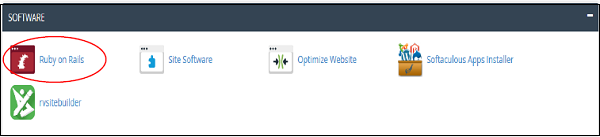
Step 1 − Click Ruby on Rails found under Software Section of cPanel Home.
 Step 2 − In Ruby on Rails Interface, you will find Create Ruby on Rails Application.
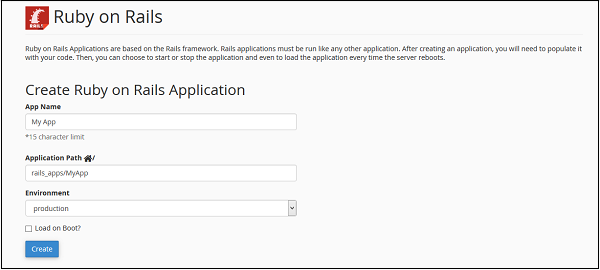 Step 3 − Provide name of your application in App Name.
Step 4 − Provide a Path for your application in your Home Directory.
Step 5 − Choose appropriate environment for your Application. Select Load on Boot, if you want your application to automatically start, whenever your server starts.
Step 6 − Click Create to create a new Ruby on Rails Application.
To delete a Ruby on Rails Application, you can scroll down to the list of currently Available Ruby on Rails Application.
 Click Delete link from Action button to delete the application. You
can also change the preferences of application from this interface.
Click Delete link from Action button to delete the application. You
can also change the preferences of application from this interface.
 It will take you to the following interface.
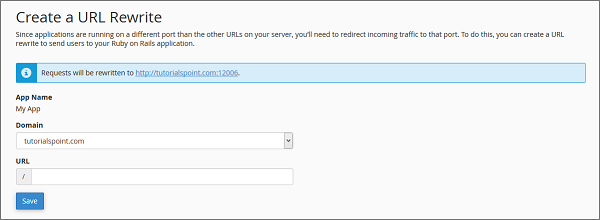 Choose a domain from the dropdown and if you want, you can specify a URL for that too in the URL text box.
Click Save to create a rewrite.
To Create a Ruby on Rails Application, follow these steps −
Step 1 − Click Ruby on Rails found under Software Section of cPanel Home.
Step 2 − In Ruby on Rails Interface, you will find Create Ruby on Rails Application.
Step 3 − Provide name of your application in App Name.Step 4 − Provide a Path for your application in your Home Directory.
Step 5 − Choose appropriate environment for your Application. Select Load on Boot, if you want your application to automatically start, whenever your server starts.
Step 6 − Click Create to create a new Ruby on Rails Application.
To delete a Ruby on Rails Application, you can scroll down to the list of currently Available Ruby on Rails Application.
Click Delete link from Action button to delete the application. You
can also change the preferences of application from this interface.Create a Rewrite
Ruby on Rails applications run on a different port rather than the incoming traffic. People will access port number 80 or 443, which is for http and https, and hence you will need to redirect people from that port on to which Ruby on Rails application is running. To create a rewrite, scroll down on Ruby on Rails Interface to Create a Rewrite. Click Create Rewrite link next to the app name of which you wish to create the rewrite.
It will take you to the following interface.
Choose a domain from the dropdown and if you want, you can specify a URL for that too in the URL text box.Click Save to create a rewrite.


No comments:
Post a Comment