
cPanel IP blocker enables you to block your website for a single IP
address, domain name or a range of IP address. All those users, who will
try to access your website from blocked IP addresses will not be able
to access your website. You can manually deny those IP addresses, who
are using your website’s bandwidth or doing malicious activity.
Step 1 − Open cPanel IP Blocker by clicking on the IP Blocker Link found under the security section of cPanel Home.
 Step 2 − In Add an IP or Range, enter your IP address or Domain Name or Range.
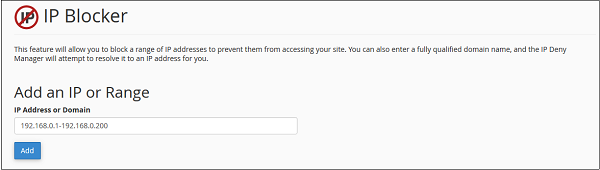 IP address can be entered in the following formats.
Step 1 − Open cPanel IP Blocker by clicking on IP Blocker Link found under security section of cPanel Home.
Step 2 − Scroll down to find Currently–Blocked IP Addresses.
Find the IP address or Range you want to remove, and click on Delete
link.
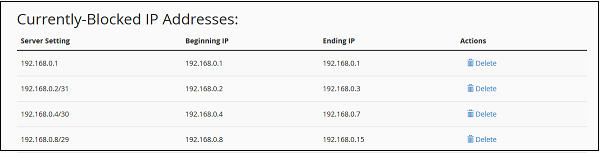 Step 3 − It will ask you for confirmation, click on Remove IP.
It will remove the IP from blocked list and will give back the
permission to access your site.
Step 3 − It will ask you for confirmation, click on Remove IP.
It will remove the IP from blocked list and will give back the
permission to access your site.
Deny Access to an IP Address or Domain
To deny access to a specific IP address or Domain name, follow these steps −Step 1 − Open cPanel IP Blocker by clicking on the IP Blocker Link found under the security section of cPanel Home.
Step 2 − In Add an IP or Range, enter your IP address or Domain Name or Range.
IP address can be entered in the following formats.- Single IP address, E.g. 192.168.0.1
- IP address Range, E.g. 192.168.0.1–192.168.0.100 or 192.168.0.1–100
- CIDR format, E.g. 192.168.0.1/32
- Using Wildcard, E.g. 192.168.*.*
- Domain Name, google.com
Remove an IP from the Denied List
You can allow access to a denied IP address or Range, by following these steps −Step 1 − Open cPanel IP Blocker by clicking on IP Blocker Link found under security section of cPanel Home.
Step 2 − Scroll down to find Currently–Blocked IP Addresses.
Find the IP address or Range you want to remove, and click on Delete
link.
Step 3 − It will ask you for confirmation, click on Remove IP.
It will remove the IP from blocked list and will give back the
permission to access your site.

No comments:
Post a Comment