
The main purpose of JasperReports is to create page oriented, ready
to print documents in a simple and flexible manner. The following flow
chart depicts a typical work flow while creating reports.
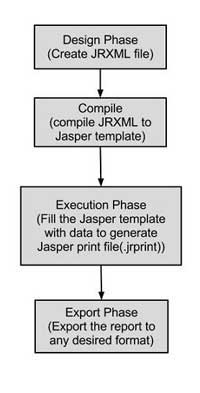 As shown in the image, the life cycle has following distinct phases −
As shown in the image, the life cycle has following distinct phases −- Designing the report − In this step we, create the JRXML file, which is an XML document that contains the definition of the report layout. We can use any text editor or iReportDesigner to manually create it. If iReportDesigner is used, the layout is designed in a visual way, hence real structure of the JRXML can be ignored.
- Compiling the report − In this step, JRXML is compiled in a binary object called a Jasper file (*.jasper). This compilation is done for performance reasons. Jasper files are what you need to ship with your application in order to run the reports.
- Executing the report (Filling data into the report) − In this step, data from the application is filled in the compiled report. The class net.sf.jasperreports.engine.JasperFillManager provides necessary functions to fill the data in the reports. A Jasper print file (*.jrprint) is created, which can be used either to print or export the report.
- Exporting the report to desired format − In this step, we can export the Jasper print file created in the previous step to any format using JasperExportManager. As Jasper provides various forms of exports, hence with the same input, we can create multiple representations of the data.


No comments:
Post a Comment