
The Transfer Object pattern is used when we want to pass data with
multiple attributes in one shot from client to server. Transfer object
is also known as Value Object. Transfer Object is a simple POJO class
having getter/setter methods and is serializable so that it can be
transferred over the network.
It does not have any behavior. Server Side business class normally fetches data from the database and fills the POJO and send it to the client or pass it by value. For client, transfer object is read-only. Client can create its own transfer object and pass it to server to update values in database in one shot. Following are the entities of this type of design pattern.
TransferObjectPatternDemo, our demo class, is acting as a client here and will use StudentBO and Student to demonstrate Transfer Object Design Pattern.
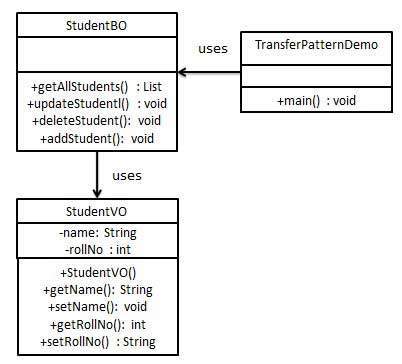
StudentVO.java
StudentBO.java
TransferObjectPatternDemo.java
It does not have any behavior. Server Side business class normally fetches data from the database and fills the POJO and send it to the client or pass it by value. For client, transfer object is read-only. Client can create its own transfer object and pass it to server to update values in database in one shot. Following are the entities of this type of design pattern.
- Business Object - Business Service fills the Transfer Object with data.
- Transfer Object - Simple POJO having methods to set/get attributes only.
- Client - Client either requests or sends the Transfer Object to Business Object.
Implementation
We are going to create a StudentBO as Business Object,Student as Transfer Object representing our entities.TransferObjectPatternDemo, our demo class, is acting as a client here and will use StudentBO and Student to demonstrate Transfer Object Design Pattern.
Step 1
Create Transfer Object.StudentVO.java
public class StudentVO {
   private String name;
   private int rollNo;

   StudentVO(String name, int rollNo){
      this.name = name;
      this.rollNo = rollNo;
   }

   public String getName() {
      return name;
   }

   public void setName(String name) {
      this.name = name;
   }

   public int getRollNo() {
      return rollNo;
   }

   public void setRollNo(int rollNo) {
      this.rollNo = rollNo;
   }
}
Step 2
Create Business Object.StudentBO.java
import java.util.ArrayList;
import java.util.List;

public class StudentBO {

   //list is working as a database
   List<StudentVO> students;

   public StudentBO(){
      students = new ArrayList<StudentVO>();
      StudentVO student1 = new StudentVO("Robert",0);
      StudentVO student2 = new StudentVO("John",1);
      students.add(student1);
      students.add(student2);
   }
   public void deleteStudent(StudentVO student) {
      students.remove(student.getRollNo());
      System.out.println("Student: Roll No " + student.getRollNo() + ", deleted from database");
   }

   //retrive list of students from the database
   public List<StudentVO> getAllStudents() {
      return students;
   }

   public StudentVO getStudent(int rollNo) {
      return students.get(rollNo);
   }

   public void updateStudent(StudentVO student) {
      students.get(student.getRollNo()).setName(student.getName());
      System.out.println("Student: Roll No " + student.getRollNo() +", updated in the database");
   }
}
Step 3
Use the StudentBO to demonstrate Transfer Object Design Pattern.TransferObjectPatternDemo.java
public class TransferObjectPatternDemo {
   public static void main(String[] args) {
      StudentBO studentBusinessObject = new StudentBO();

      //print all students
      for (StudentVO student : studentBusinessObject.getAllStudents()) {
         System.out.println("Student: [RollNo : " + student.getRollNo() + ", Name : " + student.getName() + " ]");
      }

      //update student
      StudentVO student = studentBusinessObject.getAllStudents().get(0);
      student.setName("Michael");
      studentBusinessObject.updateStudent(student);

      //get the student
      student = studentBusinessObject.getStudent(0);
      System.out.println("Student: [RollNo : " + student.getRollNo() + ", Name : " + student.getName() + " ]");
   }
}
Step 4
Verify the output.Student: [RollNo : 0, Name : Robert ] Student: [RollNo : 1, Name : John ] Student: Roll No 0, updated in the database


No comments:
Post a Comment