This chapter explains how the POI library interacts with a database.
With the help of JDBC, you can retrieve data from a database and insert
that data into a spreadsheet using the POI library. Let us consider
MySQL database for SQL operations.
Write into Excel from Database
Let us assume the following employee data table called
emp_tbl is to be retrieved from the MySQL database
test.
| EMP ID |
EMP NAME |
DEG |
SALARY |
DEPT |
| 1201 |
Gopal |
Technical Manager |
45000 |
IT |
| 1202 |
Manisha |
Proof reader |
45000 |
Testing |
| 1203 |
Masthanvali |
Technical Writer |
45000 |
IT |
| 1204 |
Kiran |
Hr Admin |
40000 |
HR |
| 1205 |
Kranthi |
Op Admin |
30000 |
Use the following code to retrieve data from a database and insert the same into a spreadsheet.
import java.io.File;
import java.io.FileOutputStream;
import java.sql.Connection;
import java.sql.DriverManager;
import java.sql.ResultSet;
import java.sql.Statement;
import org.apache.poi.xssf.usermodel.XSSFCell;
import org.apache.poi.xssf.usermodel.XSSFRow;
import org.apache.poi.xssf.usermodel.XSSFSheet;
import org.apache.poi.xssf.usermodel.XSSFWorkbook;
public class ExcelDatabase
{
   public static void main(String[] args) throws Exception
   {
      Class.forName("com.mysql.jdbc.Driver");
      Connection connect = DriverManager.getConnection(
      "jdbc:mysql://localhost:3306/test" ,
      "root" ,
      "root"
      );
      Statement statement = connect.createStatement();
      ResultSet resultSet = statement
      .executeQuery("select * from emp_tbl");
      XSSFWorkbook workbook = new XSSFWorkbook();
      XSSFSheet spreadsheet = workbook
      .createSheet("employe db");
      XSSFRow row=spreadsheet.createRow(1);
      XSSFCell cell;
      cell=row.createCell(1);
      cell.setCellValue("EMP ID");
      cell=row.createCell(2);
      cell.setCellValue("EMP NAME");
      cell=row.createCell(3);
      cell.setCellValue("DEG");
      cell=row.createCell(4);
      cell.setCellValue("SALARY");
      cell=row.createCell(5);
      cell.setCellValue("DEPT");
      int i=2;
      while(resultSet.next())
      {
         row=spreadsheet.createRow(i);
         cell=row.createCell(1);
         cell.setCellValue(resultSet.getInt("eid"));
         cell=row.createCell(2);
         cell.setCellValue(resultSet.getString("ename"));
         cell=row.createCell(3);
         cell.setCellValue(resultSet.getString("deg"));
         cell=row.createCell(4);
         cell.setCellValue(resultSet.getString("salary"));
         cell=row.createCell(5);
         cell.setCellValue(resultSet.getString("dept"));
         i++;
      }
      FileOutputStream out = new FileOutputStream(
      new File("exceldatabase.xlsx"));
      workbook.write(out);
      out.close();
      System.out.println(
      "exceldatabase.xlsx written successfully");
   }
}
Let us save the above code as
ExcelDatabase.java. Compile and execute it from the command prompt as follows.
$javac ExcelDatabase.java
$java ExcelDatabase
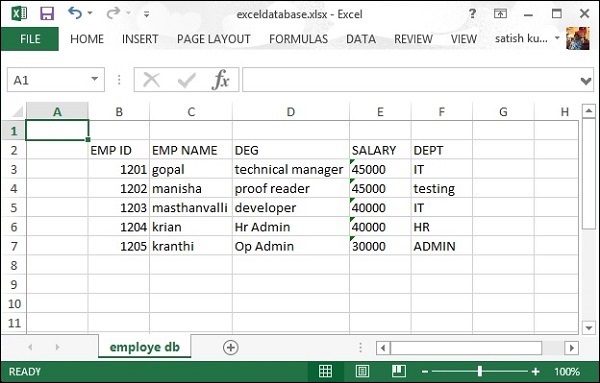
It will generate an Excel file named
exceldatabase.xlsx in your current directory and display the following output on the command prompt.
exceldatabase.xlsx written successfully
The
exceldatabase.xlsx file looks as follows.


No comments:
Post a Comment