
To become an expert AWK programmer, you need to know its internals.
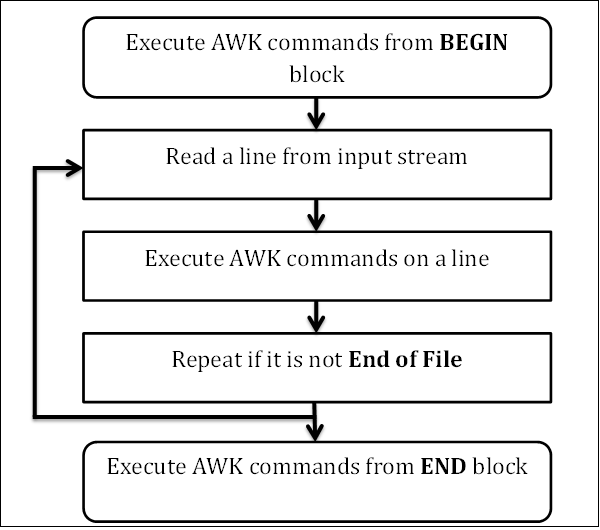
AWK follows a simple workflow − Read, Execute, and Repeat. The following
diagram depicts the workflow of AWK −
Syntax
Syntax
Syntax
Let us create a file marks.txt which contains the serial number, name of the student, subject name, and number of marks obtained.
Example
Output
Read
AWK reads a line from the input stream (file, pipe, or stdin) and stores it in memory.Execute
All AWK commands are applied sequentially on the input. By default AWK execute commands on every line. We can restrict this by providing patterns.Repeat
This process repeats until the file reaches its end.Program Structure
Let us now understand the program structure of AWK.BEGIN block
The syntax of the BEGIN block is as follows −Syntax
BEGIN {awk-commands}
The BEGIN block gets executed at program start-up. It executes only
once. This is good place to initialize variables. BEGIN is an AWK
keyword and hence it must be in upper-case. Please note that this block
is optional.Body Block
The syntax of the body block is as follows −Syntax
/pattern/ {awk-commands}
The body block applies AWK commands on every input line. By default,
AWK executes commands on every line. We can restrict this by providing
patterns. Note that there are no keywords for the Body block.END Block
The syntax of the END block is as follows −Syntax
END {awk-commands}
The END block executes at the end of the program. END is an AWK
keyword and hence it must be in upper-case. Please note that this block
is optional.Let us create a file marks.txt which contains the serial number, name of the student, subject name, and number of marks obtained.
1)  Amit    Physics  80
2)  Rahul   Maths    90
3)  Shyam   Biology  87
4)  Kedar   English  85
5)  Hari    History  89
Let us now display the file contents with header by using AWK script.
Example
[jerry]$ awk 'BEGIN{printf "Sr No\tName\tSub\tMarks\n"} {print}' marks.txtWhen this code is executed, it produces the following result −
Output
Sr No     Name     Sub          Marks
 1)       Amit     Physics      80
 2)       Rahul    Maths        90
 3)       Shyam    Biology      87
 4)       Kedar    English      85
 5)       Hari     History      89
At the start, AWK prints the header from the BEGIN block. Then in the body block, it reads a line from a file and executes AWK's print command which just prints the contents on the standard output stream. This process repeats until file reaches the end.


No comments:
Post a Comment