Dynamic Websites
The Websites provide the functionalities that can use to store, update, retrieve, and delete the data in a database.
What is the Form?
A Document that containing black fields, that the user can fill the
data or user can select the data.Casually the data will store in the
data base
Example
Below example shows the form with some specific actions by using post method.
<html>

   <head>
      <title>PHP Form Validation</title>
   </head>

   <body>
      <?php

         // define variables and set to empty values
         $name = $email = $gender = $comment = $website = "";

         if ($_SERVER["REQUEST_METHOD"] == "POST") {
            $name = test_input($_POST["name"]);
            $email = test_input($_POST["email"]);
            $website = test_input($_POST["website"]);
            $comment = test_input($_POST["comment"]);
            $gender = test_input($_POST["gender"]);
         }

         function test_input($data) {
            $data = trim($data);
            $data = stripslashes($data);
            $data = htmlspecialchars($data);
            return $data;
         }
      ?>

      <h2>Tutorials Point Absolute classes registration</h2>

      <form method = "post" action = "/php/php_form_introduction.htm">
         <table>
            <tr>
               <td>Name:</td>
               <td><input type = "text" name = "name"></td>
            </tr>

            <tr>
               <td>E-mail:</td>
               <td><input type = "text" name = "email"></td>
            </tr>

            <tr>
               <td>Specific Time:</td>
               <td><input type = "text" name = "website"></td>
            </tr>

            <tr>
               <td>Class details:</td>
               <td><textarea name = "comment" rows = "5" cols = "40"></textarea></td>
            </tr>

            <tr>
               <td>Gender:</td>
               <td>
                  <input type = "radio" name = "gender" value = "female">Female
                  <input type = "radio" name = "gender" value = "male">Male
               </td>
            </tr>

            <tr>
               <td>
                  <input type = "submit" name = "submit" value = "Submit">
               </td>
            </tr>
         </table>
      </form>

      <?php
         echo "<h2>Your Given details are as :</h2>";
         echo $name;
         echo "<br>";

         echo $email;
         echo "<br>";

         echo $website;
         echo "<br>";

         echo $comment;
         echo "<br>";

         echo $gender;
      ?>

   </body>
</html>
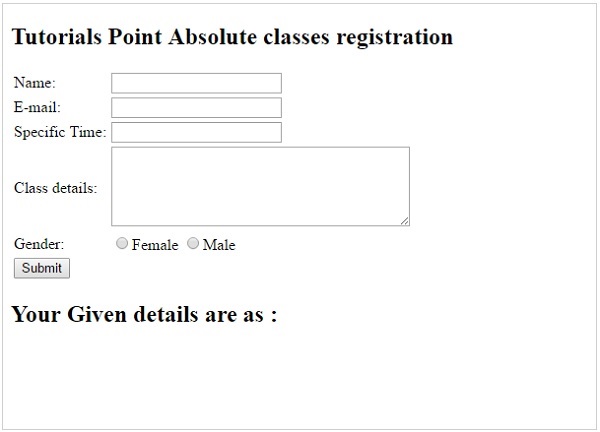
It will produce the following result −


No comments:
Post a Comment