
The process of verifying the identity of a user is called authentication. It usually uses a username and a password to judge whether the user is one who he claims as.
To use the Yii authentication framework, you need to −
The identity class must implement the yii\web\IdentityInterface with the following methods −
 Step 2 − Then, add a new function called actionAuth() to the SiteController.
 Step 4 − To login and logou,t a user you can use the following code.
Step 5 − Go to the URL http://localhost:8080/index.php?r=site/auth, you will see the following.
 The yii\web\User class raises the following events −
To use the Yii authentication framework, you need to −
- Configure the user application component.
- Implement the yii\web\IdentityInterface interface.
<?php
   $params = require(__DIR__ . '/params.php');
   $config = [
      'id' => 'basic',
      'basePath' => dirname(__DIR__),
      'bootstrap' => ['log'],
      'components' => [
         'request' => [
            // !!! insert a secret key in the following (if it is empty) - this
               //is required by cookie validation
            'cookieValidationKey' => 'ymoaYrebZHa8gURuolioHGlK8fLXCKjO',
         ],
         'cache' => [
            'class' => 'yii\caching\FileCache',
         ],
         'user' => [
            'identityClass' => 'app\models\User',
            'enableAutoLogin' => true,
         ],
         //other components...
         'db' => require(__DIR__ . '/db.php'),
      ],
      'modules' => [
         'hello' => [
            'class' => 'app\modules\hello\Hello',
         ],
      ],
      'params' => $params,
   ];
   if (YII_ENV_DEV) {
      // configuration adjustments for 'dev' environment
      $config['bootstrap'][] = 'debug';
      $config['modules']['debug'] = [
         'class' => 'yii\debug\Module',
      ];
      $config['bootstrap'][] = 'gii';
      $config['modules']['gii'] = [
         'class' => 'yii\gii\Module',
      ];
   }
   return $config;
?>
In the above configuration, the identity class for user is configured to be app\models\User.
The identity class must implement the yii\web\IdentityInterface with the following methods −
- findIdentity() − Looks for an instance of the identity class using the specified user ID.
- findIdentityByAccessToken() − Looks for an instance of the identity class using the specified access token.
- getId() − It returns the ID of the user.
- getAuthKey() − Returns a key used to verify cookie-based login.
- validateAuthKey() − Implements the logic for verifying the cookie-based login key.
<?php
   namespace app\models;
   class User extends \yii\base\Object implements \yii\web\IdentityInterface {
      public $id;
      public $username;
      public $password;
      public $authKey;
      public $accessToken;
      private static $users = [
         '100' => [
            'id' => '100',
            'username' => 'admin',
            'password' => 'admin',
            'authKey' => 'test100key',
            'accessToken' => '100-token',
         ],
         '101' => [
            'id' => '101',
            'username' => 'demo',
            'password' => 'demo',
            'authKey' => 'test101key',
            'accessToken' => '101-token',
         ],
      ];
      /**
      * @inheritdoc
      */
      public static function findIdentity($id) {
         return isset(self::$users[$id]) ? new static(self::$users[$id]) : null;
      }
      /**
      * @inheritdoc
      */
      public static function findIdentityByAccessToken($token, $type = null) {
         foreach (self::$users as $user) {
            if ($user['accessToken'] === $token) {
               return new static($user);
            }
         }
         return null;
      }
      /**
      * Finds user by username
      *
      * @param string $username
      * @return static|null
      */
      public static function findByUsername($username) {
         foreach (self::$users as $user) {
            if (strcasecmp($user['username'], $username) === 0) {
               return new static($user);
            }
         }
         return null;
      }
      /**
      * @inheritdoc
      */
      public function getId() {
         return $this->id;
      }
      /**
      * @inheritdoc
      */
      public function getAuthKey() {
         return $this->authKey;
      }
      /**
      * @inheritdoc
      */
      public function validateAuthKey($authKey) {
         return $this->authKey === $authKey;
      }
      /**
      * Validates password
      *
      * @param string $password password to validate
      * @return boolean if password provided is valid for current user
      */
      public function validatePassword($password) {
         return $this->password === $password;
      }
   }
?>
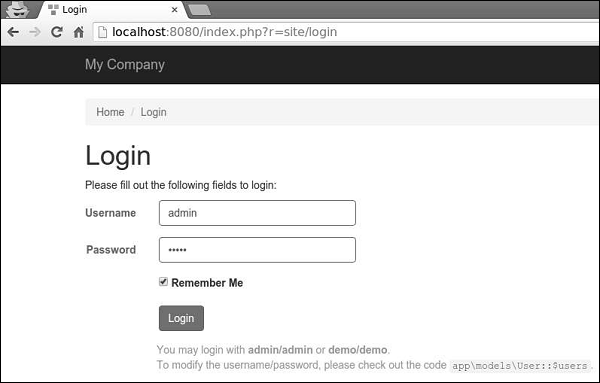
Step 1 − Go to the URL http://localhost:8080/index.php?r=site/login and log in into the web site using admin for a login and a password.
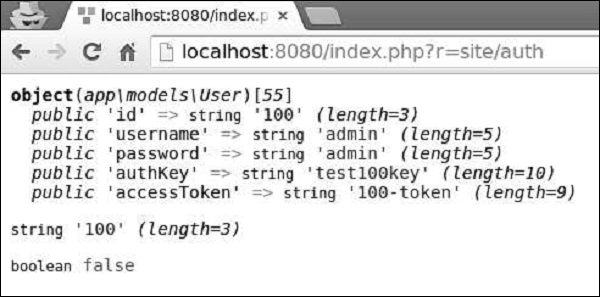
Step 2 − Then, add a new function called actionAuth() to the SiteController.public function actionAuth(){ // the current user identity. Null if the user is not authenticated. $identity = Yii::$app->user->identity; var_dump($identity); // the ID of the current user. Null if the user not authenticated. $id = Yii::$app->user->id; var_dump($id); // whether the current user is a guest (not authenticated) $isGuest = Yii::$app->user->isGuest; var_dump($isGuest); }Step 3 − Type the address http://localhost:8080/index.php?r=site/auth in the web browser, you will see the detailed information about admin user.
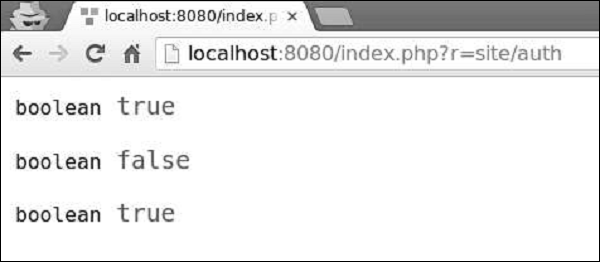
Step 4 − To login and logou,t a user you can use the following code.public function actionAuth() { // whether the current user is a guest (not authenticated) var_dump(Yii::$app->user->isGuest); // find a user identity with the specified username. // note that you may want to check the password if needed $identity = User::findByUsername("admin"); // logs in the user Yii::$app->user->login($identity); // whether the current user is a guest (not authenticated) var_dump(Yii::$app->user->isGuest); Yii::$app->user->logout(); // whether the current user is a guest (not authenticated) var_dump(Yii::$app->user->isGuest); }At first, we check whether a user is logged in. If the value returns false, then we log in a user via the Yii::$app → user → login() call, and log him out using the Yii::$app → user → logout() method.
Step 5 − Go to the URL http://localhost:8080/index.php?r=site/auth, you will see the following.
The yii\web\User class raises the following events −- EVENT_BEFORE_LOGIN − Raised at the beginning of yii\web\User::login()
- EVENT_AFTER_LOGIN − Raised after a successful login
- EVENT_BEFORE_LOGOUT − Raised at the beginning of yii\web\User::logout()
- EVENT_AFTER_LOGOUT − Raised after a successful logout


No comments:
Post a Comment