
Now we are going to create a “Hello world” page in your application. To create a page, we must create an action and a view.
Actions are declared in controllers. The end user will receive the execution result of an action.
Step 1 − Declare the speak action in the existing SiteController, which is defined in the class file controllers/SiteController.php.
In the code given above, the ‘out’ function takes a GET parameter, $message. We also call a method named ‘render’ to render a view file called speak. We pass the message parameter to the view. The rendering result is a complete HTML page.
View is a script that generates a response's content. For the speak action, we create a speak view that prints our message. When the render method is called, it looks for a PHP file names as view/controllerID/vewName.php.
Step 2 − Therefore, inside the views/site folder create a file called speak.php with the following code.
Step 3 − Type the following in your web browser http://localhost:8080/index.php?r=site/speak&message=hello%20world.
You will see the following window −
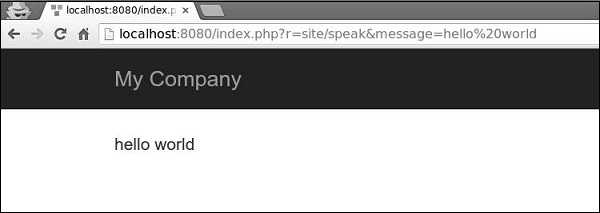 The ‘r’ parameter in the URL stands for route. The route's default format is controllerID/actionID. In our case, the route site/speak will be resolved by the SiteController class and the speak action.
Actions are declared in controllers. The end user will receive the execution result of an action.
Step 1 − Declare the speak action in the existing SiteController, which is defined in the class file controllers/SiteController.php.
<?php
   namespace app\controllers;
   use Yii;
   use yii\filters\AccessControl;
   use yii\web\Controller;
   use yii\filters\VerbFilter;
   use app\models\LoginForm;
   use app\models\ContactForm;
   class SiteController extends Controller {
      /* other code */
      public function actionSpeak($message = "default message") {
         return $this->render("speak",['message' => $message]);
      }
   }
?>
We defined the speak action as a method called actionSpeak. In Yii, all action methods are prefixed with the word action. This is how the framework differentiates action methods from non-action ones. If an action ID requires multiple words, then they will be concatenated by dashes. Hence, the action ID add-post corresponds to the action method actionAddPost.
In the code given above, the ‘out’ function takes a GET parameter, $message. We also call a method named ‘render’ to render a view file called speak. We pass the message parameter to the view. The rendering result is a complete HTML page.
View is a script that generates a response's content. For the speak action, we create a speak view that prints our message. When the render method is called, it looks for a PHP file names as view/controllerID/vewName.php.
Step 2 − Therefore, inside the views/site folder create a file called speak.php with the following code.
<?php
   use yii\helpers\Html;
?>
<?php echo Html::encode($message); ?>
Note that we HTML-encode the message parameter before printing to avoid XSS attack.
Step 3 − Type the following in your web browser http://localhost:8080/index.php?r=site/speak&message=hello%20world.
You will see the following window −
The ‘r’ parameter in the URL stands for route. The route's default format is controllerID/actionID. In our case, the route site/speak will be resolved by the SiteController class and the speak action.

No comments:
Post a Comment