
Yii includes a built-in error handler. The Yii error handler does the following −
Step 1 − You can configure it in the following way.
Step 2 − Add a new function called actionShowError() to the SiteController.
 If you want to show the user that his request is invalid, you may throw the yii\web\NotFoundHttpException.
Step 4 − Modify the actionShowError() function.
 When the YII_DEBUG constant is true, the error handler will display
errors with a detailed call stack. When the constant is false, only the
error message will be displayed. By default, the error handler shows
errors using these views −
When the YII_DEBUG constant is true, the error handler will display
errors with a detailed call stack. When the constant is false, only the
error message will be displayed. By default, the error handler shows
errors using these views −
Step 6 − Modify the errorHandler application component in the config/web.php file.
Step 7 − Modify the actions() method of the SiteController.
Step 8 − Create a file called error.php under the views/site directory.
- Converts all non-fatal PHP errors into catchable exceptions.
- Displays all errors and exceptions with a detailed call stack.
- Supports different error formats.
- Supports using a controller action to display errors.
Step 1 − You can configure it in the following way.
return [
   'components' => [
      'errorHandler' => [
         'maxSourceLines' => 10,
      ],
   ],
];
The above configuration sets the number of source code lines to be displayed to 10. The error handler converts all non-fatal PHP errors into catchable exceptions.
Step 2 − Add a new function called actionShowError() to the SiteController.
public function actionShowError() {
   try {
      5/0;
   } catch (ErrorException $e) {
      Yii::warning("Ooops...division by zero.");
   }
   // execution continues...
}
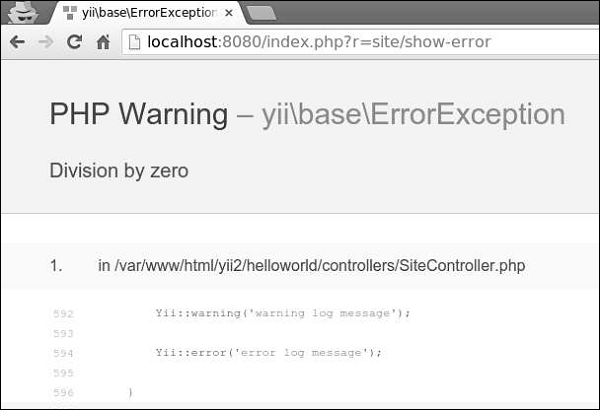
Step 3 − Go to the URL http://localhost:8080/index.php?r=site/show-error. You will see a warning message.
If you want to show the user that his request is invalid, you may throw the yii\web\NotFoundHttpException.Step 4 − Modify the actionShowError() function.
public function actionShowError() {
   throw new NotFoundHttpException("Something unexpected happened");
}
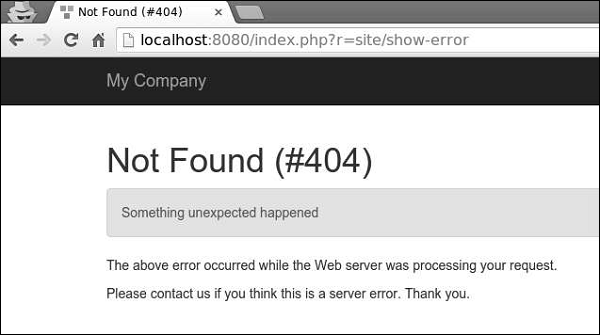
Step 5 − Type the address http://localhost:8080/index.php?r=site/show-error in the address bar. You will see the following HTTP error.
When the YII_DEBUG constant is true, the error handler will display
errors with a detailed call stack. When the constant is false, only the
error message will be displayed. By default, the error handler shows
errors using these views −- @yii/views/errorHandler/exception.php − the view file is used when errors should be displayed with call stack information.
- @yii/views/errorHandler/error.php − the view file is used when errors should be displayed without call stack information.
Step 6 − Modify the errorHandler application component in the config/web.php file.
<?php
   $params = require(__DIR__ . '/params.php');
   $config = [
      'id' => 'basic',
      'basePath' => dirname(__DIR__),
      'bootstrap' => ['log'],
      'components' => [
         'request' => [
            // !!! insert a secret key in the following (if it is empty) - this
               //is required by cookie validation
            'cookieValidationKey' => 'ymoaYrebZHa8gURuolioHGlK8fLXCKjO',
         ],
         'cache' => [
            'class' => 'yii\caching\FileCache',
         ],
         'user' => [
            'identityClass' => 'app\models\User',
            'enableAutoLogin' => true,
         ],
         'errorHandler' => [
            'errorAction' => 'site/error',
         ],
         //other components...
            'db' => require(__DIR__ . '/db.php'),
      ],
      'modules' => [
         'hello' => [
            'class' => 'app\modules\hello\Hello',
         ],
      ],
      'params' => $params,
   ];
   if (YII_ENV_DEV) {
      // configuration adjustments for 'dev' environment
      $config['bootstrap'][] = 'debug';
      $config['modules']['debug'] = [
         'class' => 'yii\debug\Module',
      ];
      $config['bootstrap'][] = 'gii';
      $config['modules']['gii'] = [
         'class' => 'yii\gii\Module',
      ];
   }
   return $config;
?>
The above configuration defines that when an error needs to be displayed without the call stack, the site/error action will be executed.
Step 7 − Modify the actions() method of the SiteController.
public function actions() {
   return [
      'error' => [
         'class' => 'yii\web\ErrorAction',
      ],
   ];
}
The above code defines, that when an error occurs, the error view will be rendered.
Step 8 − Create a file called error.php under the views/site directory.
<?php
   /* @var $this yii\web\View */
   /* @var $name string */
   /* @var $message string */
   /* @var $exception Exception */
   use yii\helpers\Html;
   $this->title = $name;
?>

<div class = "site-error">
   <h2>customized error</h2>
   <h1><?= Html::encode($this->title) ?></h1>

   <div class = "alert alert-danger">
      <?= nl2br(Html::encode($message)) ?>
   </div>

   <p>
      The above error occurred while the Web server was processing your request.
   </p>

   <p>
      Please contact us if you think this is a server error. Thank you.
   </p>
</div>
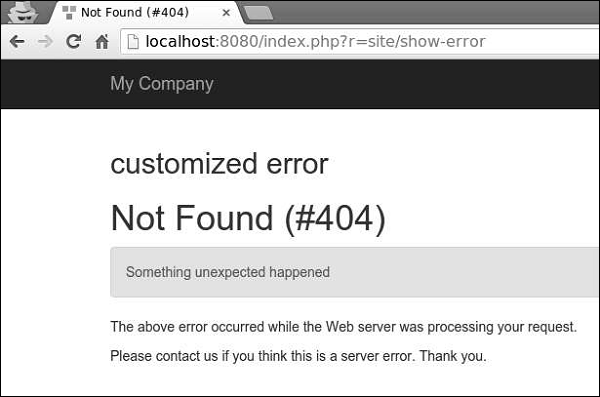
Step 9 − Go to the address http://localhost:8080/index.php?r=site/show-error, you will see the customized error view.


No comments:
Post a Comment