
To change the default route of the application, you should configure the defaultRoute property.
Step 1 − Modify the config/web.php file in the following way.
 To put your application in maintenance mode temporarily, you should configure the yii\web\Application::$catchAll property.
Step 3 − Add the following function to the SiteController.
Step 1 − Add an actionRoutes() method to the SiteController.
Step 2 − Inside the views/site directory, create a file called routes.php with the following code.
 The route passed to the yii\helpers\Url::to() method can be relative or absolute according to the following rules −
Step 4 − Modify the routes View as given in the following code.
Step 1 − Modify the config/web.php file in the following way.
<?php
   $params = require(__DIR__ . '/params.php');
   $config = [
      'id' => 'basic',
      'basePath' => dirname(__DIR__),
      'bootstrap' => ['log'],
      'defaultRoute' => 'site/contact',
      'components' => [
         //other code
?>
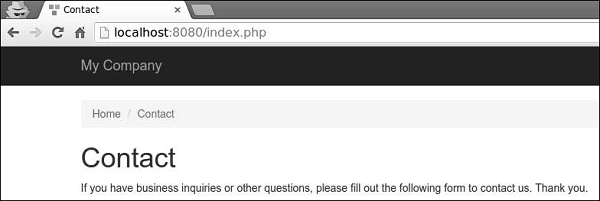
Step 2 − Got to http://localhost:8080/index.php. You will see the default contact page.
To put your application in maintenance mode temporarily, you should configure the yii\web\Application::$catchAll property.Step 3 − Add the following function to the SiteController.
public function actionMaintenance() {
   echo "<h1>Maintenance</h1>";
}
Step 4 − Then, modify the config/web.php file in the following way.
<?php
   $params = require(__DIR__ . '/params.php');
   $config = [
      'id' => 'basic',
      'basePath' => dirname(__DIR__),
      'bootstrap' => ['log'],
      'catchAll' => ['site/maintenance'],
      'components' => [
         //OTHER CODE
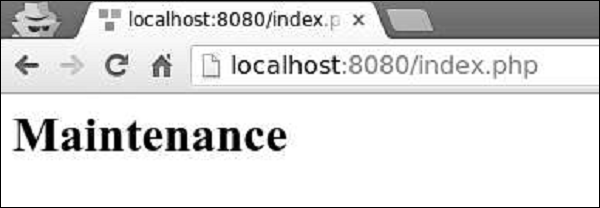
Step 5 − Now enter any URL of your application, you will see the following.
Creating URLs
To create various kinds of URLs you may use the yii\helpers\Url::to() helper method. The following example assumes the default URL format is being used.Step 1 − Add an actionRoutes() method to the SiteController.
public function actionRoutes() {
   return $this->render('routes');
}
This method simply renders the routes view.
Step 2 − Inside the views/site directory, create a file called routes.php with the following code.
<?php
   use yii\helpers\Url;
?>

<h4>
   <b>Url::to(['post/index']):</b>
   <?php
      // creates a URL to a route: /index.php?r = post/index
      echo Url::to(['post/index']);
   ?>
</h4>

<h4>
   <b>Url::to(['post/view', 'id' => 100]):</b>
   <?php
      // creates a URL to a route with parameters: /index.php?r = post/view&id=100
      echo Url::to(['post/view', 'id' => 100]);
   ?>
</h4>

<h4>
   <b>Url::to(['post/view', 'id' => 100, '#' => 'content']):</b>
   <?php
      // creates an anchored URL: /index.php?r = post/view&id=100#content
      echo Url::to(['post/view', 'id' => 100, '#' => 'content']);
   ?>
</h4>

<h4>
   <b>Url::to(['post/index'], true):</b>
   <?php
      // creates an absolute URL: http://www.example.com/index.php?r=post/index
      echo Url::to(['post/index'], true);
   ?>
</h4>

<h4>
   <b>Url::to(['post/index'], 'https'):</b>
   <?php
      // creates an absolute URL using the https scheme: https://www.example.com/index.php?r=post/index
      echo Url::to(['post/index'], 'https');
   ?>
</h4>
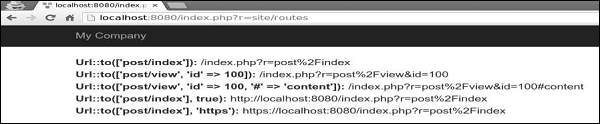
Step 3 − Type http://localhost:8080/index.php?r=site/routes, you will see some uses of the to() function.
The route passed to the yii\helpers\Url::to() method can be relative or absolute according to the following rules −- if the route is empty, the currently requested route will be used.
- if the route has no leading slash, it is considered to be a route relative to the current module.
- if the route contains no slashes, it is considered to be an action ID of the current controller.
Step 4 − Modify the routes View as given in the following code.
<?php
   use yii\helpers\Url;
?>

<h4>
   <b>Url::home():</b>
   <?php
      // home page URL: /index.php?r=site/index
      echo Url::home();
   ?>
</h4>

<h4>
   <b>Url::base():</b>
   <?php
      // the base URL, useful if the application is deployed in a sub-folder of the Web root
      echo Url::base();
   ?>
</h4>

<h4>
   <b>Url::canonical():</b>
   <?php
      // the canonical URL of the currently requested URL
      // see https://en.wikipedia.org/wiki/Canonical_link_element
      echo Url::canonical();
   ?>
</h4>

<h4>
   <b>Url::previous():</b>
   <?php
      // remember the currently requested URL and retrieve it back in later requests
      Url::remember();
      echo Url::previous();
   ?>
</h4>
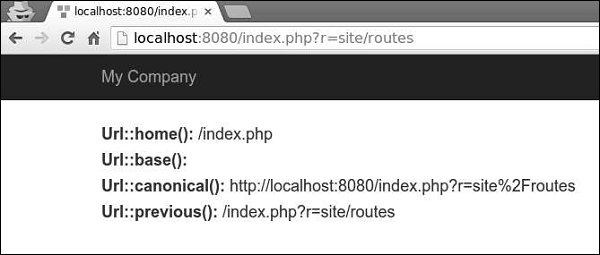
Step 5 − If you enter the address http://localhost:8080/index.php?r=site/routes in the web browser, you will see the following.


No comments:
Post a Comment