
When a Yii application processes a requested URL, first, it parses
the URL into a route. Then, to handle the request, this route is used to
instantiate the corresponding controller action. This process is called
routing. The reverse process is called URL creation. The urlManager application component is responsible for routing and URL creation. It provides two methods −
Step 1 − Modify the config/web.php file in the following way.
Step 2 − Now, if you type http://localhost:8080/site/about in the address bar of the web browser, you will see the pretty URL in action.
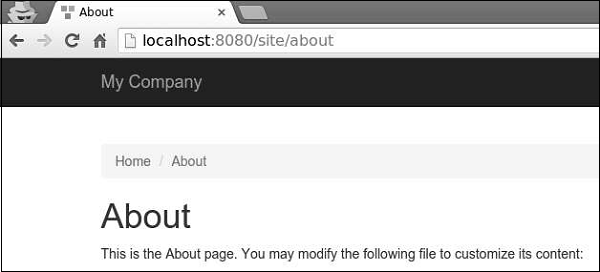 Notice, that the URL is no more http://localhost:8080/index.php?r=site/about.
- parseRequest() − Parses a request into a route.
- createUrl() − Creates a URL from a given route.
URL Formats
The urlManager application component supports two URL formats −- The default format uses a query parameter r to represent the route. For example, the URL /index.php?r=news/view&id=5 represents the route news/view and the id query parameter 5.
- The pretty URL format uses the extra path with the entry script name. For example, in the previous example, pretty format would be /index.php/news/view/5. To use this format you need to set the URL rules.
Step 1 − Modify the config/web.php file in the following way.
<?php
   $params = require(__DIR__ . '/params.php');
   $config = [
      'id' => 'basic',
      'basePath' => dirname(__DIR__),
      'bootstrap' => ['log'],
      'components' => [
         'request' => [
            // !!! insert a secret key in the following (if it is empty) -
               //this is required by cookie validation
            'cookieValidationKey' => 'ymoaYrebZHa8gURuolioHGlK8fLXCKjO',
         ],
         'cache' => [
            'class' => 'yii\caching\FileCache',
         ],
         'user' => [
            'identityClass' => 'app\models\User',
            'enableAutoLogin' => true,
         ],
         'errorHandler' => [
            'errorAction' => 'site/error',
         ],
         'mailer' => [
            'class' => 'yii\swiftmailer\Mailer',
            // send all mails to a file by default. You have to set
            // 'useFileTransport' to false and configure a transport
            // for the mailer to send real emails.
            'useFileTransport' => true,
         ],
         'log' => [
            'traceLevel' => YII_DEBUG ? 3 : 0,
            'targets' => [
               [
                  'class' => 'yii\log\FileTarget',
                  'levels' => ['error', 'warning'],
               ],
            ],
         ],
         'urlManager' => [
            'showScriptName' => false,
            'enablePrettyUrl' => true
         ],
         'db' => require(__DIR__ . '/db.php'),
      ],
      'modules' => [
         'hello' => [
            'class' => 'app\modules\hello\Hello',
         ],
      ],
      'params' => $params,
   ];
   if (YII_ENV_DEV) {
      // configuration adjustments for 'dev' environment
      $config['bootstrap'][] = 'debug';
      $config['modules']['debug'] = [
         'class' => 'yii\debug\Module',
      ];
      $config['bootstrap'][] = 'gii';
      $config['modules']['gii'] = [
         'class' => 'yii\gii\Module',
      ];
   }
   return $config;
?>
We have just enabled the pretty URL format and have disabled the entry script name.
Step 2 − Now, if you type http://localhost:8080/site/about in the address bar of the web browser, you will see the pretty URL in action.
Notice, that the URL is no more http://localhost:8080/index.php?r=site/about.

No comments:
Post a Comment