
Requests are represented by the yii\web\Request object, which provides information about HTTP headers, request parameters, cookies, and so forth.
The methods get() and post() return request parameters of the request component.
Example −
 To retrieve parameters of other request methods (PATCH, DELETE, etc.), use the yii\web\Request::getBodyParam() method.
To get the HTTP method of the current request, use the Yii::$app→request→method property.
Step 3 − Modify the actionTestGet function as shown in the following code.
 The request component provides many properties to inspect the requested URL.
Step 5 − Modify the actionTestGet function as follows.
 Step 7 − To get the HTTP header information, you may use the yii\web\Request::$headers property. Modify the actionTestGet function this way.
 To get the host name and IP address of the client machine, use userHost and userIP properties.
Step 9 − Modify the actionTestGet function this way.

The methods get() and post() return request parameters of the request component.
Example −
$req = Yii::$app->request;
   /*
   * $get = $_GET;
   */
   $get = $req->get();

   /*
   * if(isset($_GET['id'])) {
   *     $id = $_GET['id'];
   * } else {
   *     $id = null;
   * }
   */
   $id = $req->get('id');

   /*
   * if(isset($_GET['id'])) {
   *     $id = $_GET['id'];
   * } else {
   *     $id = 1;
   * }
   */
   $id = $req->get('id', 1);

   /*
   * $post = $_POST;
 */
   $post = $req->post();

   /*
   * if(isset($_POST['name'])) {
   *     $name = $_POST['name'];
   * } else {
   *     $name = null;
   * }
   */
   $name = $req->post('name');

   /*
   * if(isset($_POST['name'])) {
   *     $name = $_POST['name'];
   * } else {
   *     $name = '';
   * }
   */
   $name = $req->post('name', '');
Step 1 − Add an actionTestGet function to the SiteController of the basic application template.
public function actionTestGet() {
   var_dump(Yii::$app->request->get());
}
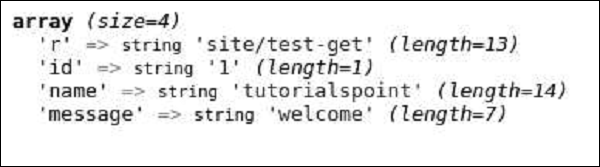
Step 2 − Now go to http://localhost:8080/index.php?r=site/testget&id=1&name=tutorialspoint&message=welcome, you will see the following.
To retrieve parameters of other request methods (PATCH, DELETE, etc.), use the yii\web\Request::getBodyParam() method.To get the HTTP method of the current request, use the Yii::$app→request→method property.
Step 3 − Modify the actionTestGet function as shown in the following code.
public function actionTestGet() {
   $req = Yii::$app->request;
   if ($req->isAjax) {
      echo "the request is AJAX";
   }
   if ($req->isGet) {
      echo "the request is GET";
   }
   if ($req->isPost) {
      echo "the request is POST";
   }
   if ($req->isPut) {
      echo "the request is PUT";
   }
}
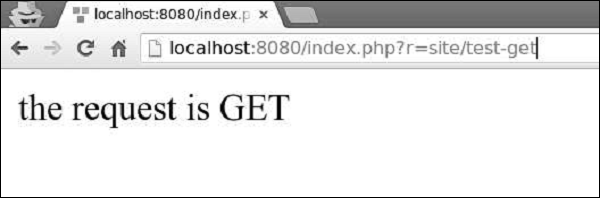
Step 4 − Go to http://localhost:8080/index.php?r=site/test-get. You will see the following.
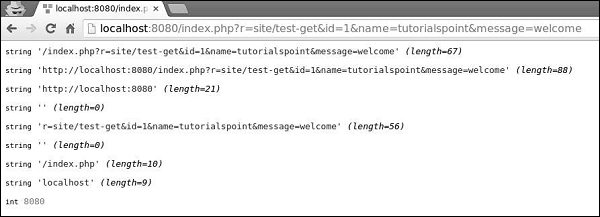
The request component provides many properties to inspect the requested URL.Step 5 − Modify the actionTestGet function as follows.
public function actionTestGet() {
   //the URL without the host
   var_dump(Yii::$app->request->url);

   //the whole URL including the host path
   var_dump(Yii::$app->request->absoluteUrl);

   //the host of the URL
   var_dump(Yii::$app->request->hostInfo);

   //the part after the entry script and before the question mark
   var_dump(Yii::$app->request->pathInfo);

   //the part after the question mark
   var_dump(Yii::$app->request->queryString);

   //the part after the host and before the entry script
   var_dump(Yii::$app->request->baseUrl);

   //the URL without path info and query string
   var_dump(Yii::$app->request->scriptUrl);

   //the host name in the URL
   var_dump(Yii::$app->request->serverName);

   //the port used by the web server
   var_dump(Yii::$app->request->serverPort);
}
Step 6 − In the address bar of the web browser, type http://localhost:8080/index.php?r=site/testget&id=1&name=tutorialspoint&message=welcome, you will see the following.
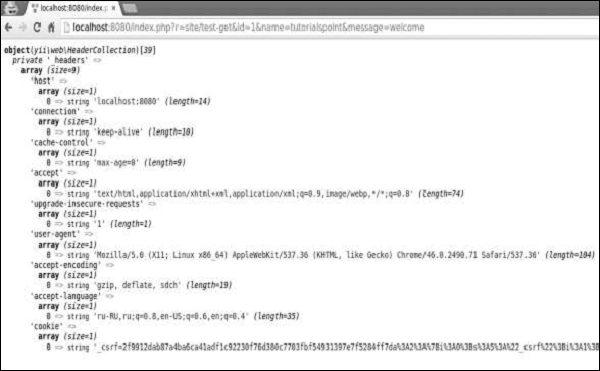
Step 7 − To get the HTTP header information, you may use the yii\web\Request::$headers property. Modify the actionTestGet function this way.public function actionTestGet() { var_dump(Yii::$app->request->headers); }Step 8 − If you go to the URL http://localhost:8080/index.php?r=site/testget&id=1&name=tutorialspoint&message=welcome, you will see the output as shown in the following code.
To get the host name and IP address of the client machine, use userHost and userIP properties.Step 9 − Modify the actionTestGet function this way.
public function actionTestGet() {
   var_dump(Yii::$app->request->userHost);
   var_dump(Yii::$app->request->userIP);
}
Step 10 − Go to the address http://localhost:8080/index.php?r=site/test-get and you see the following screen.


No comments:
Post a Comment