
Let us create a simple extension displaying a standard “Hello world” message. This extension will be distributed via the Packagist repository.
Step 1 − Create a folder called hello-world in your hard drive but not inside the Yii basic application template). Inside the hello-world directory, create a file named composer.json with the following code.
Step 2 − Create the following directory path: hello-world/src/HelloWorld.
Step 3 − Inside the HelloWorld folder, create a file called SayHello.php with the following code.
Step 4 − The extension is ready. Now create an empty repository at your github account and push this extension there.
Inside the hello-world folder run −
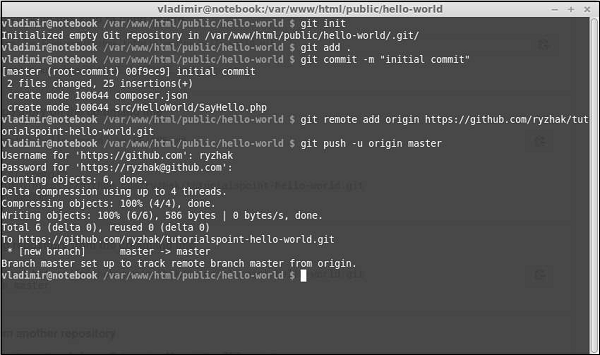 We have just sent our extension to the github. Now, go to the https://packagist.org, sign in and click “submit” at the top menu.
You will see a page where you should enter your github repository to publish it.
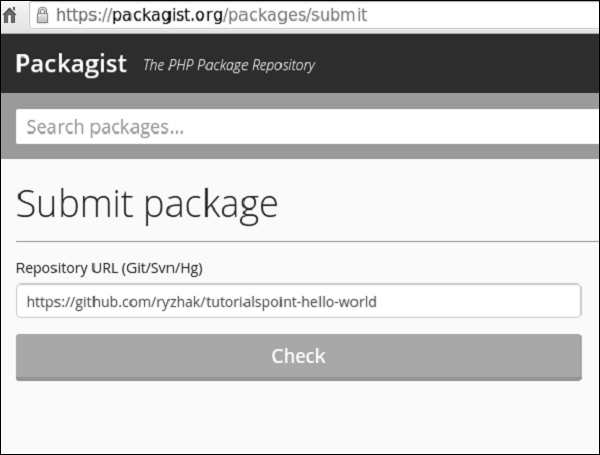 Step 5 − Click the “check” button and your extension is published.
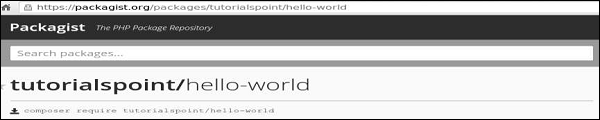 Step 6 − Go back to the basic application template. Add the extension to the composer.json.
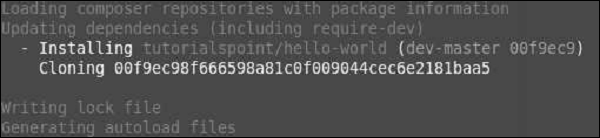 Step 8 − Our extension should be installed. To use it, modify the About view of the actionAbout method of the SiteController.
Step 1 − Create a folder called hello-world in your hard drive but not inside the Yii basic application template). Inside the hello-world directory, create a file named composer.json with the following code.
{
    "name": "tutorialspoint/hello-world",
    "authors": [
        {
            "name": "tutorialspoint"
        }
    ],
    "require": {},
    "autoload": {
        "psr-0": {
            "HelloWorld": "src/"
        }
    }
}
We have declared that we are using the PSR-0 standard and all extension files are under the src folder.
Step 2 − Create the following directory path: hello-world/src/HelloWorld.
Step 3 − Inside the HelloWorld folder, create a file called SayHello.php with the following code.
<?php
   namespace HelloWorld;
   class SayHello {
      public static function world() {
         return 'Hello World, Composer!';
      }
   }
?>
We have defined a SayHello class with a world static function, which returns our hello message.
Step 4 − The extension is ready. Now create an empty repository at your github account and push this extension there.
Inside the hello-world folder run −
- git init
- git add
- git commit -m “initial commit”
- git remote add origin <YOUR_NEWLY_CREATED_REPOSITORY>
- git push -u origin master
We have just sent our extension to the github. Now, go to the https://packagist.org, sign in and click “submit” at the top menu.You will see a page where you should enter your github repository to publish it.
Step 5 − Click the “check” button and your extension is published.
Step 6 − Go back to the basic application template. Add the extension to the composer.json.{ "name": "yiisoft/yii2-app-basic", "description": "Yii 2 Basic Project Template", "keywords": ["yii2", "framework", "basic", "project template"], "homepage": "http://www.yiiframework.com/", "type": "project", "license": "BSD-3-Clause", "support": { "issues": "https://github.com/yiisoft/yii2/issues?state=open", "forum": "http://www.yiiframework.com/forum/", "wiki": "http://www.yiiframework.com/wiki/", "irc": "irc://irc.freenode.net/yii", "source": "https://github.com/yiisoft/yii2" }, "minimum-stability": "dev", "prefer-stable" : true, "require": { "php": ">=5.4.0", "yiisoft/yii2": ">=2.0.5", "yiisoft/yii2-bootstrap": "*", "yiisoft/yii2-swiftmailer": "*", "kartik-v/yii2-widget-datetimepicker": "*", "tutorialspoint/hello-world": "*" }, "require-dev": { "yiisoft/yii2-codeception": "*", "yiisoft/yii2-debug": "*", "yiisoft/yii2-gii": "*", "yiisoft/yii2-faker": "*" }, "config": { "process-timeout": 1800 }, "scripts": { "post-create-project-cmd": [ "yii\\composer\\Installer::postCreateProject" ] }, "extra": { "yii\\composer\\Installer::postCreateProject": { "setPermission": [ { "runtime": "0777", "web/assets": "0777", "yii": "0755" } ], "generateCookieValidationKey": [ "config/web.php" ] }, "asset-installer-paths": { "npm-asset-library": "vendor/npm", "bower-asset-library": "vendor/bower" } } }Step 7 − Inside the project root folder, run the composer update to install/update all the dependencies.
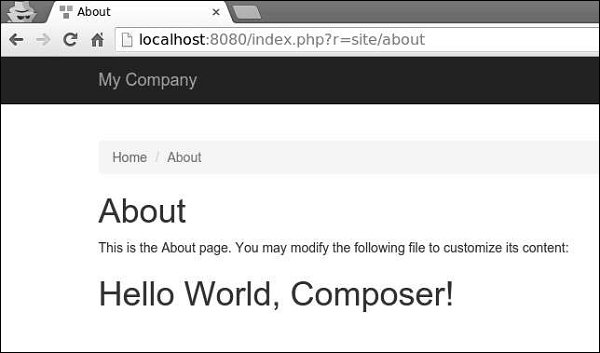
Step 8 − Our extension should be installed. To use it, modify the About view of the actionAbout method of the SiteController.<?php /* @var $this yii\web\View */ use yii\helpers\Html; $this->title = 'About'; $this->params['breadcrumbs'][] = $this->title; $this->registerMetaTag(['name' => 'keywords', 'content' => 'yii, developing, views, meta, tags']); $this->registerMetaTag(['name' => 'description', 'content' => 'This is the description of this page!'], 'description'); ?> <div class = "site-about"> <h1><?= Html::encode($this->title) ?></h1> <p> This is the About page. You may modify the following file to customize its content: </p> <h1><?= HelloWorld\SayHello::world(); ?></h1> </div>Step 9 − Type http://localhost:8080/index.php?r=site/about in the web browser. You will see a hello world message from our extension.


No comments:
Post a Comment