
Sessions make data accessible across various pages. A session creates
a file on the server in a temporary directory where all session
variables are stored. This data is available to all the pages of your
web site during the visit of that particular user.
When a session starts, the following happens −
Step 1 − Add the actionOpenAndCloseSession method to the SiteController.
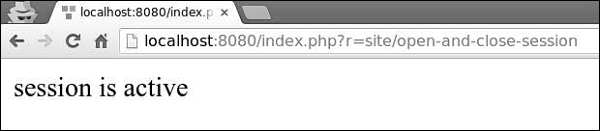
Step 2 − Type http://localhost:8080/index.php?r=site/open-and-close-session in the address bar of the web browser, you will see the following.
 To access session variables, you may use set() and get() methods.
Step 3 − Add an actionAccessSession method to the SiteController.
When a session starts, the following happens −
- PHP creates a unique ID for that particular session.
- A cookie called PHPSESSID is sent on the client side (to the browser).
- The server creates a file in the temporary folder where all session variables are saved.
- When a server wants to retrieve the value from a session variable, PHP automatically gets the unique session ID from the PHPSESSID cookie. Then, it looks in its temporary directory for the needed file.
<?php
   session_start();
   if( isset( $_SESSION['number'] ) ) {
      $_SESSION['number'] += 1;
   }else {
      $_SESSION['number'] = 1;
   }
   $msg = "This page was visited ".  $_SESSION['number'];
   $msg .= "in this session.";
   echo $msg;
?>
To destroy a session, you should call the session_destroy() function. To destroy a single session variable, call the unset() function −
<?php
   unset($_SESSION['number']);
   session_destroy();
?>
Using Sessions in Yii
Sessions allow data to be persisted across user requests. In PHP, you may access them through the $_SESSION variable. In Yii, you can get access to sessions via the session application component.Step 1 − Add the actionOpenAndCloseSession method to the SiteController.
public function actionOpenAndCloseSession() {
   $session = Yii::$app->session;
   // open a session
   $session->open();
   // check if a session is already opened
   if ($session->isActive) echo "session is active";
   // close a session
   $session->close();
   // destroys all data registered to a session
   $session->destroy();
}
In the above code, we get the session application component, open a session, check whether it is active, close the session, and finally destroy it.
Step 2 − Type http://localhost:8080/index.php?r=site/open-and-close-session in the address bar of the web browser, you will see the following.
To access session variables, you may use set() and get() methods.Step 3 − Add an actionAccessSession method to the SiteController.
public function actionAccessSession() {

   $session = Yii::$app->session;

   // set a session variable
   $session->set('language', 'ru-RU');

   // get a session variable
   $language = $session->get('language');
   var_dump($language);

   // remove a session variable
   $session->remove('language');

   // check if a session variable exists
   if (!$session->has('language')) echo "language is not set";

   $session['captcha'] = [
      'value' => 'aSBS23',
      'lifetime' => 7200,
   ];
   var_dump($session['captcha']);
}
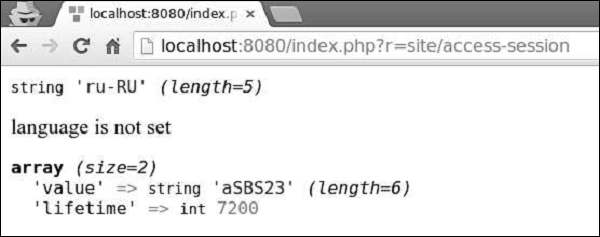
Step 4 − Go to http://localhost:8080/index.php?r=site/access-session, you will see the following.


No comments:
Post a Comment