
When a form is based upon a model, the common way of creating this form in Yii is via the yii\widgets\ActiveForm
class. In most cases, a form has a corresponding model which is used
for data validation. If the model represents data from a database, then
the model should be derived from the ActiveRecord class. If the model captures arbitrary input, it should be derived from the yii\base\Model class.
Let us create a registration form.
Step 1 − Inside the models folder, create a file called RegistrationForm.php with the following code.
Step 2 − To display this form, add the actionRegistration method to the SiteController.
Step 3 − Inside the views/site folder, add a file called registration.php with the following code.
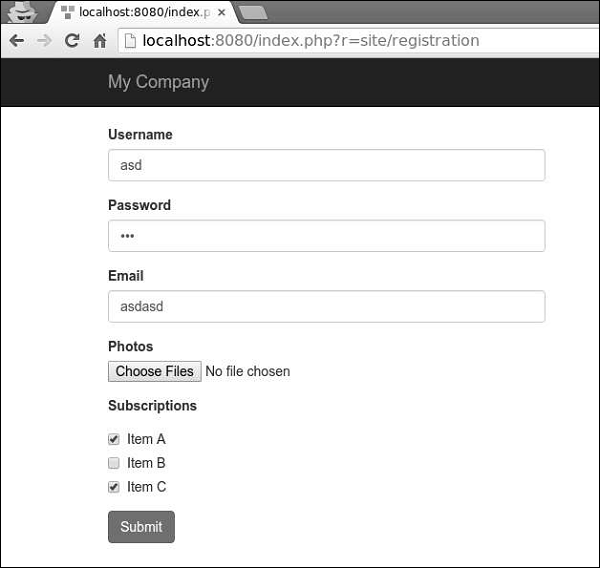
Let us create a registration form.
Step 1 − Inside the models folder, create a file called RegistrationForm.php with the following code.
<?php
   namespace app\models;
   use Yii;
   use yii\base\Model;
   class RegistrationForm extends Model {
      public $username;
      public $password;
      public $email;
      public $subscriptions;
      public $photos;
      /**
      * @return array customized attribute labels
      */
      public function attributeLabels() {
         return [
            'username' => 'Username',
            'password' => 'Password',
            'email' => 'Email',
            'subscriptions' => 'Subscriptions',
            'photos' => 'Photos',
         ];
      }
   }
?>
We have declared a model for our registration form with five properties − username, password, email, subscriptions, and photos.
Step 2 − To display this form, add the actionRegistration method to the SiteController.
public function actionRegistration() {
   $mRegistration = new RegistrationForm();
   return $this->render('registration', ['model' => $mRegistration]);
}
We create an instance of the RegistrationForm and pass it to the registration view. Now, it is time to create a view.
Step 3 − Inside the views/site folder, add a file called registration.php with the following code.
<?php
   use yii\bootstrap\ActiveForm;
   use yii\bootstrap\Html;
?>
<div class = "row">
   <div class = "col-lg-5">
      <?php $form = ActiveForm::begin(['id' => 'registration-form']); ?>
      <?= $form->field($model, 'username') ?>
      <?= $form->field($model, 'password')->passwordInput() ?>
      <?= $form->field($model, 'email')->input('email') ?>
      <?= $form->field($model, 'photos[]')->fileInput(['multiple'=>'multiple']) ?>
      <?= $form->field($model, 'subscriptions[]')->checkboxList(['a' => 'Item A',
         'b' => 'Item B', 'c' => 'Item C']) ?>
      <div class = "form-group">
         <?= Html::submitButton('Submit', ['class' => 'btn btn-primary',
            'name' => 'registration-button']) ?>
      </div>
      <?php ActiveForm::end(); ?>
   </div>
</div>
We observe the following −
- The ActiveForm::begin() function marks the beginning of the form. All the code between ActiveForm::begin() and ActiveForm::end() functions will be wrapped within the form tag.
- To create a field in the form you should call the ActiveForm::field() method. It creates all the input and label tags. Input names are determined automatically.
- For example, the password attribute will be RegistrationForm[password]. If you want an attribute to take an array, you should append [ ] to the attribute name.


No comments:
Post a Comment