
You should never trust the data received from users. To validate a model with user inputs, you should call yii\base\Model::validate() method. It returns a Boolean value if the validation succeeds. If there are errors, you may get them from the yii\base\Model::$errors property.
Step 1 − The rules() method returns an array in the following format.
The core validation rules are − boolean, captcha, compare, date, default, double, each, email, exist, file, filter, image, ip, in, integer, match, number, required, safe, string, trim, unique, url.
Step 2 − Create a new model in the models folder.
Step 3 − Add the actionRegistration method to the SiteController where we create a new RegistrationForm model and pass it to a view.
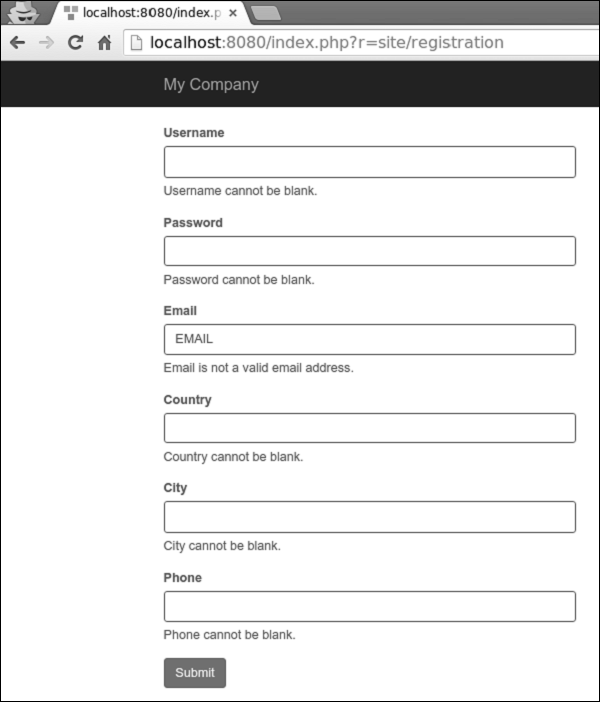
Step 5 − If you go to the local host http://localhost:8080/index.php?r=site/registration and click the submit button, you will see validation rules in action.
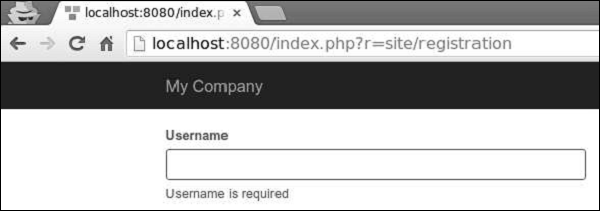
 Step 6 − To customize the error message for the username property, modify the rules() method of the RegistrationForm in the following way.
 Step 8 − To customize the validation process, you may override these methods.
Using Rules
To make the validate() function work, you should override the yii\base\Model::rules() method.Step 1 − The rules() method returns an array in the following format.
[
   // required, specifies which attributes should be validated
   ['attr1', 'attr2', ...],
   // required, specifies the type a rule.
   'type_of_rule',
   // optional, defines in which scenario(s) this rule should be applied
   'on' => ['scenario1', 'scenario2', ...],
   // optional, defines additional configurations
   'property' => 'value', ...
]
For each rule, you should define at least which attributes the rule applies to and the type of rule applied.
The core validation rules are − boolean, captcha, compare, date, default, double, each, email, exist, file, filter, image, ip, in, integer, match, number, required, safe, string, trim, unique, url.
Step 2 − Create a new model in the models folder.
<?php
   namespace app\models;
   use Yii;
   use yii\base\Model;
   class RegistrationForm extends Model {
      public $username;
      public $password;
      public $email;
      public $country;
      public $city;
      public $phone;
      public function rules() {
         return [
            // the username, password, email, country, city, and phone attributes are
            //required
            [['username' ,'password', 'email', 'country', 'city', 'phone'], 'required'],
            // the email attribute should be a valid email address
            ['email', 'email'],
         ];
      }
   }
?>
We have declared the model for the registration form. The model has five properties − username, password, email, country, city, and phone. They are all required and the email property must be a valid email address.
Step 3 − Add the actionRegistration method to the SiteController where we create a new RegistrationForm model and pass it to a view.
public function actionRegistration() {
   $model = new RegistrationForm();
   return $this->render('registration', ['model' => $model]);
}
Step 4 − Add a view for our registration form. Inside the views/site folder, create a file called registration.php with the following code.
<?php
   use yii\bootstrap\ActiveForm;
   use yii\bootstrap\Html;
?>

<div class = "row">
   <div class = "col-lg-5">
      <?php $form = ActiveForm::begin(['id' => 'registration-form']); ?>
         <?= $form->field($model, 'username') ?>
         <?= $form->field($model, 'password')->passwordInput() ?>
         <?= $form->field($model, 'email')->input('email') ?>
         <?= $form->field($model, 'country') ?>
         <?= $form->field($model, 'city') ?>
         <?= $form->field($model, 'phone') ?>
         <div class = "form-group">
            <?= Html::submitButton('Submit', ['class' => 'btn btn-primary',
               'name' => 'registration-button']) ?>
         </div>
      <?php ActiveForm::end(); ?>
   </div>
</div>
We are using the ActiveForm widget for displaying our registration form.
Step 5 − If you go to the local host http://localhost:8080/index.php?r=site/registration and click the submit button, you will see validation rules in action.
Step 6 − To customize the error message for the username property, modify the rules() method of the RegistrationForm in the following way.public function rules() { return [ // the username, password, email, country, city, and phone attributes are required [['password', 'email', 'country', 'city', 'phone'], 'required'], ['username', 'required', 'message' => 'Username is required'], // the email attribute should be a valid email address ['email', 'email'], ]; }Step 7 − Go to the local host http://localhost:8080/index.php?r=site/registration and click the submit button. You will notice that the error message of the username property has changed.
Step 8 − To customize the validation process, you may override these methods.- yii\base\Model::beforeValidate(): triggers a
yii\base\Model::EVENT_BEFORE_VALIDATE event. - yii\base\Model::afterValidate(): triggers a
yii\base\Model::EVENT_AFTER_VALIDATE event.
public function rules() {
   return [
      // the username, password, email, country, city, and phone attributes are required
      [['password', 'email', 'country', 'city', 'phone'], 'required'],
      ['username', 'required', 'message' => 'Username is required'],
      ['country', 'trim'],
      ['city', 'default'],
      // the email attribute should be a valid email address
      ['email', 'email'],
   ];
}
Step 10 − If an input is empty, you can set a default value for it.
public function rules() {
   return [
      ['city', 'default', 'value' => 'Paris'],
   ];
}
If the city property is empty, then the default “Paris” value will be used.


No comments:
Post a Comment