
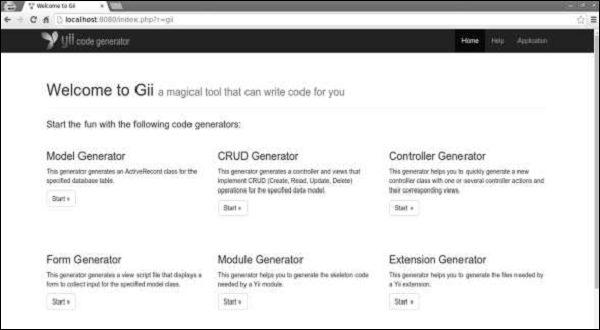
Gii is the extension, that provides a web-based code generator for generating models, forms, modules, CRUD, and so forth.
By default, the following generators are available −
Step 4 − Modify the migration file (m160106_163154_test_table.php in this case) this way.
Step 5 − Inside the project root run ./yii migrate to apply the migration to the database.
Step 6 − Now, we need to create a model for our user table. For the sake of simplicity, we are going to use the Gii code generation tool. Open up this url: http://localhost:8080/index.php?r=gii. Then, click the “Start” button under the “Model generator” header. Fill in the Table Name (“user”) and the Model Class (“MyUser”), click the “Preview” button and finally, click the “Generate” button.
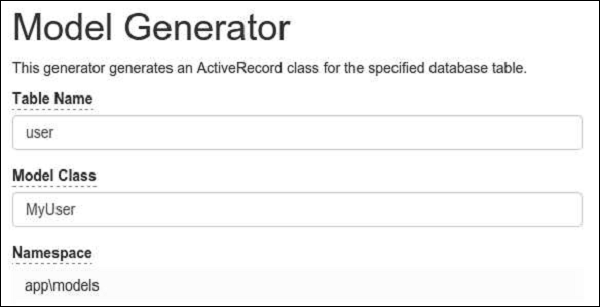 The MyUser model should appear in the models directory.
By default, the following generators are available −
- Model Generator − Generates an ActiveRecord class for the specified database table.
- CRUD Generator − Generates a controller and views that implement CRUD (Create, Read, Update, Delete) operations for the specified model.
- Controller Generator − Generates a new controller class with one or several controller actions and their corresponding views.
- Form Generator − Generates a view script file that displays a form to collect input for the specified model class.
- Module Generator − Generates the skeleton code needed by an Yii module.
- Extension Generator − GenerateS the files needed by a Yii extension.
Preparing the DB
Step 1 − Create a new database. Database can be prepared in the following two ways −- In the terminal run mysql -u root –p
- Create a new database via CREATE DATABASE helloworld CHARACTER SET utf8 COLLATE utf8_general_ci;
<?php
   return [
      'class' => 'yii\db\Connection',
      'dsn' => 'mysql:host=localhost;dbname=helloworld',
      'username' => 'vladimir',
      'password' => '12345',
      'charset' => 'utf8',
   ];
?>
Step 3 − Inside the root folder run ./yii migrate/create test_table. This command will create a database migration for managing our DB. The migration file should appear in the migrations folder of the project root.
Step 4 − Modify the migration file (m160106_163154_test_table.php in this case) this way.
<?php
   use yii\db\Schema;
   use yii\db\Migration;
   class m160106_163154_test_table extends Migration {
      public function safeUp() {
         $this->createTable("user", [
            "id" => Schema::TYPE_PK,
            "name" => Schema::TYPE_STRING,
            "email" => Schema::TYPE_STRING,
         ]);
         $this->batchInsert("user", ["name", "email"], [
            ["User1", "user1@gmail.com"],
            ["User2", "user2@gmail.com"],
            ["User3", "user3@gmail.com"],
            ["User4", "user4@gmail.com"],
            ["User5", "user5@gmail.com"],
            ["User6", "user6@gmail.com"],
            ["User7", "user7@gmail.com"],
            ["User8", "user8@gmail.com"],
            ["User9", "user9@gmail.com"],
            ["User10", "user10@gmail.com"],
            ["User11", "user11@gmail.com"],
         ]);
      }
      public function safeDown() {
         $this->dropTable('user');
      }
   }
?>
The above migration creates a user table with these fields: id, name, and email. It also adds a few demo users.
Step 5 − Inside the project root run ./yii migrate to apply the migration to the database.
Step 6 − Now, we need to create a model for our user table. For the sake of simplicity, we are going to use the Gii code generation tool. Open up this url: http://localhost:8080/index.php?r=gii. Then, click the “Start” button under the “Model generator” header. Fill in the Table Name (“user”) and the Model Class (“MyUser”), click the “Preview” button and finally, click the “Generate” button.
The MyUser model should appear in the models directory.

No comments:
Post a Comment