
Aliases help you not to hard-code absolute paths or URLs in your project. An alias starts with the @ character.
To define an alias you should call the Yii::setAlias() method −
Yii predefines the following aliases −
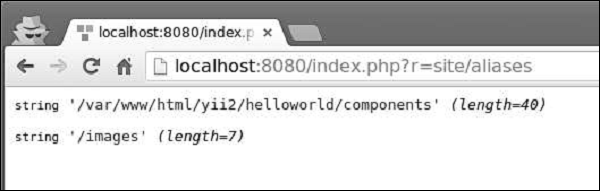
Type http://localhost:8080/index.php?r=site/aliases, you will see the following output −
To define an alias you should call the Yii::setAlias() method −
// an alias of a file path
Yii::setAlias('@alias', '/path/to/alias');
// an alias of a URL
Yii::setAlias('@urlAlias', 'http://www.google.com');
You can also derive a new alias from an existing one −Yii::setAlias('@pathToSomewhere', '@alias/path/to/somewhere');
You can call the Yii::setAlias() method in the entry script or in a
writable property called aliases in the application configuration −$config = [ 'id' => 'basic', 'basePath' => dirname(__DIR__), 'bootstrap' => ['log'], 'components' => [ 'aliases' => [ '@alias' => '/path/to/somewhere', '@urlAlias' => 'http://www.google.com', ], //other components... ] ]To resolve alias, you should call the Yii::getAlias() method.
Yii predefines the following aliases −
- @app − The base path of the application.
- @yii − The folder where the BaseYii.php file is located.
- @webroot − The Web root directory of the application.
- @web − The base URL of the application.
- @runtime − The runtime path of the application. Defaults to @app/runtime.
- @vendor − The Composer vendor directory. Defaults to @app/vendor.
- @npm − The root directory for npm packages. Defaults to @vendor/npm.
- @bower − The root directory for bower packages. Defaults to @vendor/bower.
public function actionAliases() {
   Yii::setAlias("@components", "@app/components");
   Yii::setAlias("@imagesUrl", "@web/images");
   var_dump(Yii::getAlias("@components"));
   var_dump(Yii::getAlias("@imagesUrl"));
}
In the above code, we created two aliases: @components for application components and @imagesUrl for URL where we stored all application images.
Type http://localhost:8080/index.php?r=site/aliases, you will see the following output −


No comments:
Post a Comment