
Fragment caching provides caching of a fragment of a web page.
Step 1 − Add a new function called actionFragmentCaching() to the SiteController.
Step 2 − Now, create a new file called cachedview.php in the views/site folder.
Step 3 − Go to the URL http://localhost:8080/index.php?r=site/fragment-caching and reload the page. Following will be the output.
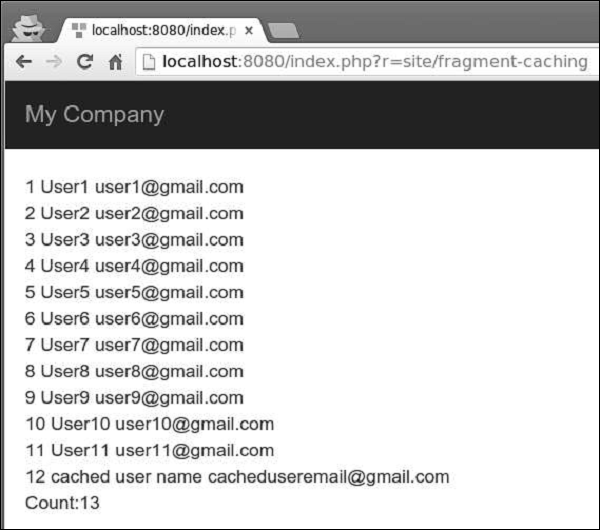 Notice, that the content between the beginCache() and endCache()
methods is cached. In the database, we have 13 users but only 12 are
displayed.
Notice, that the content between the beginCache() and endCache()
methods is cached. In the database, we have 13 users but only 12 are
displayed.
Step 1 − Modify the behaviors() function of the SiteController.
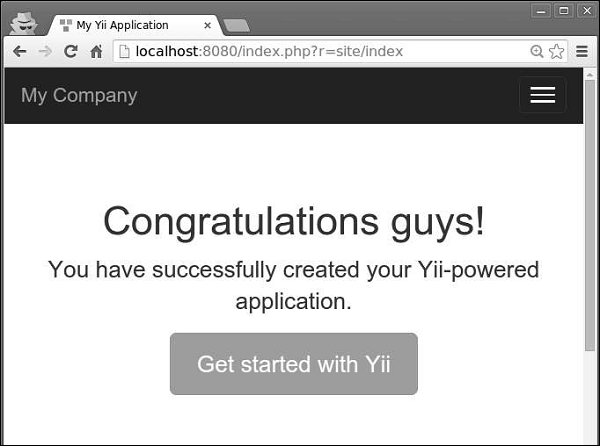
Step 2 − Go to the URL http://localhost:8080/index.php?r=site/index. Then, modify the congratulation message of the index view file. If you reload the page, you will not notice any changes because the page is cached. Wait a minute and reload the page again.
The Last-Modified header uses a timestamp to indicate whether the page has been modified.
Step 1 − To enable sending the Last-Modified header, configure the yii\filter\HttpCache::$lastModified property.
The Etag header provides a hash representing the content of the page. If the page is changed, the hash will be changed as well.
Step 2 − To enable sending the Etag header, configure the yii\filters\HttpCache::$etagSeed property.
Step 1 − Add a new function called actionFragmentCaching() to the SiteController.
public function actionFragmentCaching() {
   $user = new MyUser();
   $user->name = "cached user name";
   $user->email = "cacheduseremail@gmail.com";
   $user->save();
   $models = MyUser::find()->all();
   return $this->render('cachedview', ['models' => $models]);
}
In the above code, we created a new user and displayed a cachedview view file.
Step 2 − Now, create a new file called cachedview.php in the views/site folder.
<?php if ($this->beginCache('cachedview')) { ?>
   <?php foreach ($models as $model): ?>
      <?= $model->id; ?>
      <?= $model->name; ?>
      <?= $model->email; ?>
      <br/>
   <?php endforeach; ?>
<?php $this->endCache(); } ?>
<?php echo "Count:", \app\models\MyUser::find()->count(); ?>
We have enclosed a content generation logic in a pair of beginCache() and endCache() methods. If the content is found in cache, the beginCache() method will render it.
Step 3 − Go to the URL http://localhost:8080/index.php?r=site/fragment-caching and reload the page. Following will be the output.
Notice, that the content between the beginCache() and endCache()
methods is cached. In the database, we have 13 users but only 12 are
displayed.Page Caching
Page caching provides caching the content of a whole web page. Page caching is supported by yii\filter\PageCache.Step 1 − Modify the behaviors() function of the SiteController.
public function behaviors() {
   return [
      'access' => [
         'class' => AccessControl::className(),
         'only' => ['logout'],
         'rules' => [
            [
               'actions' => ['logout'],
               'allow' => true,
               'roles' => ['@'],
            ],
         ],
      ],
      'verbs' => [
         'class' => VerbFilter::className(),
         'actions' => [
            'logout' => ['post'],
         ],
      ],
      [
         'class' => 'yii\filters\PageCache',
         'only' => ['index'],
         'duration' => 60
      ],
   ];
}
The above code caches the index page for 60 seconds.
Step 2 − Go to the URL http://localhost:8080/index.php?r=site/index. Then, modify the congratulation message of the index view file. If you reload the page, you will not notice any changes because the page is cached. Wait a minute and reload the page again.
HTTP Caching
Web applications can also use client-side caching. To use it, you may configure the yii\filter\HttpCache filter for controller actions.The Last-Modified header uses a timestamp to indicate whether the page has been modified.
Step 1 − To enable sending the Last-Modified header, configure the yii\filter\HttpCache::$lastModified property.
public function behaviors() {
   return [
      [
         'class' => 'yii\filters\HttpCache',
         'only' => ['index'],
         'lastModified' => function ($action, $params) {
            $q = new \yii\db\Query();
            return $q->from('news')->max('created_at');
         },
      ],
   ];
}
In the above code, we enabled the HTTP caching only for the index page. When a browser opens the index page for the first time, the page is generated on the server side and sent to the browser. The second time, if no news is created, the server will not regenerate the page.
The Etag header provides a hash representing the content of the page. If the page is changed, the hash will be changed as well.
Step 2 − To enable sending the Etag header, configure the yii\filters\HttpCache::$etagSeed property.
public function behaviors() {
   return [
      [
         'class' => 'yii\filters\HttpCache',
         'only' => ['index'],
         'etagSeed' => function ($action, $params) {
            $user = $this->findModel(\Yii::$app->request->get('id'));
            return serialize([$user->name, $user->email]);
         },
      ],
   ];
}
In the above code, we enabled the HTTP caching for the index action only. It should generate the Etag HTTP header based on the name and email of the user. When a browser opens the index page for the first time, the page is generated on the server side and sent to the browser. The second time, if there are no changes to the name or email, the server will not regenerate the page.


No comments:
Post a Comment