
In this chapter, we will study about General Settings in
WordPress. WordPress general setting is used to set the basic
configuration settings for your site. In the setting administration
screen, it is a default setting screen.
Following are the steps to access the general settings −
Step 1 − Click on Settings → General option in WordPress.
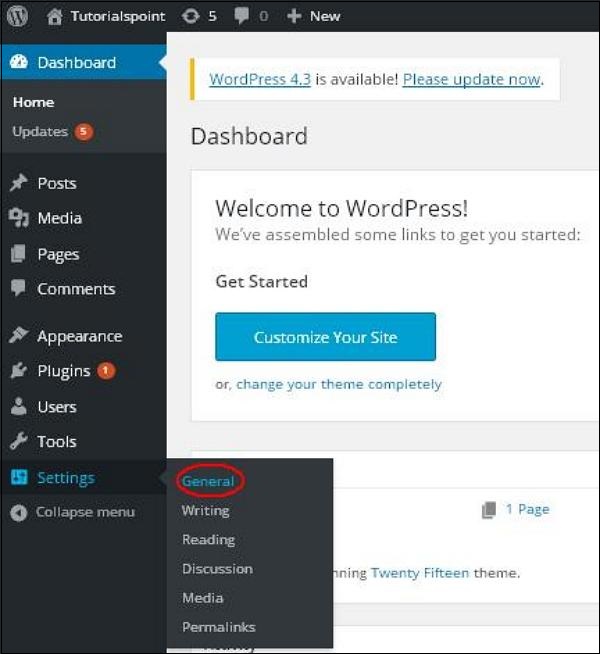 Step 2 − The General Setting page is displayed as shown in the following snapshot.
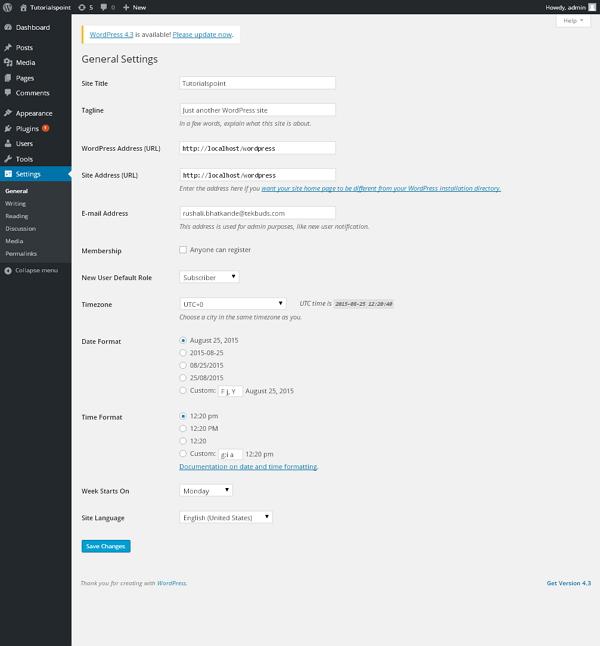 Following are the details of the fields on general settings page.
Following are the steps to access the general settings −
Step 1 − Click on Settings → General option in WordPress.
Step 2 − The General Setting page is displayed as shown in the following snapshot.
Following are the details of the fields on general settings page.- Site Title − It displays the name of the site in the template header.
- Tagline − Displays a short sentence about your site.
- WordPress Address (URL) − It is the URL of WordPress directory where your all core application files are present.
- Site Address(URL) − Enter the site URL which you want your site to display on the browser.
- E-mail Address − Enter your e-mail address which helps to recover your password or any update.
- Membership − Anyone can register an account on your site after you check this checkbox.
- New User Default Role − The default role is set for the newly registered user or members.
- Timezone − Sets the time zone based on the particular city.
- Date Format − Sets the date format as you need to display on the site.
- Time Format − Sets the time format as you need to display on the site.
- Week Starts On − Select the week day which you prefer to start for WordPress calendar. By default it is set as Monday.
- Site Language − Sets the language for the WordPress dashboard.


No comments:
Post a Comment