
This communication platform by Google, includes video chat,
messaging, and VOIP features. It is a free service from Google that
provides both single chat or group chats. Group chat can take place with
up to 10 persons. Google Hangouts users can easily share files such as
images and videos with other users.
This platform also offers “hangouts on Air” option using which we can broadcast live video chatting and discussions to the world through your Google+. These video chats and discussion is accessible to all. It can be edited and a copy of the broadcast can be shared though YouTube channel.
Hangouts is a good way to communicate with anyone and easily get an instant reply. Moreover, you can upload your video or pictures to one or many friends at a time.
To broadcast our Hangouts on Air, all we need is −
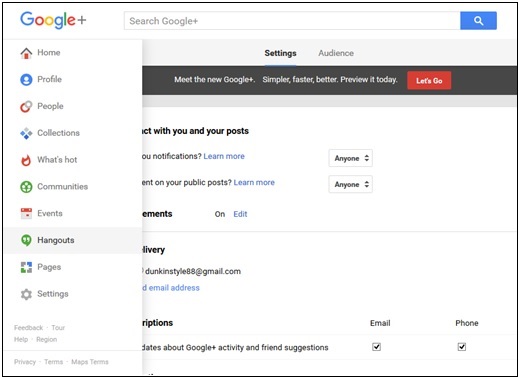
Step 2 − Search for Hangouts in the drop-down menu located on the left side of the page.
Step 3 − Click “+ New Hangout”. Check and add people to be added to Hangouts.
 Step 4 − Step 4: Choose the format for Hangouts, i.e. either video or text hangout. We can also alter text chat to video chat any time by clicking the camera button that appears on the top of the chat window.
 We can share emoticons or pictures through Hangouts. We can also add
filters to the pictures and videos. When we are done chatting, click the
Close (x) button.
We can share emoticons or pictures through Hangouts. We can also add
filters to the pictures and videos. When we are done chatting, click the
Close (x) button.
This platform also offers “hangouts on Air” option using which we can broadcast live video chatting and discussions to the world through your Google+. These video chats and discussion is accessible to all. It can be edited and a copy of the broadcast can be shared though YouTube channel.
Hangouts is a good way to communicate with anyone and easily get an instant reply. Moreover, you can upload your video or pictures to one or many friends at a time.
To broadcast our Hangouts on Air, all we need is −
- YouTube channel − Make sure to have a YouTube account. Create an account, if there isn’t one.
- Google+ profile − Make sure the Google+ page is connected to YouTube account. Nowadays they are automatically connected, however existing users should connect it to Google+ page.
Creating a Hangout
Step 1 − Open Google+ page.Step 2 − Search for Hangouts in the drop-down menu located on the left side of the page.
Step 3 − Click “+ New Hangout”. Check and add people to be added to Hangouts.
Step 4 − Step 4: Choose the format for Hangouts, i.e. either video or text hangout. We can also alter text chat to video chat any time by clicking the camera button that appears on the top of the chat window.
We can share emoticons or pictures through Hangouts. We can also add
filters to the pictures and videos. When we are done chatting, click the
Close (x) button.

No comments:
Post a Comment