
Google+ has over 300 million active users. Hence, it can be used for
business purpose to reach millions of customers worldwide. The Google+
platform is managed through a dashboard ‘Google My Business’. It
uses maps, search, and Google+ to make it easy for our brand to be more
visible on search.
It allows users to share their experiences in the form of reviews. We can use these reviews to get more credibility, improve our search rank and influence the buyers. To set up a business page, first we have to create an account.
Visit business.google.com or Google My Business locations. In case there are many businesses in different places, we have to set up an account for all of them individually. Click the hamburger ☰ icon on the top left corner of the page.
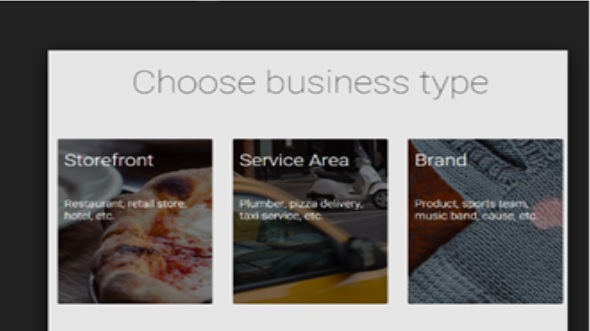
Click the Create business account. Enter the business type, it offers three options to choose from −
 Service area and Storefront are options for local businesses, and
brand is for the product type. From option 1 and 2, if we select one of
them then we’ll be prompted to select the business name and the
location.
Service area and Storefront are options for local businesses, and
brand is for the product type. From option 1 and 2, if we select one of
them then we’ll be prompted to select the business name and the
location.
Add the business info. Make the business profile look decent and appealing to others by adding photos of the brand and also by creating a URL which provides a recognizable web address of the brand.
We can also connect the business page to the existing pages by selecting a location. Click Manage this location. Click the hamburger icon on the top left hand side of the page. Select settings and then click Connect a different page. Choose the Google+ page that is to be connected to the business account page from the dropdown menu and click Done. An account will be created. We can rename or delete the business account any time we feel like.
It allows users to share their experiences in the form of reviews. We can use these reviews to get more credibility, improve our search rank and influence the buyers. To set up a business page, first we have to create an account.
Visit business.google.com or Google My Business locations. In case there are many businesses in different places, we have to set up an account for all of them individually. Click the hamburger ☰ icon on the top left corner of the page.
Click the Create business account. Enter the business type, it offers three options to choose from −
- Storefront − Choose this option if the customers are to visit our business place. In the search results, Google+ will show the location, the duration and other contact information like phone number, address, etc.
- Service area − Choose this option if the customers are to be served at their place. In the search results, Google+ will show location, duration, and other contact information, such as phone number, address, etc.
- Brand − In search results, Google+ will not show the location, duration, and other contact information.
Service area and Storefront are options for local businesses, and
brand is for the product type. From option 1 and 2, if we select one of
them then we’ll be prompted to select the business name and the
location.Add the business info. Make the business profile look decent and appealing to others by adding photos of the brand and also by creating a URL which provides a recognizable web address of the brand.
We can also connect the business page to the existing pages by selecting a location. Click Manage this location. Click the hamburger icon on the top left hand side of the page. Select settings and then click Connect a different page. Choose the Google+ page that is to be connected to the business account page from the dropdown menu and click Done. An account will be created. We can rename or delete the business account any time we feel like.


No comments:
Post a Comment