
Cookies allow data to be persisted across requests. In PHP, you may access them through the $_COOKIE variable. Yii represents cookie as an object of the yii\web\Cookie class. In this chapter, we describe several methods for reading cookies.
Step 1 − Create an actionReadCookies method in the SiteController.
 In Yii, by default, cookie validation is enabled. It protects the
cookies from being modified on the client side. The hash string from the
config/web.php file signs each cookie.
In Yii, by default, cookie validation is enabled. It protects the
cookies from being modified on the client side. The hash string from the
config/web.php file signs each cookie.
Step 1 − Create an actionReadCookies method in the SiteController.
public function actionReadCookies() {
   // get cookies from the "request" component
   $cookies = Yii::$app->request->cookies;
   // get the "language" cookie value
   // if the cookie does not exist, return "ru" as the default value
   $language = $cookies->getValue('language', 'ru');
   // an alternative way of getting the "language" cookie value
   if (($cookie = $cookies->get('language')) !== null) {
      $language = $cookie->value;
   }
   // you may also use $cookies like an array
   if (isset($cookies['language'])) {
      $language = $cookies['language']->value;
   }
   // check if there is a "language" cookie
   if ($cookies->has('language')) echo "Current language: $language";
}
Step 2 − To see sending cookies in action, create a method called actionSendCookies in the SiteController.
public function actionSendCookies() {
   // get cookies from the "response" component
   $cookies = Yii::$app->response->cookies;
   // add a new cookie to the response to be sent
   $cookies->add(new \yii\web\Cookie([
      'name' => 'language',
      'value' => 'ru-RU',
   ]));
   $cookies->add(new \yii\web\Cookie([
      'name' => 'username',
      'value' => 'John',
   ]));
   $cookies->add(new \yii\web\Cookie([
      'name' => 'country',
      'value' => 'USA',
   ]));
}
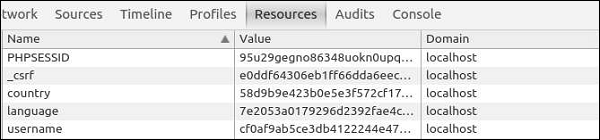
Step 3 − Now, if you go to http://localhost:8080/index.php?r=site/send-cookies, you will notice that cookies are saved inside the browser.
In Yii, by default, cookie validation is enabled. It protects the
cookies from being modified on the client side. The hash string from the
config/web.php file signs each cookie.<?php $params = require(__DIR__ . '/params.php'); $config = [ 'id' => 'basic', 'basePath' => dirname(__DIR__), 'bootstrap' => ['log'], 'components' => [ 'request' => [ // !!! insert a secret key in the following (if it is empty) - this is //required by cookie validation 'cookieValidationKey' => 'ymoaYrebZHa8gURuolioHGlK8fLXCKjO', ], 'cache' => [ 'class' => 'yii\caching\FileCache', ], 'user' => [ 'identityClass' => 'app\models\User', 'enableAutoLogin' => true, ], 'errorHandler' => [ 'errorAction' => 'site/error', ], 'mailer' => [ 'class' => 'yii\swiftmailer\Mailer', // send all mails to a file by default. You have to set // 'useFileTransport' to false and configure a transport // for the mailer to send real emails. 'useFileTransport' => true, ], 'log' => [ 'traceLevel' => YII_DEBUG ? 3 : 0, 'targets' => [ [ 'class' => 'yii\log\FileTarget', 'levels' => ['error', 'warning'], ], ], ], 'urlManager' => [ //'showScriptName' => false, //'enablePrettyUrl' => true, //'enableStrictParsing' => true, //'suffix' => '/' ], 'db' => require(__DIR__ . '/db.php'), ], 'modules' => [ 'hello' => [ 'class' => 'app\modules\hello\Hello', ], ], 'params' => $params, ]; if (YII_ENV_DEV) { // configuration adjustments for 'dev' environment $config['bootstrap'][] = 'debug'; $config['modules']['debug'] = [ 'class' => 'yii\debug\Module', ]; $config['bootstrap'][] = 'gii'; $config['modules']['gii'] = [ 'class' => 'yii\gii\Module', ]; } return $config; ?>You can disable cookie validation by setting the yii\web\Request::$enableCookieValidation property to false.


No comments:
Post a Comment