
Theming helps you replace a set of views with another one without the need of modifying original view files. You should set the theme property of the view application component to use theming.
You should also define the following properties −
Step 1 − Modify the config/web.php file this way.
Step 2 − Now create the web/themes/basic directory structure and themes/basic/site. Inside the themes/basic/site folder create a file called about.php with the following code.
 Step 4 − To theme modules, configure the yii\base\Theme::$pathMap property this way.
Step 6 − Modify the view application component this way.
Step 7 − Create the themes/christmas/site directory structure.
Step 8 − Now, inside the themes/christmas/site folder, create a file called about.php with the following code.
You should also define the following properties −
- yii\base\Theme::$basePath − Defines the base directory for CSS, JS, images, and so forth.
- yii\base\Theme::$baseUrl − Defines the base URL of the themed resources.
- yii\base\Theme::$pathMap − Defines the replacement rules.
Step 1 − Modify the config/web.php file this way.
<?php
   $params = require(__DIR__ . '/params.php');
   $config = [
      'id' => 'basic',
      'basePath' => dirname(__DIR__),
      'bootstrap' => ['log'],
      'components' => [
         'request' => [
            // !!! insert a secret key in the following (if it is empty) - this
               //is required by cookie validation
            'cookieValidationKey' => 'ymoaYrebZHa8gURuolioHGlK8fLXCKjO',
         ],
         'cache' => [
            'class' => 'yii\caching\FileCache',
         ],
         'user' => [
            'identityClass' => 'app\models\User',
            'enableAutoLogin' => true,
         ],
         'errorHandler' => [
            'errorAction' => 'site/error',
         ],
         'mailer' => [
            'class' => 'yii\swiftmailer\Mailer',
            // send all mails to a file by default. You have to set
            // 'useFileTransport' to false and configure a transport
            // for the mailer to send real emails.
            'useFileTransport' => true,
         ],
         'log' => [
            'traceLevel' => YII_DEBUG ? 3 : 0,
            'targets' => [
               [
                  'class' => 'yii\log\FileTarget',
                  'levels' => ['error', 'warning'],
               ],
            ],
         ],
         'view' => [
            'theme' => [
               'basePath' => '@app/themes/basic',
               'baseUrl' => '@web/themes/basic',
               'pathMap' => [
                  '@app/views' => '@app/themes/basic',
               ],
            ],
         ],
         'db' => require(__DIR__ . '/db.php'),
      ],
      'modules' => [
         'hello' => [
            'class' => 'app\modules\hello\Hello',
         ],
      ],
      'params' => $params,
   ];
   if (YII_ENV_DEV) {
      // configuration adjustments for 'dev' environment
      $config['bootstrap'][] = 'debug';
      $config['modules']['debug'] = [
         'class' => 'yii\debug\Module',
      ];
      $config['bootstrap'][] = 'gii';
      $config['modules']['gii'] = [
         'class' => 'yii\gii\Module',
      ];
   }
   return $config;
?>
We have added the view application component.
Step 2 − Now create the web/themes/basic directory structure and themes/basic/site. Inside the themes/basic/site folder create a file called about.php with the following code.
<?php
   /* @var $this yii\web\View */
   use yii\helpers\Html;
   $this->title = 'About';
   $this->params['breadcrumbs'][] = $this->title;
   $this->registerMetaTag(['name' => 'keywords', 'content' => 'yii, developing,
      views, meta, tags']);
   $this->registerMetaTag(['name' => 'description', 'content' => 'This is the
      description of this page!'], 'description');
?>

<div class = "site-about">
   <h1><?= Html::encode($this->title) ?></h1>

   <p style = "color: red;">
      This is the About page. You may modify the following file to customize its content:
   </p>
</div>
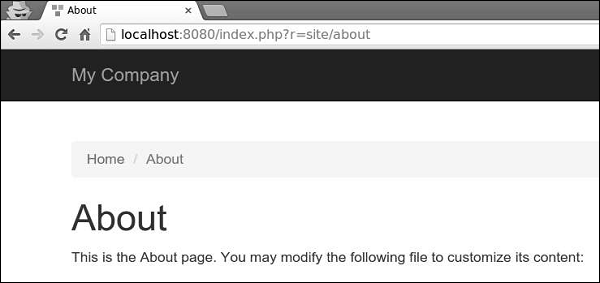
Step 3 − Now, go to http://localhost:8080/index.php?r=site/about, the themes/basic/site/about.php file will be rendered, instead of views/site/about.php.
Step 4 − To theme modules, configure the yii\base\Theme::$pathMap property this way.'pathMap' => [ '@app/views' => '@app/themes/basic', '@app/modules' => '@app/themes/basic/modules', ],Step 5 − To theme widgets, configure the yii\base\Theme::$pathMap property this way.
'pathMap' => [
   '@app/views' => '@app/themes/basic',
   '@app/widgets' => '@app/themes/basic/widgets', // <-- !!!
],
Sometimes you need to specify a basic theme which contains a basic look and feel of the application. To achieve this goal, you can use theme inheritance.
Step 6 − Modify the view application component this way.
'view' => [
   'theme' => [
      'basePath' => '@app/themes/basic',
      'baseUrl' => '@web/themes/basic',
      'pathMap' => [
         '@app/views' => [
            '@app/themes/christmas',
            '@app/themes/basic',
         ],
      ]
   ],
],
In the above configuration, the @app/views/site/index.php view file will be themed as either @app/themes/christmas/site/index.php or @app/themes/basic/site/index.php, depending on which file exists. If both files exist, the first one will be used.
Step 7 − Create the themes/christmas/site directory structure.
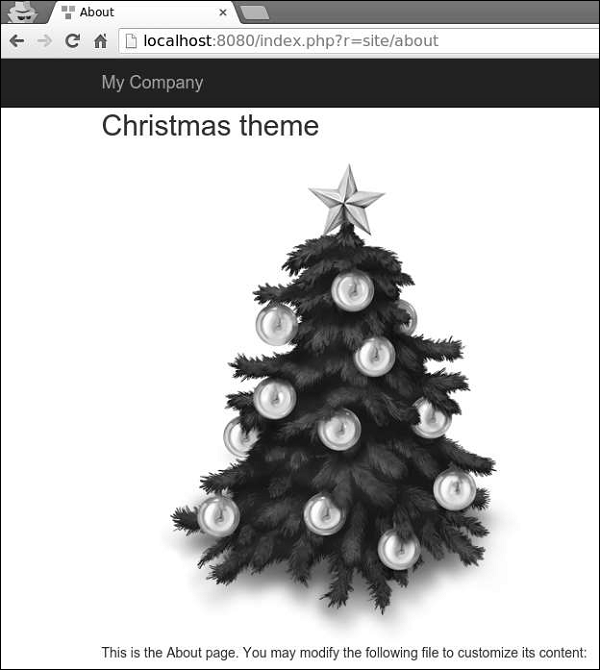
Step 8 − Now, inside the themes/christmas/site folder, create a file called about.php with the following code.
<?php
   /* @var $this yii\web\View */
   use yii\helpers\Html;
   $this->title = 'About';
   $this->params['breadcrumbs'][] = $this->title;
   $this->registerMetaTag(['name' => 'keywords', 'content' => 'yii, developing,
      views, meta, tags']);
   $this->registerMetaTag(['name' => 'description', 'content' => 'This is the
      description of this page!'], 'description');
?>

<div class = "site-about">
   <h2>Christmas theme</h2>
   <img src = "http://pngimg.com/upload/fir_tree_PNG2514.png" alt = ""/>
   <p style = "color: red;">
      This is the About page. You may modify the following file to customize its content:
   </p>
</div>
Step 9 − If you go to http://localhost:8080/index.php?r=site/about, you will see the updated about page using the Christmas theme.


No comments:
Post a Comment