
The controller class extends from the yii\rest\ActiveController class, which implements common RESTful actions. We specify the $modelClass property so that the controller knows which model to use for manipulating data.
Step 1 − Create a file called UserController.php inside the controllers folder.
Step 2 − Modify the config/web.php file this way −
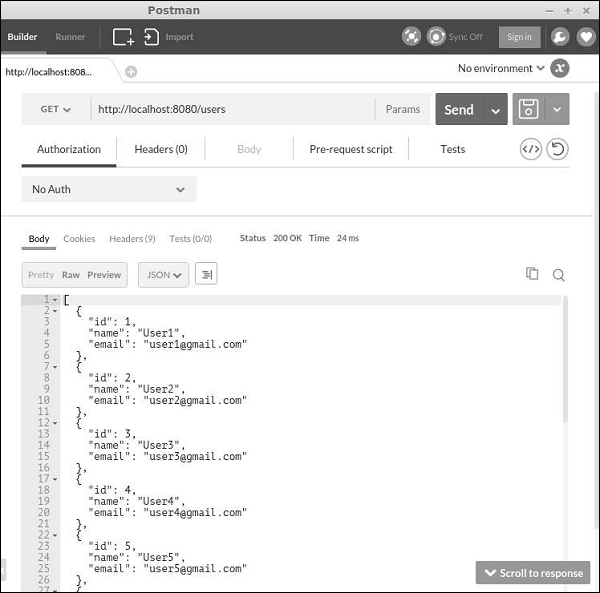
Step 3 − Now, open Postman, punch in http://localhost:8080/users, and click “Send”. You will see the following.
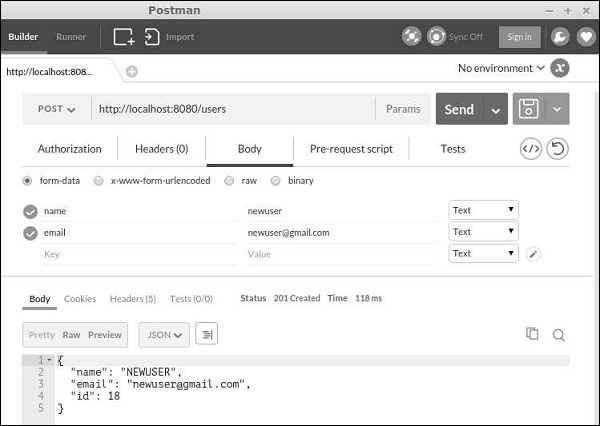
 Step 4 − To create a new user, change the request type to POST, add two body parameters: name and email, and click “Send”.
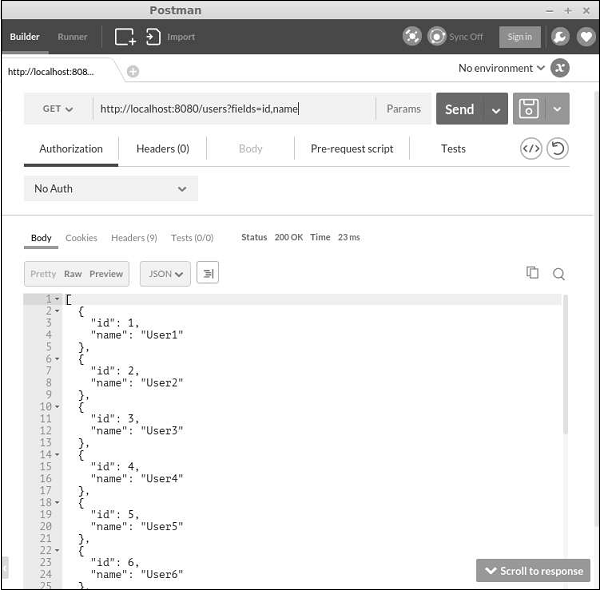
 Step 5 − You can use the fields parameter to specify which fields should be included in the result. For example, the URL http://localhost:8080/users?fields=id, name will only return the id and name fields as shown in the following screenshot.
Step 1 − Create a file called UserController.php inside the controllers folder.
<?php
   namespace app\controllers;
   use yii\rest\ActiveController;
   class UserController extends ActiveController {
      public $modelClass = 'app\models\MyUser';
   }
?>
Next we need to set up the urlManager component, so that the user data can be accessed and manipulated with meaningful HTTP verbs and pretty URLs. To let the API access data in JSON, we should configure the parsers property of the request application component.
Step 2 − Modify the config/web.php file this way −
<?php
   $params = require(__DIR__ . '/params.php');
   $config = [
      'id' => 'basic',
      'basePath' => dirname(__DIR__),
      'bootstrap' => ['log'],
      'components' => [
         'request' => [
            // !!! insert a secret key in the following (if it is empty) - this is
               //required by cookie validation
            'cookieValidationKey' => 'ymoaYrebZHa8gURuolioHGlK8fLXCKjO',
         ],
         'cache' => [
            'class' => 'yii\caching\FileCache',
         ],
         'user' => [
            'identityClass' => 'app\models\User',
            'enableAutoLogin' => true,
         ],
         'errorHandler' => [
            'errorAction' => 'site/error',
         ],
         'mailer' => [
            'class' => 'yii\swiftmailer\Mailer',
            // send all mails to a file by default. You have to set
            // 'useFileTransport' to false and configure a transport
            // for the mailer to send real emails.
            'useFileTransport' => true,
         ],
         'log' => [
            'traceLevel' => YII_DEBUG ? 3 : 0,
            'targets' => [
               [
                  'class' => 'yii\log\FileTarget',
                  'levels' => ['error', 'warning'],
               ],
            ],
         ],
         'urlManager' => [
            'enablePrettyUrl' => true,
            'enableStrictParsing' => true,
            'showScriptName' => false,
            'rules' => [
               ['class' => 'yii\rest\UrlRule', 'controller' => 'user'],
            ],
         ],
         'request' => [
            'parsers' => [
               'application/json' => 'yii\web\JsonParser',
            ]
         ],
         'db' => require(__DIR__ . '/db.php'),
      ],
      'modules' => [
         'hello' => [
            'class' => 'app\modules\hello\Hello',
         ],
      ],
      'params' => $params,
   ];
   if (YII_ENV_DEV) {
      // configuration adjustments for 'dev' environment
      $config['bootstrap'][] = 'debug';
      $config['modules']['debug'] = [
         'class' => 'yii\debug\Module',
      ];
      $config['bootstrap'][] = 'gii';
      $config['modules']['gii'] = [
         'class' => 'yii\gii\Module',
      ];
   }
   return $config;
?>
With the minimal amount of effort, we've just built a RESTful API for accessing user data. The APIs include −
- GET /users − list all users page by page
- HEAD /users − show the overview information of user listing
- POST /users − create a new user
- GET /users/20 − return the details of the user 20
- HEAD /users/20 − show the overview information of user 20
- PATCH /users/ 20 and PUT /users/20 − update the user 20
- DELETE /users/20 − delete the user 20
- OPTIONS /users − show the supported verbs regarding endpoint /users
- OPTIONS /users/20 − show the supported verbs regarding endpoint /users/ 20
Step 3 − Now, open Postman, punch in http://localhost:8080/users, and click “Send”. You will see the following.
Step 4 − To create a new user, change the request type to POST, add two body parameters: name and email, and click “Send”.
Step 5 − You can use the fields parameter to specify which fields should be included in the result. For example, the URL http://localhost:8080/users?fields=id, name will only return the id and name fields as shown in the following screenshot.

No comments:
Post a Comment