
Layouts represent the common parts of multiple views i.e. for
example, page header and footer. By default, layouts should be stored in
the views/layouts folder.
Let us have a look at the main layout of the basic application template −
Step 2 − To apply this layout to the SiteController, add the $layout property to the SiteController class.
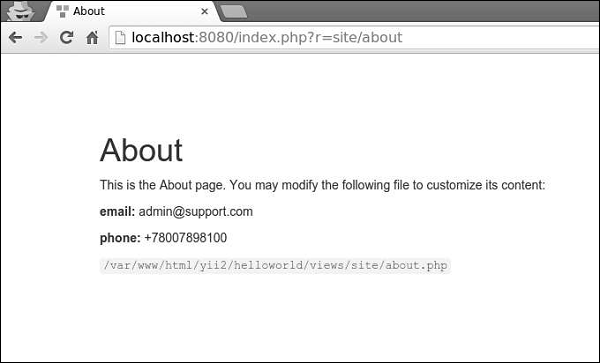 Step 4 − To register various meta tags, you can call yii\web\View::registerMetaTag() in a content view.
Step 5 − Modify the ‘About’ view of the SiteController.
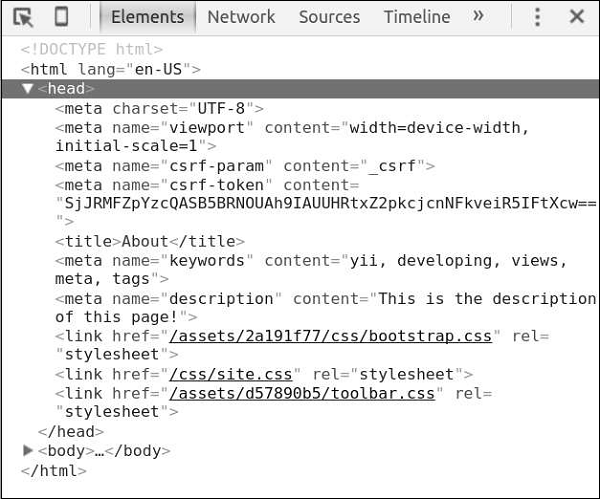
Step 6 − Now go to http://localhost:8080/index.php?r=site/about, you will find the meta tags in the head section of the page as shown in the following screenshot.
 Views trigger several events −
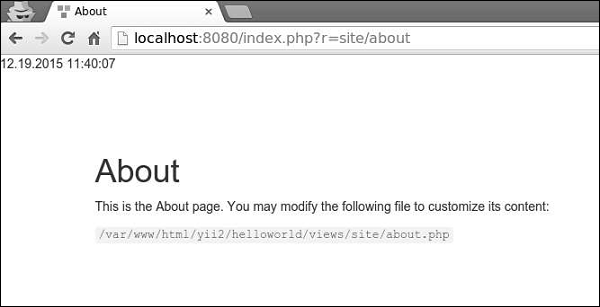
Step 7 − To display the current date and time in the actionAbout of the SiteController, modify it this way.
Let us have a look at the main layout of the basic application template −
<?php
   /* @var $this \yii\web\View */
   /* @var $content string */
   use yii\helpers\Html;
   use yii\bootstrap\Nav;
   use yii\bootstrap\NavBar;
   use yii\widgets\Breadcrumbs;
   use app\assets\AppAsset;
   AppAsset::register($this);
?>

<?php $this->beginPage() ?>
<!DOCTYPE html>
<html lang = "<?= Yii::$app->language ?>">
   <head>
      <meta charset = "<?= Yii::$app->charset ?>">
      <meta name = "viewport" content = "width = device-width, initial-scale = 1">
      <?= Html::csrfMetaTags() ?>
      <title><?= Html::encode($this->title) ?></title>
      <?php $this->head() ?>
   </head>

   <body>
      <?php $this->beginBody() ?>
         <div class = "wrap">
            <?php
               NavBar::begin([
                  'brandLabel' => 'My Company',
                  'brandUrl' => Yii::$app->homeUrl,
                  'options' => [
                     'class' => 'navbar-inverse navbar-fixed-top',
                  ],
               ]);

               echo Nav::widget([
                  'options' => ['class' => 'navbar-nav navbar-right'],
                  'items' => [
                     ['label' => 'Home', 'url' => ['/site/index']],
                     ['label' => 'About', 'url' => ['/site/about']],
                     ['label' => 'Contact', 'url' => ['/site/contact']],
                     Yii::$app->user->isGuest ?
                        ['label' => 'Login', 'url' => ['/site/login']] :
                        [
                           'label' => 'Logout (' . Yii::$app->user->identity->username.')',
                           'url' => ['/site/logout'],
                           'linkOptions' => ['data-method' => 'post']
                        ],
                  ],
               ]);

               NavBar::end();
            ?>
            <div class = "container">
               <?= Breadcrumbs::widget([
                  'links' => isset($this->params['breadcrumbs']) ? $this>params
                     ['breadcrumbs'] : [],
               ]) ?>
               <?= $content ?>
            </div>

         </div>

         <footer class = "footer">
            <div class = "container">
               <p class = "pull-left">© My Company <?= date('Y') ?></p>
               <p class = "pull-right"><?= Yii::powered() ?></p>
            </div>
         </footer>

      <?php $this->endBody() ?>
   </body>
</html>
<?php $this->endPage() ?>
This layout generates the HTML page that is common for all pages. The $content variable is the rendering result of content views. The following methods trigger events about the rendering process so that the scripts and tags registered in other places could be properly injected −
- head() − Should be called within the head section. Generates a placeholder, which will be replaced with the registered HTML targeted at the head position.
- beginBody() − Should be called at the beginning of the body section. Triggers the EVENT_BEGIN_BODY event. Generates a placeholder which will be replaced with the registered HTML targeted at the body begin position.
- endBody() − Should be called at the end of the body section. Triggers the EVENT_END_BODY event. Generates a placeholder, which will be replaced with the registered HTML targeted at the body end position.
- beginPage() − Should be called at the beginning of the layout. Triggers the EVENT_BEGIN_PAGE event.
- endPage() − Should be called at the end of the layout. Triggers the EVENT_END_PAGE event.
Create a Layout
Step 1 − Inside the views/layouts directory, create a file called newlayout.php with the following code.<?php /* @var $this \yii\web\View */ /* @var $content string */ use yii\helpers\Html; use yii\bootstrap\Nav; use yii\bootstrap\NavBar; use yii\widgets\Breadcrumbs; use app\assets\AppAsset; AppAsset::register($this); ?> <?php $this->beginPage() ?> <!DOCTYPE html> <html lang = "<?= Yii::$app->language ?>"> <head> <meta charset = "<?= Yii::$app->charset ?>"> <meta name = "viewport" content = "width = device-width, initial-scale = 1"> <? = Html::csrfMetaTags() ?> <title><? = Html::encode($this->title) ?></title> <?php $this->head() ?> </head> <body> <?php $this->beginBody() ?> <div class = "wrap"> <div class = "container"> <? = $content ?> </div> </div> <footer class = "footer"> <div class = "container"> <p class = "pull-left">© My Company <?= date('Y') ?></p> <p class = "pull-right"><? = Yii::powered() ?></p> </div> </footer> <?php $this->endBody() ?> </body> </html> <?php $this->endPage() ?>We have removed the top menu bar.
Step 2 − To apply this layout to the SiteController, add the $layout property to the SiteController class.
<?php
   namespace app\controllers;
   use Yii;
   use yii\filters\AccessControl;
   use yii\web\Controller;
   use yii\filters\VerbFilter;
   use app\models\LoginForm;
   use app\models\ContactForm;
   class SiteController extends Controller {
      public $layout = “newlayout”;
      /* other methods */
   }
?>
Step 3 − Now if you go to the web browser at any view of the SiteController, you will see that the layout has changed.
Step 4 − To register various meta tags, you can call yii\web\View::registerMetaTag() in a content view.Step 5 − Modify the ‘About’ view of the SiteController.
<?php
   /* @var $this yii\web\View */
   use yii\helpers\Html;
   $this->title = 'About';
   $this->params['breadcrumbs'][] = $this->title;
   $this->registerMetaTag(['name' => 'keywords', 'content' => 'yii, developing, views,
      meta, tags']);
   $this->registerMetaTag(['name' => 'description', 'content' => 'This is the description
      of this page!'], 'description');
?>
<div class="site-about">
   <h1><?= Html::encode($this->title) ?></h1>
   <p>
      This is the About page. You may modify the following file to customize its content:
   </p>
   <code><?= __FILE__ ?></code>
</div>
We have just registered two meta tags − keywords and description.
Step 6 − Now go to http://localhost:8080/index.php?r=site/about, you will find the meta tags in the head section of the page as shown in the following screenshot.
Views trigger several events −- EVENT_BEGIN_BODY − triggered in layouts by the call of yii\web\View::beginBody().
- EVENT_END_BODY − triggered in layouts by the call of yii\web\View::endBody().
- EVENT_BEGIN_PAGE − triggered in layouts by the call of yii\web\View::beginPage().
- EVENT_END_PAGE − triggered in layouts by the call of yii\web\View::endPage().
- EVENT_BEFORE_RENDER − triggered in a controller at the beginning of rendering a file.
- EVENT_AFTER_RENDER − triggered after rendering a file.
Step 7 − To display the current date and time in the actionAbout of the SiteController, modify it this way.
public function actionAbout() {
   \Yii::$app->view->on(View::EVENT_BEGIN_BODY, function () {
      echo date('m.d.Y H:i:s');
   });
   return $this->render('about');
}
Step 8 − Type http://localhost:8080/index.php?r=site/about in the address bar of the web browser and you will see the following.
Important Points
To make Views more manageable you should −- Divide complex views into several smaller ones.
- Use layouts for common HTML sections (headers, footers, menus and so forth).
- Use widgets.
- Contain HTML and simple PHP code to format and render data.
- NOT process requests.
- NOT modify model properties.
- NOT perform database queries.


No comments:
Post a Comment