
In this chapter, we will learn about Permalink settings in
WordPress. Permalink is a permanent link to a particular blog post or
category. It allows setting the default permalink structure. These
settings are used to add permalinks to your posts in WordPress.
Following are the steps to access permalink settings.
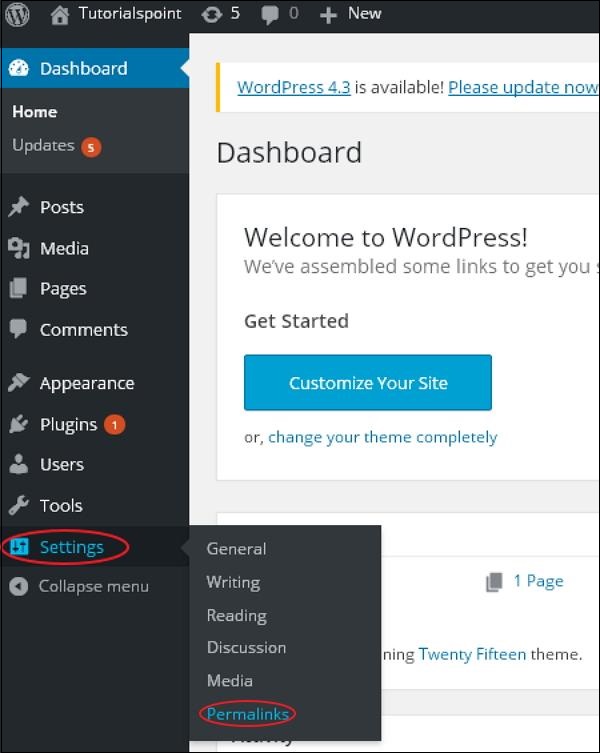
Step (1) − Click on Settings → Permalinks option from the left navigation menu.
 Step (2) − When you click on Permalinks, the following page appears on the screen.
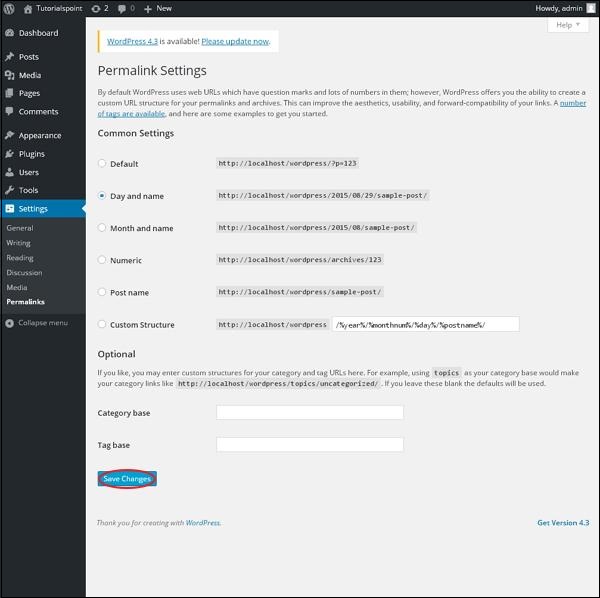 Here are a few settings you can make −
Step (1) − Click on Settings → Permalinks option from the left navigation menu.
Step (2) − When you click on Permalinks, the following page appears on the screen.
Here are a few settings you can make −- Common settings −
Check any of the radio buttons to choose your permalink structure for your blogs
- Default − It sets the default URL structure in Wordpress.
- Day and name − It sets URL structure according to the date and name in your posts.
- Month and name − It sets the URL structure according to the month and name in your post.
- Numeric − It sets numbers in the URL structure in your post.
- Post name − It sets post name in the URL structure in your post.
- Custom Structure − It sets the URL structure of your choice by writing the desired name in the given text box.
- Optional
These are optional. You can add custom structure for main category or tag URL. If your text box is empty then default settings is used. Here you have two options.
- Category Base − Add custom prefix for your category URL.
- Tag Base − Add custom prefix to your Tags URL.


No comments:
Post a Comment