
This tutorial will teach you how to create documentation of the
application in one go. So let's start, go to C:/MVN directory where you
had created your java consumerBanking application. Open consumerBanking folder and execute the following mvn command.
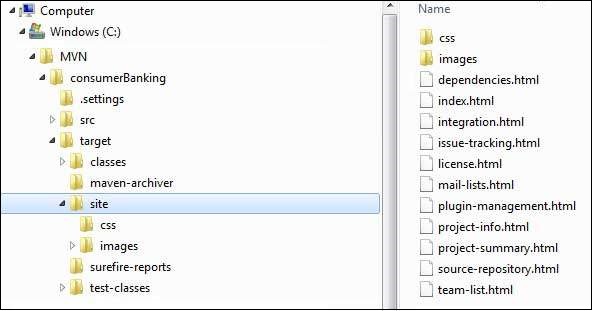 Open C:\MVN\consumerBanking\target\site folder. Click on index.html to see the documentation.
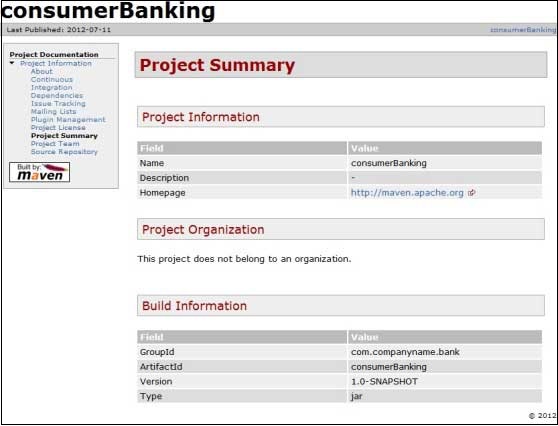 Maven creates the documentation using a documentation-processing engine called Doxia
which reads multiple source formats into a common document model.To
write documentation for your project, you can write your content in a
following few commonly used formats which are parsed by Doxia.
Maven creates the documentation using a documentation-processing engine called Doxia
which reads multiple source formats into a common document model.To
write documentation for your project, you can write your content in a
following few commonly used formats which are parsed by Doxia.
C:\MVN>mvn siteMaven will start building the project.
[INFO] Scanning for projects...
[INFO]
[INFO] ------------------------------------------------------------------------
[INFO] Building consumerBanking 1.0-SNAPSHOT
[INFO] ------------------------------------------------------------------------
[INFO]
[INFO] --- maven-site-plugin:3.3:site (default-site) @ consumerBanking ---
[WARNING] Report plugin org.apache.maven.plugins:maven-project-info-reports-plugin has an empty version.
[WARNING]
[WARNING] It is highly recommended to fix these problems because they threaten the stability of your build.
[WARNING]
[WARNING] For this reason, future Maven versions might no longer support building such malformed projects.
[INFO] configuring report plugin org.apache.maven.plugins:maven-project-info-reports-plugin:2.8.1
[INFO] Relativizing decoration links with respect to project URL: http://maven.apache.org
[INFO] Rendering site with org.apache.maven.skins:maven-default-skin:jar:1.0 skin.
[INFO] Generating "Dependencies" report    --- maven-project-info-reports-plugin:2.8.1
[INFO] Generating "Dependency Convergence" report    --- maven-project-info-reports-plugin:2.8.1
[INFO] Generating "Dependency Information" report    --- maven-project-info-reports-plugin:2.8.1
[INFO] Generating "About" report    --- maven-project-info-reports-plugin:2.8.1
[INFO] Generating "Plugin Management" report    --- maven-project-info-reports-plugin:2.8.1
[INFO] Generating "Project Plugins" report    --- maven-project-info-reports-plugin:2.8.1
[INFO] Generating "Project Summary" report    --- maven-project-info-reports-plugin:2.8.1
[INFO] ------------------------------------------------------------------------
[INFO] BUILD SUCCESS
[INFO] ------------------------------------------------------------------------
[INFO] Total time: 37.828 s
[INFO] Finished at: 2015-09-27T12:11:27+05:30
[INFO] Final Memory: 23M/247M
[INFO] ------------------------------------------------------------------------
That's it. Your project documentation is ready. Maven has created a site within target directory.
Open C:\MVN\consumerBanking\target\site folder. Click on index.html to see the documentation.
Maven creates the documentation using a documentation-processing engine called Doxia
which reads multiple source formats into a common document model.To
write documentation for your project, you can write your content in a
following few commonly used formats which are parsed by Doxia.| Format Name | Description | Reference |
|---|---|---|
| APT | A Plain Text document format | doxia format |
| XDoc | A Maven 1.x documentation format | jakarta format |
| FML | Used for FAQ documents | fml format |
| XHTML | Extensible HTML | XHTML wiki |


No comments:
Post a Comment