
A test suite is a collection of test cases intended to test a
behavior or a set of behaviors of software program. In TestNG, we cannot
define a suite in testing source code, but it is represented by one XML
file, as suite is the feature of execution. It also allows flexible
configuration of the tests to be run.
A suite can contain one or more tests and is defined by the <suite> tag.
<suite> is the root tag of your testng.xml. It describes a test suite, which in turn is made of several <test> sections.
The following table lists all the legal attributes that <suite> accepts.
In this chapter, we will show you an example having two test classes, Test1 & Test2, to run together using Test Suite.
Compile all java classes using javac.
A suite can contain one or more tests and is defined by the <suite> tag.
<suite> is the root tag of your testng.xml. It describes a test suite, which in turn is made of several <test> sections.
The following table lists all the legal attributes that <suite> accepts.
| Attribute | Description |
|---|---|
| name | The name of this suite. It is a mandatory attribute. |
| verbose | The level or verbosity for this run. |
| parallel | Whether TestNG should run different threads to run this suite. |
| thread-count | The number of threads to use, if parallel mode is enabled (ignored other-wise). |
| annotations | The type of annotations you are using in your tests. |
| time-out | The default timeout that will be used on all the test methods found in this test. |
Create a Class
Create a java class to be tested, say, MessageUtil.java in C:\>JUNIT_WORKSPACE./* * This class prints the given message on console. */ public class MessageUtil { private String message; // Constructor // @param message to be printed public MessageUtil(String message) { this.message = message; } // prints the message public String printMessage() { System.out.println(message); return message; } // add "Hi!" to the message public String salutationMessage() { message = "Hi!" + message; System.out.println(message); return message; } }
Create Test Case Classes
Create a java class file named Test1.java in C:\>TestNG_WORKSPACE.import org.testng.Assert; import org.testng.annotations.Test; public class Test1 { String message = "Manisha"; MessageUtil messageUtil = new MessageUtil(message); @Test public void testPrintMessage() { System.out.println("Inside testPrintMessage()"); Assert.assertEquals(message, messageUtil.printMessage()); } }Create a java class file named Test2.java in C:\>TestNG_WORKSPACE.
import org.testng.Assert;
import org.testng.annotations.Test;

public class Test2 {
   String message = "Manisha";
   MessageUtil messageUtil = new MessageUtil(message);

   @Test
   public void testSalutationMessage() {
      System.out.println("Inside testSalutationMessage()");
      message = "Hi!" + "Manisha";
      Assert.assertEquals(message,messageUtil.salutationMessage());
   }
}
Now, let's write the testng.xml in C:\>TestNG_WORKSPACE, which would contain the <suite> tag as follows:
<?xml version="1.0" encoding="UTF-8"?>
<!DOCTYPE suite SYSTEM "http://testng.org/testng-1.0.dtd" >

<suite name="Suite1">

  <test name="exampletest1">
    <classes>
       <class name="Test1" />
    </classes>
  </test>

  <test name="exampletest2">
    <classes>
       <class name="Test2" />
    </classes>
  </test>

</suite>
Suite1 includes exampletest1 and exampletest2.
Compile all java classes using javac.
C:\TestNG_WORKSPACE>javac MessageUtil.java Test1.java Test2.javaNow, run the testng.xml, which will run the test case defined in the provided Test Case class.
C:\TestNG_WORKSPACE>java -cp "C:\TestNG_WORKSPACE" org.testng.TestNG testng.xmlVerify the output.
Inside testPrintMessage()
Manisha
Inside testSalutationMessage()
Hi!Manisha

===============================================
Suite1
Total tests run: 2, Failures: 0, Skips: 0
===============================================
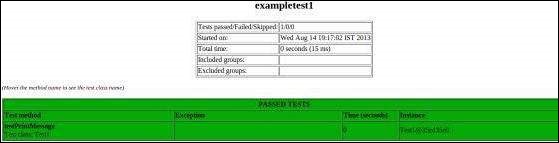
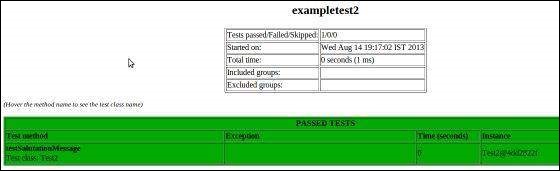
You can also check the test-output folder. Under the Suite1 folder, you can see two html files created, exampletest1.html and exampletest2.html, which would look as follows:


No comments:
Post a Comment