
In this chapter you will learn how to create hyperlinks in a presentation.
Create an empty presentation using the XMLSlideShow class as shown below:
Creating Hyperlinks
You can read the hyperlinks in a presentation using the createHyperlink() method of the XSLFTextRun class. Follow the procedure given below to create a hyperlink in a presentation.Create an empty presentation using the XMLSlideShow class as shown below:
XMLSlideShow ppt = new XMLSlideShow();Create an empty slide and create a textbox and body of the slide using body and content layout.
//create an empty presentation
XSLFSlideMaster slideMaster = ppt.getSlideMasters()[0];

//creating a slide with title and content layout
XSLFSlideLayout slidelayout = slideMaster.getLayout(SlideLayout.TITLE_AND_CONTENT);
XSLFSlide slide = ppt.createSlide(slidelayout);

//selection of body place holder
XSLFTextShape body = slide.getPlaceholder(1);

//clear the existing text in the slide
body.clearText();
Create a text run object and set text to it as shown below:
XSLFTextRun textRun=body.addNewTextParagraph().addNewTextRun();
textRun.setText("Tutorials point");
Create a hyperlink using the createHyperlink() method of the XSLFTextRun class as shown below:
XSLFHyperlink link = textRun.createHyperlink();Set the link address to the hyperlink using the setAddress() method of XSLFHyperlink class as shown below:
link.setAddress("http://www.tutorialspoint.com/");Given below is the complete program to create hyperlink in a presentation:
import java.io.File;
import java.io.FileOutputStream;
import java.io.IOException;

import org.apache.poi.xslf.usermodel.SlideLayout;
import org.apache.poi.xslf.usermodel.XMLSlideShow;
import org.apache.poi.xslf.usermodel.XSLFHyperlink;
import org.apache.poi.xslf.usermodel.XSLFSlide;
import org.apache.poi.xslf.usermodel.XSLFSlideLayout;
import org.apache.poi.xslf.usermodel.XSLFSlideMaster;
import org.apache.poi.xslf.usermodel.XSLFTextRun;
import org.apache.poi.xslf.usermodel.XSLFTextShape;

public class CreatingHyperlinks {

   public static void main(String args[]) throws IOException{

      //create an empty presentation
      XMLSlideShow ppt = new XMLSlideShow();

      //getting the slide master object
      XSLFSlideMaster slideMaster = ppt.getSlideMasters()[0];

      //select a layout from specified list
      XSLFSlideLayout slidelayout = slideMaster.getLayout(SlideLayout.TITLE_AND_CONTENT);

      //creating a slide with title and content layout
      XSLFSlide slide = ppt.createSlide(slidelayout);

      //selection of title place holder
      XSLFTextShape body = slide.getPlaceholder(1);

      //clear the existing text in the slid
      body.clearText();

      //adding new paragraph
      XSLFTextRun textRun = body.addNewTextParagraph().addNewTextRun();

      //setting the text
      textRun.setText("Tutorials point");

      //creating the hyperlink
      XSLFHyperlink link = textRun.createHyperlink();

      //setting the link address
      link.setAddress("http://www.tutorialspoint.com/");

      //create the file object
      File file=new File("hyperlink.pptx");
      FileOutputStream out = new FileOutputStream(file);

      //save the changes in a file
      ppt.write(out);
      System.out.println("slide cretated successfully");
      out.close();
   }
}
Save the above Java code as CreatingHyperlinks.java, and then compile and execute it from the command prompt as follows:
$javac CreatingHyperlinks.java
$java CreatingHyperlinks
It will compile and execute to generate the following output:
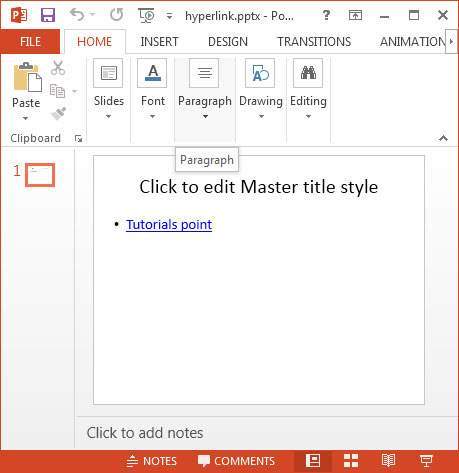
slide cretated successfullyThe newly added slide with the hyperlink in its body looks as follows:


No comments:
Post a Comment