
To display data in a readable format, you can use the formatter application component.
Step1 − Add the actionFormatter method to the SiteController.
Step 2 − Now, create a formatter.php view file inside the views/site folder.
 The formatter component supports the following formats related with date and time −
Step 4 − Modify the formatter view this way.
Step 1 − Modify the formatter view file this way.
Step 1 − Modify the formatter view this way.
The following example shows how to format date for different locales.
Step1 − Add the actionFormatter method to the SiteController.
public function actionFormatter(){
   return $this->render('formatter');
}
In the above code, we just render the formatter view.
Step 2 − Now, create a formatter.php view file inside the views/site folder.
<?php
   $formatter = \Yii::$app->formatter;
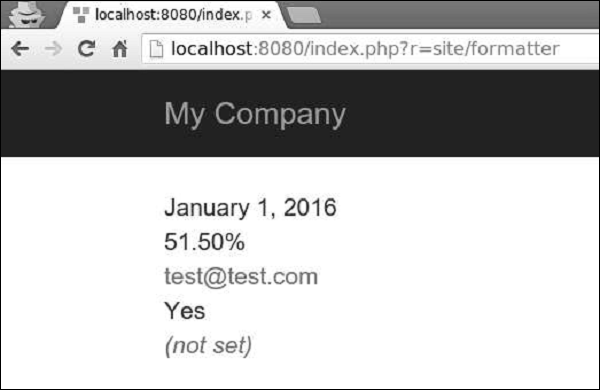
   // output: January 1, 2016
   echo $formatter->asDate('2016-01-01', 'long'),"<br>";
   // output: 51.50%
   echo $formatter->asPercent(0.515, 2),"<br>";
   // output: <a href = "mailto:test@test.com">test@test.com</a>
   echo $formatter->asEmail('test@test.com'),"<br>";
   // output: Yes
   echo $formatter->asBoolean(true),"<br>";
   // output: (Not set)
   echo $formatter->asDate(null),"<br>";
?>
Step 3 − Go to http://localhost:8080/index.php?r=site/formatter, you will see the following output.
The formatter component supports the following formats related with date and time −| Output format | Example |
|---|---|
| date | January 01, 2016 |
| time | 16:06 |
| datetime | January 01, 2016 16:06 |
| timestamp | 1512609983 |
| relativeTime | 1 hour ago |
| duration | 5 minutes |
<?php
   $formatter = \Yii::$app->formatter;
   echo $formatter->asDate(date('Y-m-d'), 'long'),"<br>";
   echo $formatter->asTime(date("Y-m-d")),"<br>";
   echo $formatter->asDatetime(date("Y-m-d")),"<br>";

   echo $formatter->asTimestamp(date("Y-m-d")),"<br>";
   echo $formatter->asRelativeTime(date("Y-m-d")),"<br>";
?>
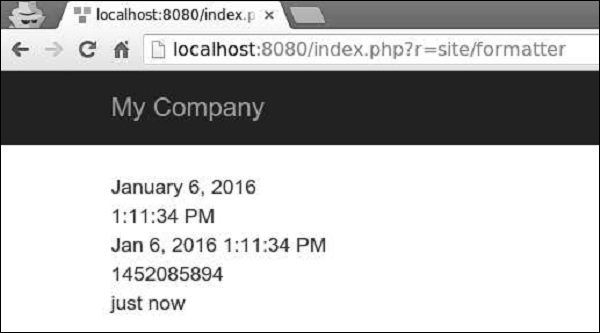
Step 5 − Type http://localhost:8080/index.php?r=site/formatter in the address bar of your web browser, you will see the following output.
Date Formats
There are also four date format shortcuts: short, medium, long, and full.Step 1 − Modify the formatter view file this way.
<?php
   $formatter = \Yii::$app->formatter;
   echo $formatter->asDate(date('Y-m-d'), 'short'),"<br>";
   echo $formatter->asDate(date('Y-m-d'), 'medium'),"<br>";
   echo $formatter->asDate(date('Y-m-d'), 'long'),"<br>";
   echo $formatter->asDate(date('Y-m-d'), 'full'),"<br>";
?>
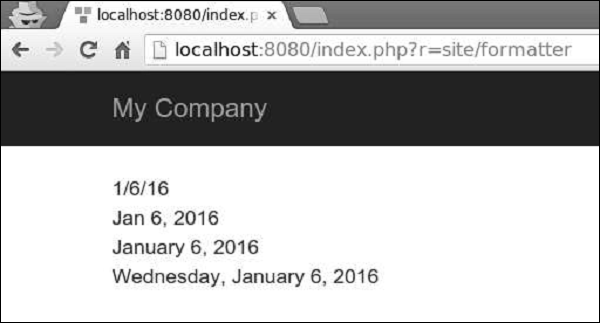
Step 2 − If you go to the web browser and type http://localhost:8080/index.php?r=site/formatter, you will see the following output.
Number Formats
The formatter component supports the following formats related with numbers −| Output format | Example |
|---|---|
| integer | 51 |
| decimal | 105.51 |
| percent | 51% |
| scientific | 1.050000E+2 |
| currency | $105 |
| size | 105 bytes |
| shortSize | 105 B |
<?php
   $formatter = \Yii::$app->formatter;
   echo Yii::$app->formatter->asInteger(105),"<br>";
   echo Yii::$app->formatter->asDecimal(105.41),"<br>";
   echo Yii::$app->formatter->asPercent(0.51),"<br>";
   echo Yii::$app->formatter->asScientific(105),"<br>";
   echo Yii::$app->formatter->asCurrency(105, "$"),"<br>";
   echo Yii::$app->formatter->asSize(105),"<br>";
   echo Yii::$app->formatter->asShortSize(105),"<br>";
?>
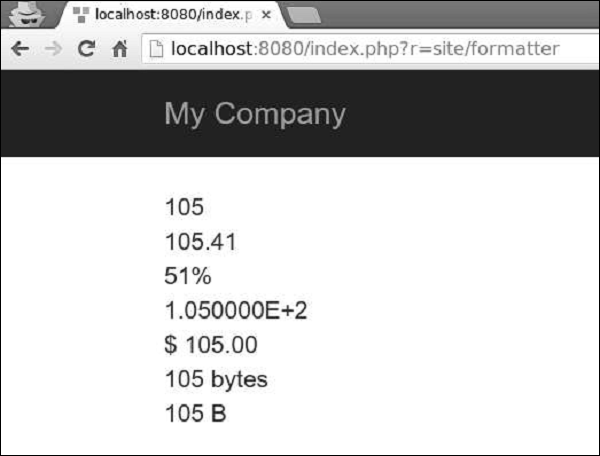
Step 2 − Go to http://localhost:8080/index.php?r=site/formatter, you will see the following output.
Other Formats
Yii also supports other formats −- text − The value is HTML-encoded.
- raw − The value is outputted as is.
- paragraphs − The value is formatted as HTML text paragraphs wrapped into the p tag.
- ntext − The value is formatted as an HTML plain text where newlines are converted into line breaks.
- html − The value is purified using HtmlPurifier to avoid XSS attacks.
- image − The value is formatted as an image tag.
- boolean − The value is formatted as a boolean.
- url − The value is formatted as a link.
- email − The value is formatted as a mailto-link.
The following example shows how to format date for different locales.
<?php
   Yii::$app->formatter->locale = 'ru-RU';
   echo Yii::$app->formatter->asDate('2016-01-01'); // output: 1 января 2016 г.
   Yii::$app->formatter->locale = 'de-DE';
   // output: 1. Januar 2016
   echo Yii::$app->formatter->asDate('2016-01-01');
   Yii::$app->formatter->locale = 'en-US';
   // output: January 1, 2016
   echo Yii::$app->formatter->asDate('2016-01-01');
?>


No comments:
Post a Comment