
A Web Socket server is a simple program, which has the ability to
handle Web Socket events and actions. It usually exposes similar methods
to the Web Socket client API and most programming languages provide an
implementation. The following diagram illustrates the communication
process between a Web Socket server and a Web Socket client, emphasizing
the triggered events and actions.
The following diagram shows a Web Socket server and client event triggering −
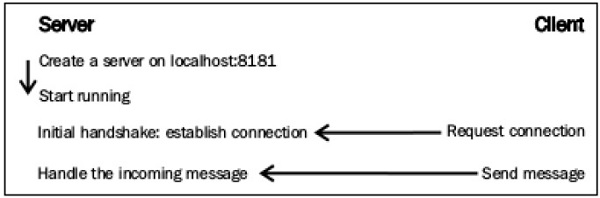
It is initialized to a Web Socket address. It handles OnOpen, OnClose, and OnMessage events, and sends messages to the clients too.
Fleck represents the incoming connections (clients) with the IwebSocketConnection interface. Whenever someone connects or disconnects from our service, empty list can be created or updated.
The process is simple. Note that this handler takes a string named message as a parameter −
The working of OnMessage event is as follows −
The following diagram shows a Web Socket server and client event triggering −
Connecting to the Web Server
The Web Socket server works in a similar way to the Web Socket clients. It responds to events and performs actions when necessary. Regardless of the programming language used, every Web Socket server performs some specific actions.It is initialized to a Web Socket address. It handles OnOpen, OnClose, and OnMessage events, and sends messages to the clients too.
Creating a Web Socket Server Instance
Every Web Socket server needs a valid host and port. An example of creating a Web Socket instance in server is as follows −var server = new WebSocketServer("ws://localhost:8181");
Any valid URL can be used with the specification of a port, which was
not used earlier. It is very useful to keep a record of the connected
clients, as it provides details with different data or send different
messages to each one.Fleck represents the incoming connections (clients) with the IwebSocketConnection interface. Whenever someone connects or disconnects from our service, empty list can be created or updated.
var clients = new List<IWebSocketConnection>();After that, we can call the Start method and wait for the clients to connect. After starting, the server is able to accept incoming connections. In Fleck, the Start method needs a parameter, which indicates the socket that raised the events −
server.Start(socket) =>
{
});
OnOpen Event
The OnOpen event determines that a new client has requested access and performs an initial handshake. The client should be added to the list and probably the information should be stored related to it, such as the IP address. Fleck provides us with such information, as well as a unique identifier for the connection.server.Start(socket) ⇒ { socket.OnOpen = () ⇒ { // Add the incoming connection to our list. clients.Add(socket); } // Handle the other events here... });
OnClose Event
The OnClose event is raised whenever a client is disconnected. The Client is removed from the list and informs the rest of clients about the disconnection.socket.OnClose = () ⇒ { // Remove the disconnected client from the list. clients.Remove(socket); };
OnMessage Event
The OnMessage event is raised when a client sends data to the server. Inside this event handler, the incoming message can be transmitted to the clients, or probably select only some of them.The process is simple. Note that this handler takes a string named message as a parameter −
socket.OnMessage = () ⇒ {
   // Display the message on the console.
   Console.WriteLine(message);
};
Send () Method
The Send() method simply transmits the desired message to the specified client. Using Send(), text or binary data can be stored across the clients.The working of OnMessage event is as follows −
socket.OnMessage = () ⇒ {
   foreach (var client in clients) {
      // Send the message to everyone!
      // Also, send the client connection's unique identifier in order
      // to recognize who is who.
      client.Send(client.ConnectionInfo.Id + " says: " + message);
   }
};


No comments:
Post a Comment