
Once a connection has been established between the client and the
server, the open event is fired from Web Socket instance. It is called
as the initial handshake between client and server.
The event, which is raised once the connection is established, is called the onopen. Creating Web Socket connections is really simple. All you have to do is call the WebSocket constructor and pass in the URL of your server.
The following code is used to create a Web Socket connection −
onopen refers to the initial handshake between client and the server which has lead to the first deal and the web application is ready to transmit the data.
The following code snippet describes opening the connection of Web Socket protocol −
The demo of the Web Socket connection established is documented in the given URL − https://www.websocket.org/echo.html
A snapshot of the connection establishment and response to the user is shown below −
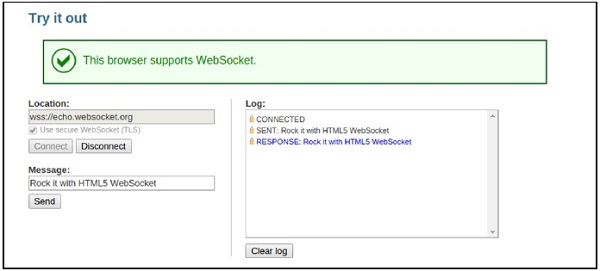 Establishing an open state allows full duplex communication and transfer of messages until the connection is terminated.
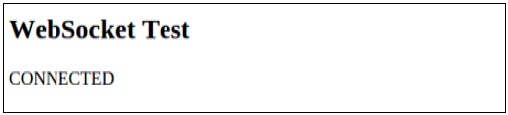 The above HTML5 and JavaScript file shows the implementation of two events of Web Socket, namely −
The event, which is raised once the connection is established, is called the onopen. Creating Web Socket connections is really simple. All you have to do is call the WebSocket constructor and pass in the URL of your server.
The following code is used to create a Web Socket connection −
// Create a new WebSocket.
var socket = new WebSocket('ws://echo.websocket.org');
Once the connection has been established, the open event will be fired on your Web Socket instance.
onopen refers to the initial handshake between client and the server which has lead to the first deal and the web application is ready to transmit the data.
The following code snippet describes opening the connection of Web Socket protocol −
socket.onopen = function(event) {
   console.log(“Connection established”);
   // Display user friendly messages for the successful establishment of connection
   var.label = document.getElementById(“status”);
   label.innerHTML = ”Connection established”;
}
It is a good practice to provide appropriate feedback to the users waiting for the Web Socket connection to be established. However, it is always noted that Web Socket connections are comparatively fast.
The demo of the Web Socket connection established is documented in the given URL − https://www.websocket.org/echo.html
A snapshot of the connection establishment and response to the user is shown below −
Establishing an open state allows full duplex communication and transfer of messages until the connection is terminated.Example
Building up the client-HTML5 file.<!DOCTYPE html> <html> <meta charset = "utf-8" /> <title>WebSocket Test</title> <script language = "javascript" type = "text/javascript"> var wsUri = "ws://echo.websocket.org/"; var output; function init() { output = document.getElementById("output"); testWebSocket(); } function testWebSocket() { websocket = new WebSocket(wsUri); websocket.onopen = function(evt) { onOpen(evt) }; } function onOpen(evt) { writeToScreen("CONNECTED"); } window.addEventListener("load", init, false); </script> <h2>WebSocket Test</h2> <div id = "output"></div> </html>The output will be as follows −
The above HTML5 and JavaScript file shows the implementation of two events of Web Socket, namely −- onLoad which helps in creation of JavaScript object and initialization of connection.
- onOpen establishes connection with the server and also sends the status.


No comments:
Post a Comment