Ajax: A Brief Introduction
- AJAX stands for Asynchronous JavaScript And Xml.
- Ajax is a technique to use HTTPXMLObject of JavaScript to send data to server and receive data from server asynchronously.
- So using Ajax technique, javascript code exchanges data with server, updates parts of web page without reloading the whole page.
JSF provides execellent support for making ajax call. It provides f:ajax tag to handle ajax calls.
JSF Tag
<f:ajax execute="input-component-name" render="output-component-name" />
Tag Attributes
| S.N. | Attribute & Description |
|---|
| 1 | disabledIf true, the Ajax behavior will be applied to any parent or child components. If false, the Ajax behavior will be disabled. |
| 2 | eventThe event that will invoke Ajax requests, for example "click", "change", "blur", "keypress", etc. |
| 3 | executeA space-separated List of IDs for components that should be included in the Ajax request. |
| 4 | immediateIf "true" behavior events generated
from this behavior are broadcast during Apply Request Values phase.
Otherwise, the events will be broadcast during Invoke Applications phase |
| 5 | listenerAn EL expression for a method in a backing bean to be called during the Ajax request. |
| 6 | onerrorThe name of a JavaScript callback function that will be invoked if there is an error during the Ajax request |
| 7 | oneventThe name of a JavaScript callback function that will be invoked to handle UI events. |
| 8 | renderA space-separated list of IDs for components that will be updated after an Ajax request. |
Example Application
Let us create a test JSF application to test the custom component in JSF.
| Step | Description |
|---|
| 1 | Create a project with a name helloworld under a package com.tutorialspoint.test as explained in the JSF - First Application chapter. |
| 2 | Modify UserData.java file as explained below. |
| 3 | Modify home.xhtml as explained below. Keep rest of the files unchanged. |
| 4 | Compile and run the application to make sure business logic is working as per the requirements. |
| 5 | Finally, build the application in the form of war file and deploy it in Apache Tomcat Webserver. |
| 6 | Launch your web application using appropriate URL as explained below in the last step. |
UserData.java
package com.tutorialspoint.test;

import java.io.Serializable;

import javax.faces.bean.ManagedBean;
import javax.faces.bean.SessionScoped;

@ManagedBean(name = "userData", eager = true)
@SessionScoped
public class UserData implements Serializable {

   private static final long serialVersionUID = 1L;

   private String name;
   public String getName() {
      return name;
   }
   public void setName(String name) {
      this.name = name;
   }

   public String getWelcomeMessage(){
      return "Hello " + name;
   }
}
home.xhtml
<?xml version="1.0" encoding="UTF-8"?>
<!DOCTYPE html PUBLIC "-//W3C//DTD XHTML 1.0 Transitional//EN"
"http://www.w3.org/TR/xhtml1/DTD/xhtml1-transitional.dtd">
<html xmlns="http://www.w3.org/1999/xhtml"
   xmlns:h="http://java.sun.com/jsf/html"
   xmlns:f="http://java.sun.com/jsf/core"
   xmlns:tp="http://java.sun.com/jsf/composite/tutorialspoint">
   <h:head>
      <title>JSF tutorial</title>
   </h:head>
   <h:body>
      <h2>Ajax Example</h2>
      <h:form>
      <h:inputText id="inputName" value="#{userData.name}"></h:inputText>
       <h:commandButton value="Show Message">
         <f:ajax execute="inputName" render="outputMessage" />
      </h:commandButton>
      <h2><h:outputText id="outputMessage"
         value="#{userData.welcomeMessage !=null ?
            userData.welcomeMessage : ''}"
         /></h2>
      </h:form>
   </h:body>
</html>
Once you are ready with all the changes done, let us compile and run
the application as we did in JSF - First Application chapter. If
everything is fine with your application, this will produce following
result:
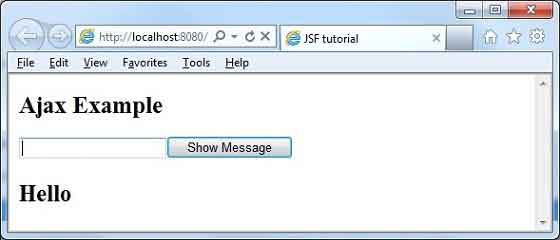
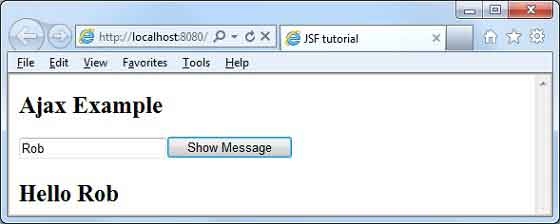
Enter name and press
Show Message button. You will see the following result without page refresh/form submit.


No comments:
Post a Comment