
The following program code describes the working of a chat application using JavaScript and Web Socket protocol.
To test, open the two windows with Web Socket support, type a message above and press return. This would enable the feature of chat application.
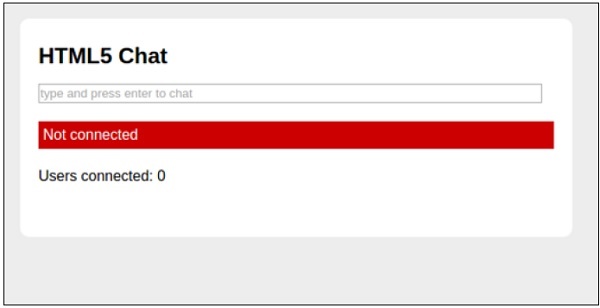
If the connection is not established, the output is available as shown below.
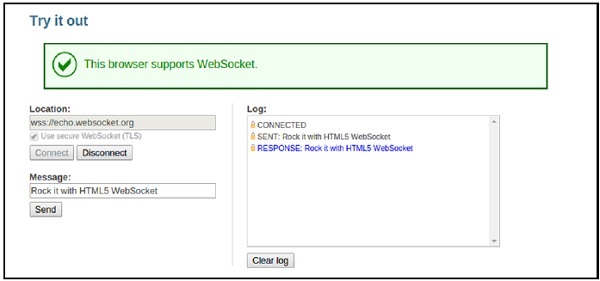
 The output of a successful chat communication is shown below.
<!DOCTYPE html>
<html lang = "en">

   <head>
      <meta charset = utf-8>
      <title>HTML5 Chat</title>

      <body>

         <section id = "wrapper">

            <header>
               <h1>HTML5 Chat</h1>
            </header>

            <style>
               #chat { width: 97%; }
               .message { font-weight: bold; }
               .message:before { content: ' '; color: #bbb; font-size: 14px; }

               #log {
                  overflow: auto;
                  max-height: 300px;
                  list-style: none;
                  padding: 0;
               }

               #log li {
                  border-top: 1px solid #ccc;
                  margin: 0;
                  padding: 10px 0;
               }

               body {
                  font: normal 16px/20px "Helvetica Neue", Helvetica, sans-serif;
                  background: rgb(237, 237, 236);
                  margin: 0;
                  margin-top: 40px;
                  padding: 0;
               }

               section, header {
                  display: block;
               }

               #wrapper {
                  width: 600px;
                  margin: 0 auto;
                  background: #fff;
                  border-radius: 10px;
                  border-top: 1px solid #fff;
                  padding-bottom: 16px;
               }

               h1 {
                  padding-top: 10px;
               }

               h2 {
                  font-size: 100%;
                  font-style: italic;
               }

               header, article > * {
                  margin: 20px;
               }

               #status {
                  padding: 5px;
                  color: #fff;
                  background: #ccc;
               }

               #status.fail {
                  background: #c00;
               }

               #status.success {
                  background: #0c0;
               }

               #status.offline {
                  background: #c00;
               }

               #status.online {
                  background: #0c0;
               }

               #html5badge {
                  margin-left: -30px;
                  border: 0;
               }

               #html5badge img {
                  border: 0;
               }
            </style>

            <article>

               <form onsubmit = "addMessage(); return false;">
                  <input type = "text" id = "chat" placeholder = "type and press
                  enter to chat" />
               </form>

               <p id = "status">Not connected</p>
               <p>Users connected: <span id = "connected">0
                  </span></p>
               <ul id = "log"></ul>

            </article>

            <script>
               connected = document.getElementById("connected");
               log = document.getElementById("log");
               chat = document.getElementById("chat");
               form = chat.form;
               state = document.getElementById("status");

               if (window.WebSocket === undefined) {
                  state.innerHTML = "sockets not supported";
                  state.className = "fail";
               }else {
                  if (typeof String.prototype.startsWith != "function") {
                     String.prototype.startsWith = function (str) {
                        return this.indexOf(str) == 0;
                     };
                  }

                  window.addEventListener("load", onLoad, false);
               }

               function onLoad() {
                  var wsUri = "ws://127.0.0.1:7777";
                  websocket = new WebSocket(wsUri);
                  websocket.onopen = function(evt) { onOpen(evt) };
                  websocket.onclose = function(evt) { onClose(evt) };
                  websocket.onmessage = function(evt) { onMessage(evt) };
                  websocket.onerror = function(evt) { onError(evt) };
               }

               function onOpen(evt) {
                  state.className = "success";
                  state.innerHTML = "Connected to server";
               }

               function onClose(evt) {
                  state.className = "fail";
                  state.innerHTML = "Not connected";
                  connected.innerHTML = "0";
               }

               function onMessage(evt) {
                  // There are two types of messages:
                  // 1. a chat participant message itself
                  // 2. a message with a number of connected chat participants
                  var message = evt.data;

                  if (message.startsWith("log:")) {
                     message = message.slice("log:".length);
                     log.innerHTML = '<li class = "message">' +
                        message + "</li>" + log.innerHTML;
                  }else if (message.startsWith("connected:")) {
                     message = message.slice("connected:".length);
                     connected.innerHTML = message;
                  }
               }

               function onError(evt) {
                  state.className = "fail";
                  state.innerHTML = "Communication error";
               }

               function addMessage() {
                  var message = chat.value;
                  chat.value = "";
                  websocket.send(message);
               }

            </script>

         </section>

      </body>

   </head>

</html>
The key features and the output of the chat application are discussed below −
To test, open the two windows with Web Socket support, type a message above and press return. This would enable the feature of chat application.
If the connection is not established, the output is available as shown below.
The output of a successful chat communication is shown below.

No comments:
Post a Comment