
The following example show how to intigrate LOG4J using Spring Web MVC framework. To start with it, let us have working Eclipse IDE in place and follow the following steps to develop a Dynamic Form based Web Application using Spring Web Framework:
HelloController.java
Once you are done with creating source and configuration files, export your application. Right click on your application and use Export > WAR File option and save your TestWeb.war file in Tomcat's webapps folder.
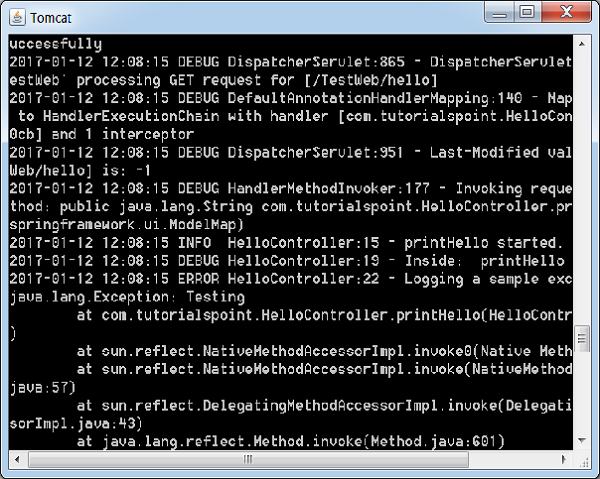
Now start your Tomcat server and make sure you are able to access other web pages from webapps folder using a standard browser. Now try a URL http://localhost:8080/TestWeb/hello and you should see the following result on Tomcat's log.
| Step | Description |
|---|---|
| 1 | Create a project with a name TestWeb under a package com.tutorialspoint as explained in the Spring MVC - Hello World Example chapter. |
| 2 | Create a Java classes HelloController under the com.tutorialspoint package. |
| 3 | Download log4j library LOG4J from maven repository page. Put it in your CLASSPATH. |
| 4 | Create a log4j.properties under the src folder. |
| 5 | The final step is to create the content of all the source and configuration files and export the application as explained below. |
package com.tutorialspoint;

import org.apache.log4j.Logger;
import org.springframework.stereotype.Controller;
import org.springframework.web.bind.annotation.RequestMapping;
import org.springframework.web.bind.annotation.RequestMethod;
import org.springframework.ui.ModelMap;

@Controller
@RequestMapping("/hello")
public class HelloController{
   private static final Logger LOGGER = Logger.getLogger(HelloController.class);
   @RequestMapping(method = RequestMethod.GET)
   public String printHello(ModelMap model) {
      LOGGER.info("printHello started.");

      //logs debug message
      if(LOGGER.isDebugEnabled()){
         LOGGER.debug("Inside:  printHello");
      }
      //logs exception
      LOGGER.error("Logging a sample exception", new Exception("Testing"));

      model.addAttribute("message", "Hello Spring MVC Framework!");
      LOGGER.info("printHello ended.");
      return "hello";
   }
}
log4j.properties
# Root logger option
log4j.rootLogger=DEBUG, stdout, file

# Redirect log messages to console
log4j.appender.stdout=org.apache.log4j.ConsoleAppender
log4j.appender.stdout.Target=System.out
log4j.appender.stdout.layout=org.apache.log4j.PatternLayout
log4j.appender.stdout.layout.ConversionPattern=%d{yyyy-MM-dd HH:mm:ss} %-5p %c{1}:%L - %m%n

# Redirect log messages to a log file
log4j.appender.file=org.apache.log4j.RollingFileAppender
#outputs to Tomcat home
log4j.appender.file.File=${catalina.home}/logs/myapp.log
log4j.appender.file.MaxFileSize=5MB
log4j.appender.file.MaxBackupIndex=10
log4j.appender.file.layout=org.apache.log4j.PatternLayout
log4j.appender.file.layout.ConversionPattern=%d{yyyy-MM-dd HH:mm:ss} %-5p %c{1}:%L - %m%n
TestWeb-servlet.xml
<beans xmlns="http://www.springframework.org/schema/beans"
   xmlns:context="http://www.springframework.org/schema/context"
   xmlns:xsi="http://www.w3.org/2001/XMLSchema-instance"
   xmlns:mvc="http://www.springframework.org/schema/mvc"
   xsi:schemaLocation="
   http://www.springframework.org/schema/beans
   http://www.springframework.org/schema/beans/spring-beans-3.0.xsd
   http://www.springframework.org/schema/context
   http://www.springframework.org/schema/context/spring-context-3.0.xsd
   http://www.springframework.org/schema/mvc
   http://www.springframework.org/schema/mvc/spring-mvc-3.0.xsd">
   <context:component-scan base-package="com.tutorialspoint" />

   <bean class="org.springframework.web.servlet.view.InternalResourceViewResolver">
      <property name="prefix" value="/WEB-INF/jsp/" />
      <property name="suffix" value=".jsp" />
   </bean>
</beans>
hello.jsp
<%@ page contentType="text/html; charset=UTF-8" %>
<html>
<head>
<title>Hello World</title>
</head>
<body>
   <h2>${message}</h2>
</body>
</html>
Here we've configured log4j to log details on tomcat console and in file present in &t; tomcat home > logs as myapp.log.
Once you are done with creating source and configuration files, export your application. Right click on your application and use Export > WAR File option and save your TestWeb.war file in Tomcat's webapps folder.
Now start your Tomcat server and make sure you are able to access other web pages from webapps folder using a standard browser. Now try a URL http://localhost:8080/TestWeb/hello and you should see the following result on Tomcat's log.


No comments:
Post a Comment