
The following example show how to generate PDF using Spring Web MVC framework. To start with it, let us have working Eclipse IDE in place and follow the following steps to develop a Dynamic Form based Web Application using Spring Web Framework:
PDFController.java
Once you are done with creating source and configuration files, export your application. Right click on your application and use Export > WAR File option and save your TestWeb.war file in Tomcat's webapps folder.
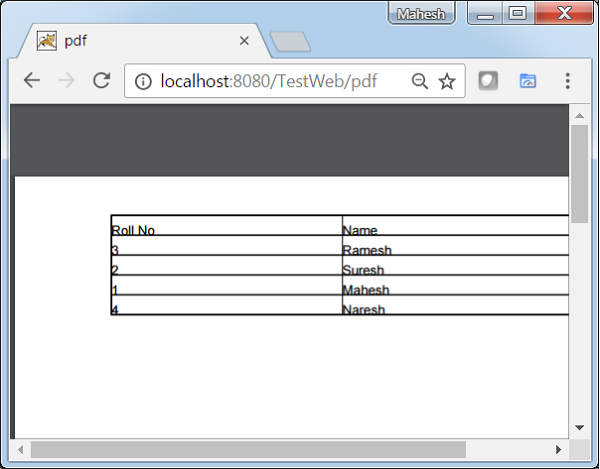
Now start your Tomcat server and make sure you are able to access other web pages from webapps folder using a standard browser. Now try a URL http://localhost:8080/TestWeb/pdf and you should see the following result.
| Step | Description |
|---|---|
| 1 | Create a project with a name TestWeb under a package com.tutorialspoint as explained in the Spring MVC - Hello World Example chapter. |
| 2 | Create a Java classes UserPDFView, PDFController under the com.tutorialspoint package. |
| 3 | Download iText library iText from maven repository page. Put it in your CLASSPATH. |
| 4 | The final step is to create the content of all the source and configuration files and export the application as explained below. |
package com.tutorialspoint;

import java.util.HashMap;
import java.util.Map;

import javax.servlet.http.HttpServletRequest;
import javax.servlet.http.HttpServletResponse;

import org.springframework.web.servlet.ModelAndView;
import org.springframework.web.servlet.mvc.AbstractController;

public class PDFController extends AbstractController {

   @Override
   protected ModelAndView handleRequestInternal(HttpServletRequest request,
      HttpServletResponse response) throws Exception {
      //user data
      Map<String,String> userData = new HashMap<String,String>();
      userData.put("1", "Mahesh");
      userData.put("2", "Suresh");
      userData.put("3", "Ramesh");
      userData.put("4", "Naresh");
      return new ModelAndView("UserSummary","userData",userData);
   }
}
UserExcelView.java
package com.tutorialspoint;

import java.util.Map;

import javax.servlet.http.HttpServletRequest;
import javax.servlet.http.HttpServletResponse;

import org.springframework.web.servlet.view.document.AbstractPdfView;

import com.lowagie.text.Document;
import com.lowagie.text.Table;
import com.lowagie.text.pdf.PdfWriter;

public class UserPDFView extends AbstractPdfView {

   protected void buildPdfDocument(Map<String, Object> model, Document document,
      PdfWriter pdfWriter, HttpServletRequest request, HttpServletResponse response)
      throws Exception {
      Map<String,String> userData = (Map<String,String>) model.get("userData");

      Table table = new Table(2);
      table.addCell("Roll No");
      table.addCell("Name");

      for (Map.Entry<String, String> entry : userData.entrySet()) {
         table.addCell(entry.getKey());
         table.addCell(entry.getValue());
      }
      document.add(table);
   }
}
TestWeb-servlet.xml
<beans xmlns="http://www.springframework.org/schema/beans"
   xmlns:context="http://www.springframework.org/schema/context"
   xmlns:xsi="http://www.w3.org/2001/XMLSchema-instance"
   xmlns:mvc="http://www.springframework.org/schema/mvc"
   xsi:schemaLocation="
   http://www.springframework.org/schema/beans
   http://www.springframework.org/schema/beans/spring-beans-3.0.xsd
   http://www.springframework.org/schema/context
   http://www.springframework.org/schema/context/spring-context-3.0.xsd
   http://www.springframework.org/schema/mvc
   http://www.springframework.org/schema/mvc/spring-mvc-3.0.xsd">
   <bean
      class="org.springframework.web.servlet.mvc.support.ControllerClassNameHandlerMapping" />

   <bean class="com.tutorialspoint.PDFController" />

   <bean class="org.springframework.web.servlet.view.XmlViewResolver">
      <property name="location">
         <value>/WEB-INF/views.xml</value>
      </property>
   </bean>
</beans>
views.xml
<beans xmlns="http://www.springframework.org/schema/beans"
   xmlns:context="http://www.springframework.org/schema/context"
   xmlns:xsi="http://www.w3.org/2001/XMLSchema-instance"
   xsi:schemaLocation="
   http://www.springframework.org/schema/beans
   http://www.springframework.org/schema/beans/spring-beans-3.0.xsd
   http://www.springframework.org/schema/context
   http://www.springframework.org/schema/context/spring-context-3.0.xsd">

   <bean id="UserSummary" class="com.tutorialspoint.UserPDFView"></bean>
</beans>
Here we've created a PDFController and UserPDFView. iText library deals with PDF file formats and will convert the data to a PDF document.
Once you are done with creating source and configuration files, export your application. Right click on your application and use Export > WAR File option and save your TestWeb.war file in Tomcat's webapps folder.
Now start your Tomcat server and make sure you are able to access other web pages from webapps folder using a standard browser. Now try a URL http://localhost:8080/TestWeb/pdf and you should see the following result.


No comments:
Post a Comment