
Given below is the program to extract content and metadata from a Microsoft Office Document.
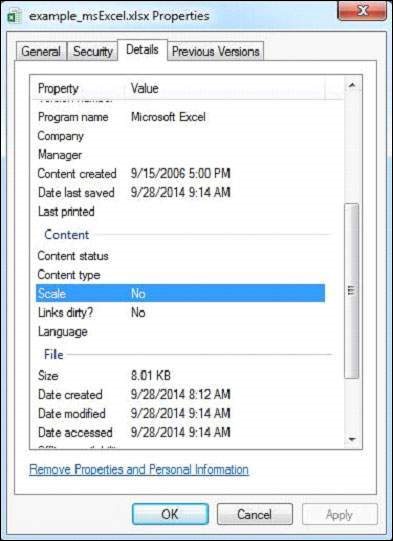
 The given Excel file has the following properties:
 After executing the above program you will get the following output.
Output:
import java.io.File;
import java.io.FileInputStream;
import java.io.IOException;

import org.apache.tika.exception.TikaException;
import org.apache.tika.metadata.Metadata;
import org.apache.tika.parser.ParseContext;
import org.apache.tika.parser.microsoft.ooxml.OOXMLParser;
import org.apache.tika.sax.BodyContentHandler;

import org.xml.sax.SAXException;

public class MSExcelParse {

   public static void main(final String[] args) throws IOException, TikaException {

      //detecting the file type
      BodyContentHandler handler = new BodyContentHandler();
      Metadata metadata = new Metadata();
      FileInputStream inputstream = new FileInputStream(new File("example_msExcel.xlsx"));
      ParseContext pcontext = new ParseContext();

      //OOXml parser
      OOXMLParser  msofficeparser = new OOXMLParser ();
      msofficeparser.parse(inputstream, handler, metadata,pcontext);
      System.out.println("Contents of the document:" + handler.toString());
      System.out.println("Metadata of the document:");
      String[] metadataNames = metadata.names();

      for(String name : metadataNames) {
         System.out.println(name + ": " + metadata.get(name));
      }
   }
}
Save the above code as MSExelParse.java, and compile it from the command prompt by using the following commands:
javac MSExcelParse.java
java MSExcelParse
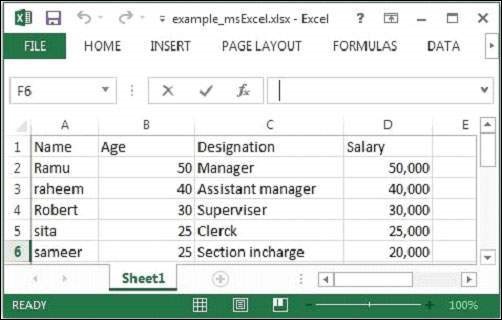
Below given is the snapshot of example_msExcel.xlsx file
The given Excel file has the following properties:
After executing the above program you will get the following output.Output:
Contents of the document:
Sheet1
Name Age Designation  Salary
Ramu 50 Manager   50,000
Raheem 40 Assistant manager 40,000
Robert 30 Superviser  30,000
sita 25 Clerk   25,000
sameer 25 Section in-charge 20,000

Metadata of the document:
meta:creation-date:    2006-09-16T00:00:00Z
dcterms:modified:    2014-09-28T15:18:41Z
meta:save-date:    2014-09-28T15:18:41Z
Application-Name:    Microsoft Excel
extended-properties:Company:
dcterms:created:    2006-09-16T00:00:00Z
Last-Modified:    2014-09-28T15:18:41Z
Application-Version:    15.0300
date:    2014-09-28T15:18:41Z
publisher:
modified:    2014-09-28T15:18:41Z
Creation-Date:    2006-09-16T00:00:00Z
extended-properties:AppVersion:    15.0300
protected:    false
dc:publisher:
extended-properties:Application:    Microsoft Excel
Content-Type:    application/vnd.openxmlformats-officedocument.spreadsheetml.sheet
Last-Save-Date:    2014-09-28T15:18:41Z


No comments:
Post a Comment