This chapter takes you through the process of setting up Apache Tika
on Windows and Linux. User administration is needed while installing the
Apache Tika.
System Requirements
| JDK |
Java SE 2 JDK 1.6 or above |
| Memory |
1 GB RAM (recommeneded) |
| Disk Space |
No minimum requirement |
| Operating System Version |
Windows XP or above, Linux |
Step 1: Verifying Java Installation
To verify Java installation, open the console and execute the following java command.
| OS |
Task |
Command |
| Windows |
Open command console |
\>java –version |
| Linux |
Open command terminal |
$java –version |
If Java has been installed properly on your system, then you should
get one of the following outputs, depending on the platform you are
working on.
| OS |
Output |
| Windows |
Java version "1.7.0_60"
Java (TM) SE Run Time Environment (build 1.7.0_60-b19)
Java Hotspot (TM) 64-bit Server VM (build 24.60-b09, mixed mode) |
| Lunix |
java version "1.7.0_25"
Open JDK Runtime Environment (rhel-2.3.10.4.el6_4-x86_64)
Open JDK 64-Bit Server VM (build 23.7-b01, mixed mode) |
Step 2: Setting Java Environment
Set the JAVA_HOME environment variable to point to the base directory
location where Java is installed on your machine. For example,
| OS |
Output |
| Windows |
Set Environmental variable JAVA_HOME to C:\ProgramFiles\java\jdk1.7.0_60 |
| Linux |
export JAVA_HOME=/usr/local/java-current |
Append the full path of the Java compiler location to the System Path.
| OS |
Output |
| Windows |
Append the String; C:\Program Files\Java\jdk1.7.0_60\bin to the end of the system variable PATH. |
| Linux |
export PATH=$PATH:$JAVA_HOME/bin/ |
Verify the command java-version from command prompt as explained above.
Step 3: Setting up Apache Tika Environment
Programmers can integrate Apache Tika in their environment by using
- Command line,
- Tika API,
- Command line interface (CLI) of Tika,
- Graphical User interface (GUI) of Tika, or
- the source code.
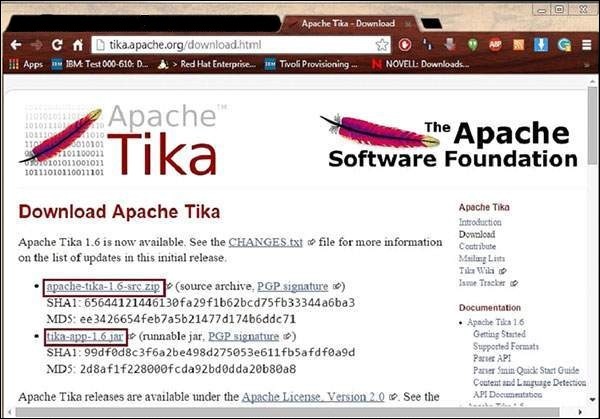
For any of these approaches, first of all, you have to download the source code of Tika.
You will find the source code of Tika at
http://Tika.apache.org/download.html, where you will find two links:
apache-tika-1.6-src.zip: It contains the source code of Tika, and
Tika -app-1.6.jar: It is a jar file that contains the Tika application.
Download these two files. A snapshot of the official website of Tika is shown below.
After downloading the files, set the classpath for the jar file
tika-app-1.6.jar. Add the complete path of the jar file as shown in the table below.
| OS |
Output |
| Windows |
Append the String “C:\jars\Tika-app-1.6.jar” to the user environment variable CLASSPATH |
| Linux |
Export CLASSPATH=$CLASSPATH:
/usr/share/jars/Tika-app-1.6.tar: |
Apache provides Tika application, a Graphical User Interface (GUI) application using Eclipse.
Tika-Maven Build using Eclipse
- Open eclipse and create a new project.
- If you do not having Maven in your Eclipse, set it up by following the given steps.
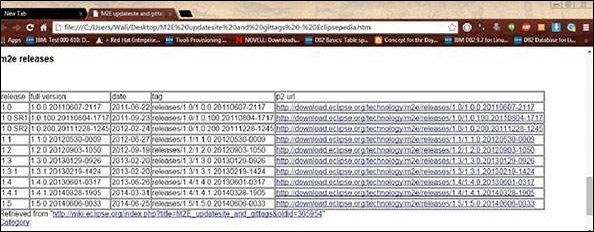
- Pick the latest version and save the path of the url in p2 url column.
- Now revisit eclipse, in the menu bar, click Help, and choose Install New Software from the dropdown menu
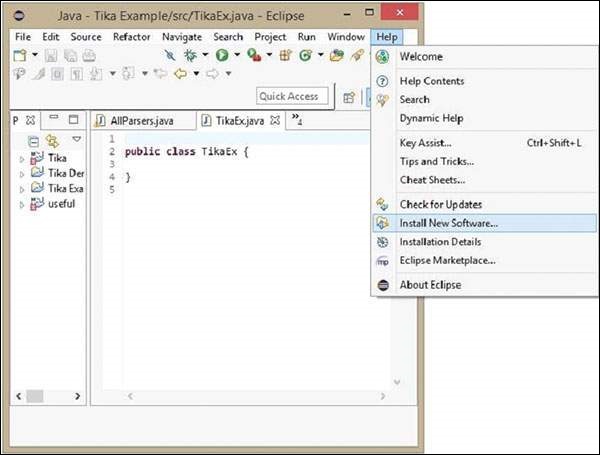
- Click the Add button, type any desired name, as it is optional. Now paste the saved url in the Location field.
- A new plugin will be added with the name you have chosen in the previous step, check the checkbox in front of it, and click Next.
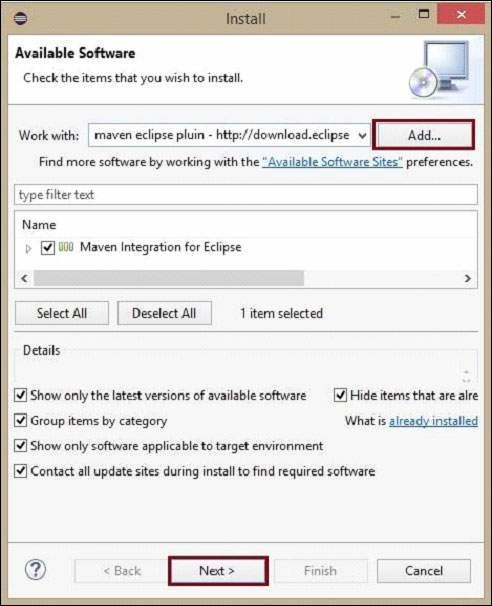
- Proceed with the installation. Once completed, restart the Eclipse.
- Now right click on the project, and in the configure option, select convert to maven project.
- A new wizard for creating a new pom appears. Enter the Group Id
as org.apache.tika, enter the latest version of Tika, select the packaging as jar, and click Finish.
The Maven project is successfully installed, and your project is
converted into Maven. Now you have to configure the pom.xml file.
Configure the XML File
Get the Tika maven dependency from
http://mvnrepository.com/artifact/org.apache.tika
Shown below is the complete Maven dependency of Apache Tika.
<dependency>
   <groupId>org.apache.Tika</groupId>
   <artifactId>Tika-core</artifactId>
   <version>1.6</version>

   <groupId>org.apache.Tika</groupId>
   <artifactId> Tika-parsers</artifactId>
   <version> 1.6</version>

   <groupId> org.apache.Tika</groupId>
   <artifactId>Tika</artifactId>
   <version>1.6</version>

   <groupId>org.apache.Tika</groupId>
   < artifactId>Tika-serialization</artifactId>
   < version>1.6< /version>

   < groupId>org.apache.Tika< /groupId>
   < artifactId>Tika-app< /artifactId>
   < version>1.6< /version>

   <groupId>org.apache.Tika</groupId>
   <artifactId>Tika-bundle</artifactId>
   <version>1.6</version>
</dependency>


No comments:
Post a Comment