
Besides content, Tika also extracts the metadata from a file.
Metadata is nothing but the additional information supplied with a file.
If we consider an audio file, the artist name, album name, title comes
under metadata.
 It gives the following output −
XMP Standards
The Extensible Metadata Platform (XMP) is a standard for processing and storing information related to the content of a file. It was created by Adobe Systems Inc. XMP provides standards for defining, creating, and processing of metadata. You can embed this standard into several file formats such as PDF, JPEG, JPEG, GIF, jpg, HTML etc.Property Class
Tika uses the Property class to follow XMP property definition. It provides the PropertyType and ValueType enums to capture the name and value of a metadata.Metadata Class
This class implements various interfaces such as ClimateForcast, CativeCommons, Geographic, TIFF etc. to provide support for various metadata models. In addition, this class provides various methods to extract the content from a file.Metadata Names
We can extract the list of all metadata names of a file from its metadata object using the method names(). It returns all the names as a string array. Using the name of the metadata, we can get the value using the get() method. It takes a metadata name and returns a value associated with it.String[] metadaNames = metadata.names(); String value = metadata.get(name);
Extracting Metadata using Parse Method
Whenever we parse a file using parse(), we pass an empty metadata object as one of the parameters. This method extracts the metadata of the given file (if that file contains any), and places them in the metadata object. Therefore, after parsing the file using parse(), we can extract the metadata from that object.Parser parser = new AutoDetectParser(); BodyContentHandler handler = new BodyContentHandler(); Metadata metadata = new Metadata(); //empty metadata object FileInputStream inputstream = new FileInputStream(file); ParseContext context = new ParseContext(); parser.parse(inputstream, handler, metadata, context); // now this metadata object contains the extracted metadata of the given file. metadata.metadata.names();Given below is the complete program to extract metadata from a text file.
import java.io.File;
import java.io.FileInputStream;
import java.io.IOException;

import org.apache.tika.exception.TikaException;
import org.apache.tika.metadata.Metadata;
import org.apache.tika.parser.AutoDetectParser;
import org.apache.tika.parser.ParseContext;
import org.apache.tika.parser.Parser;
import org.apache.tika.sax.BodyContentHandler;

import org.xml.sax.SAXException;

public class GetMetadata {

   public static void main(final String[] args) throws IOException, TikaException {

      //Assume that boy.jpg is in your current directory
      File file = new File("boy.jpg");

      //Parser method parameters
      Parser parser = new AutoDetectParser();
      BodyContentHandler handler = new BodyContentHandler();
      Metadata metadata = new Metadata();
      FileInputStream inputstream = new FileInputStream(file);
      ParseContext context = new ParseContext();

      parser.parse(inputstream, handler, metadata, context);
      System.out.println(handler.toString());

      //getting the list of all meta data elements
      String[] metadataNames = metadata.names();

      for(String name : metadataNames) {
         System.out.println(name + ": " + metadata.get(name));
      }
   }
}
Save the above code as GetMetadata.java and run it from the command prompt using the following commands −
javac  GetMetadata .java
java  GetMetadata
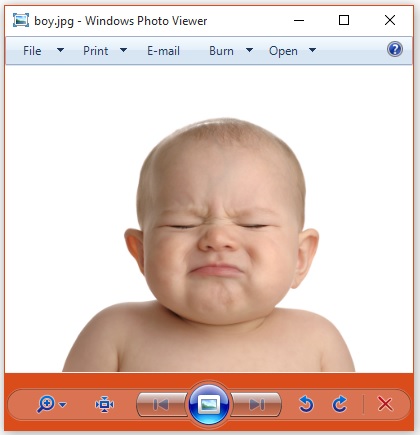
Note − Assume that the following image is boy.jpg
It gives the following output −X-Parsed-By: org.apache.tika.parser.DefaultParser Resolution Units: inch Compression Type: Baseline Data Precision: 8 bits Number of Components: 3 tiff:ImageLength: 3000 Component 2: Cb component: Quantization table 1, Sampling factors 1 horiz/1 vert Component 1: Y component: Quantization table 0, Sampling factors 2 horiz/2 vert Image Height: 3000 pixels X Resolution: 300 dots Original Transmission Reference: 53616c7465645f5f2368da84ca932841b336ac1a49edb1a93fae938b8db2cb3ec9cc4dc28d7383f1 Image Width: 4000 pixels IPTC-NAA record: 92 bytes binary data Component 3: Cr component: Quantization table 1, Sampling factors 1 horiz/1 vert tiff:BitsPerSample: 8 Application Record Version: 4 tiff:ImageWidth: 4000 Content-Type: image/jpeg Y Resolution: 300 dotsWe can also get our desired metadata values.
Adding New Metadata Values
We can add new metadata values using the add() method of the metadata class. Given below is the syntax of this method. Here we are adding the author name.metadata.add(“author”,”Tutorials point”);The Metadata class has predefined properties including the properties inherited from classes like ClimateForcast, CativeCommons, Geographic, etc., to support various data models. Shown below is the usage of the SOFTWARE data type inherited from the TIFF interface implemented by Tika to follow XMP metadata standards for TIFF image formats.
metadata.add(Metadata.SOFTWARE,"ms paint");Given below is the complete program that demonstrates how to add metadata values to a given file. Here the list of the metadata elements is displayed in the output so that you can observe the change in the list after adding new values.
import java.io.File;
import java.io.FileInputStream;
import java.io.IOException;
import java.util.Arrays;

import org.apache.tika.exception.TikaException;
import org.apache.tika.metadata.Metadata;
import org.apache.tika.parser.AutoDetectParser;
import org.apache.tika.parser.ParseContext;
import org.apache.tika.parser.Parser;
import org.apache.tika.sax.BodyContentHandler;

import org.xml.sax.SAXException;

public class AddMetadata {

   public static void main(final String[] args) throws IOException, SAXException, TikaException {

      //create a file object and assume sample.txt is in your current directory
      File file = new File("Example.txt");

      //Parser method parameters
      Parser parser = new AutoDetectParser();
      BodyContentHandler handler = new BodyContentHandler();
      Metadata metadata = new Metadata();
      FileInputStream inputstream = new FileInputStream(file);
      ParseContext context = new ParseContext();

      //parsing the document
      parser.parse(inputstream, handler, metadata, context);

      //list of meta data elements before adding new elements
      System.out.println( " metadata elements :"  +Arrays.toString(metadata.names()));

      //adding new meta data name value pair
      metadata.add("Author","Tutorials Point");
      System.out.println(" metadata name value pair is successfully added");

      //printing all the meta data elements after adding new elements
      System.out.println("Here is the list of all the metadata elements  after adding new elements ");
      System.out.println( Arrays.toString(metadata.names()));
   }
}
Save the above code as AddMetadata.java class and run it from the command prompt −
javac  AddMetadata .java
java  AddMetadata
Assume that Example.txt is having the following content −
Hi students welcome to tutorialspointIt gives the following output −
metadata elements of the given file :[Content-Encoding, Content-Type]

metadata name value pair is successfully added
Here is the list of all the metadata elements  after adding new elements
[Content-Encoding, Author, Content-Type]
Setting Values to Existing Metadata Elements
You can set values to the existing metadata elements using the set() method. The syntax of setting the date property using the set() method is as follows −metadata.set(Metadata.DATE, new Date());You can also set multiple values to the properties using the set() method. The syntax of setting multiple values to the Author property using the set() method is as follows −
metadata.set(Metadata.AUTHOR, "ram ,raheem ,robin ");Given below is the complete program demonstrating the set() method.
import java.io.File;
import java.io.FileInputStream;
import java.io.IOException;

import java.util.Date;

import org.apache.tika.exception.TikaException;
import org.apache.tika.metadata.Metadata;
import org.apache.tika.parser.AutoDetectParser;
import org.apache.tika.parser.ParseContext;
import org.apache.tika.parser.Parser;
import org.apache.tika.sax.BodyContentHandler;

import org.xml.sax.SAXException;

public class SetMetadata {

   public static void main(final String[] args) throws IOException,SAXException, TikaException {

      //Create a file object and assume example.txt is in your current directory
      File file = new File("example.txt");

      //parameters of parse() method
      Parser parser = new AutoDetectParser();
      BodyContentHandler handler = new BodyContentHandler();
      Metadata metadata = new Metadata();
      FileInputStream inputstream = new FileInputStream(file);
      ParseContext context = new ParseContext();

      //Parsing the given file
      parser.parse(inputstream, handler, metadata, context);

      //list of meta data elements elements
      System.out.println( " metadata elements and values of the given file :");
      String[] metadataNamesb4 = metadata.names();

      for(String name : metadataNamesb4) {
       System.out.println(name + ": " + metadata.get(name));
      }

      //setting date meta data
      metadata.set(Metadata.DATE, new Date());

      //setting multiple values to author property
      metadata.set(Metadata.AUTHOR, "ram ,raheem ,robin ");

      //printing all the meta data elements with new elements
      System.out.println("List of all the metadata elements  after adding new elements ");
      String[] metadataNamesafter = metadata.names();

      for(String name : metadataNamesafter) {
         System.out.println(name + ": " + metadata.get(name));
      }
   }
}
Save the above code as SetMetadata.java and run it from the command prompt −
javac  SetMetadata.java
java  SetMetadata
Note − Assume that sample.txt is having the following content:
Hi students welcome to tutorialspointIn the output, you can observe the newly added metadata elements.
metadata elements and values of the given file :
Content-Encoding: ISO-8859-1
Content-Type: text/plain; charset=ISO-8859-1
Here is the list of all the metadata elements  after adding new elements
date: 2014-09-24T07:01:32Z
Content-Encoding: ISO-8859-1
Author: ram, raheem, robin
Content-Type: text/plain; charset=ISO-8859-1


No comments:
Post a Comment