
Struts provides an easier way to handle uncaught exception and
redirect users to a dedicated error page. You can easily configure
Struts to have different error pages for different execeptions.
Struts makes the exception handling easy by the use of the "exception" interceptor. The "exception" interceptor is included as part of the default stack, so you don't have to do anything extra to configure it. It is available out-of-the-box ready for you to use. Let us see a simple Hello World example with some modification in HelloWorldAction.java file. Here we purposely introduced a NullPointer Exception in our HelloWorldAction action code.
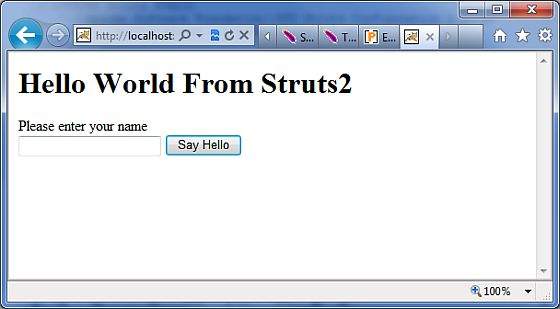
Enter a value "Struts2" and submit the page. You should see the following page:
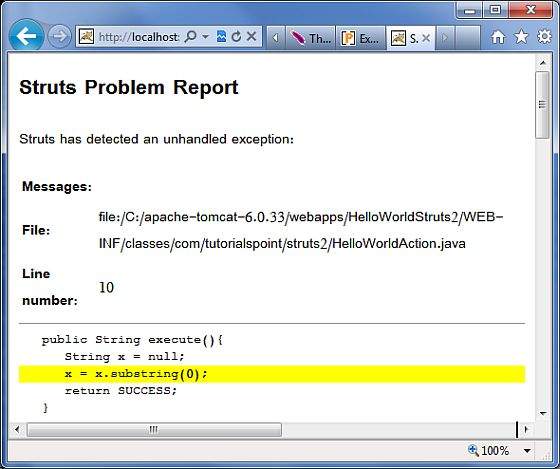
As shown in the above example, the default exception interceptor does
a great job of handling the exception. Let us now create a dedicated
error page for our Exception. Create a file called Error.jsp with the following contents:
In addition to this, Struts2 framework comes with a "logging"
interceptor to log the exceptions. By enabling the logger to log the
uncaught exceptions, we can easily look at the stack trace and work out
what went wrong.
Struts makes the exception handling easy by the use of the "exception" interceptor. The "exception" interceptor is included as part of the default stack, so you don't have to do anything extra to configure it. It is available out-of-the-box ready for you to use. Let us see a simple Hello World example with some modification in HelloWorldAction.java file. Here we purposely introduced a NullPointer Exception in our HelloWorldAction action code.
package com.tutorialspoint.struts2;

import com.opensymphony.xwork2.ActionSupport;

public class HelloWorldAction extends ActionSupport{
   private String name;

   public String execute(){
      String x = null;
      x = x.substring(0);
      return SUCCESS;
   }

   public String getName() {
      return name;
   }

   public void setName(String name) {
      this.name = name;
   }
}
Let us keep the content of HelloWorld.jsp as follows:
<%@ page contentType="text/html; charset=UTF-8" %>
<%@ taglib prefix="s" uri="/struts-tags" %>
<html>
<head>
<title>Hello World</title>
</head>
<body>
   Hello World, <s:property value="name"/>
</body>
</html>
Following is the content of index.jsp:
<%@ page language="java" contentType="text/html; charset=ISO-8859-1"
   pageEncoding="ISO-8859-1"%>
<%@ taglib prefix="s" uri="/struts-tags"%>
   <!DOCTYPE html PUBLIC "-//W3C//DTD HTML 4.01 Transitional//EN"
"http://www.w3.org/TR/html4/loose.dtd">
<html>
<head>
<title>Hello World</title>
</head>
<body>
   <h1>Hello World From Struts2</h1>
   <form action="hello">
      <label for="name">Please enter your name</label><br/>
      <input type="text" name="name"/>
      <input type="submit" value="Say Hello"/>
   </form>
</body>
</html>
Your struts.xml should look like:
<?xml version="1.0" encoding="UTF-8"?>
<!DOCTYPE struts PUBLIC
   "-//Apache Software Foundation//DTD Struts Configuration 2.0//EN"
   "http://struts.apache.org/dtds/struts-2.0.dtd">
<struts>
<constant name="struts.devMode" value="true" />
   <package name="helloworld" extends="struts-default">

      <action name="hello"
         class="com.tutorialspoint.struts2.HelloWorldAction"
         method="execute">
         <result name="success">/HelloWorld.jsp</result>
      </action>

   </package>
</struts>
Now right click on the project name and click Export > WAR File to create a War file. Then deploy this WAR in the Tomcat's webapps directory. Finally, start Tomcat server and try to access URL http://localhost:8080/HelloWorldStruts2/index.jsp. This will give you following screen:
<%@ page language="java" contentType="text/html; charset=ISO-8859-1"
 pageEncoding="ISO-8859-1"%>
<%@ taglib prefix="s" uri="/struts-tags"%>
<!DOCTYPE html PUBLIC "-//W3C//DTD HTML 4.01 Transitional//EN"
"http://www.w3.org/TR/html4/loose.dtd">
<html>
<head>
<title></title>
</head>
<body>
   This is my custom error page
</body>
</html>
Let us now configure Struts to use this this error page in case of an exception. Let us modify the struts.xml as follows:
<?xml version="1.0" encoding="UTF-8"?>
<!DOCTYPE struts PUBLIC
   "-//Apache Software Foundation//DTD Struts Configuration 2.0//EN"
   "http://struts.apache.org/dtds/struts-2.0.dtd">
<struts>
<constant name="struts.devMode" value="true" />
   <package name="helloworld" extends="struts-default">

      <action name="hello"
         class="com.tutorialspoint.struts2.HelloWorldAction"
         method="execute">
         <exception-mapping exception="java.lang.NullPointerException"
         result="error" />
         <result name="success">/HelloWorld.jsp</result>
         <result name="error">/Error.jsp</result>
      </action>

   </package>
</struts>
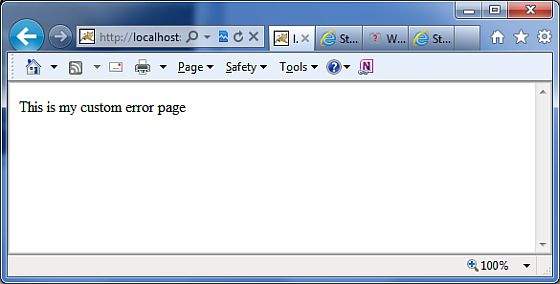
As shown in the example above, now we have configured Struts to use the dedicated Error.jsp for the NullPointerException. If you rerun the program now, you shall now see the following output:
Global Exception Mappings
We have seen how we can handle action specific exception. We can set an exception globally which will apply to all the actions. For example, to catch the same NullPointerException exceptions, we could add <global-exception-mappings...> tag inside <package...> tag and its <result...> tag should be added inside the <action...> tag in struts.xml file as follows:<?xml version="1.0" encoding="UTF-8"?> <!DOCTYPE struts PUBLIC "-//Apache Software Foundation//DTD Struts Configuration 2.0//EN" "http://struts.apache.org/dtds/struts-2.0.dtd"> <struts> <constant name="struts.devMode" value="true" /> <package name="helloworld" extends="struts-default"> <global-exception-mappings> <exception-mapping exception="java.lang.NullPointerException" result="error" /> </global-exception-mappings> <action name="hello" class="com.tutorialspoint.struts2.HelloWorldAction" method="execute"> <result name="success">/HelloWorld.jsp</result> <result name="error">/Error.jsp</result> </action> </package> </struts>


No comments:
Post a Comment