
Struts uses the DOJO framework for the AJAX tag implementation. First
of all, to proceed with this example, you need to add
struts2-dojo-plugin-2.2.3.jar to your classpath.
You can get this file from the lib folder of your struts2 download (C:\struts-2.2.3-all\struts-2.2.3\lib\struts2-dojo-plugin-2.2.3.jar)
For this exercies, let us modify HelloWorld.jsp as follows:
Let us now go through this example one step at a time.
First thing to notice is the addition of a new tag library with the prefix sx. This (struts-dojo-tags) is the tag library specifically created for the ajax integration.
Then inside the HTML head we call the sx:head. This initializes the dojo framework and makes it ready for all AJAX invocations within the page. This step is important - your ajax calls will not work without the sx:head being initialized.
First we have the autocompleter tag. The autocompleter tag looks pretty much like a select box. It is populated with the values red, green and blue. But the different between a select box and this one is that it auto completes. That is, if you start typing in gr, it will fill it with "green". Other than that this tag is very much similar to the s:select tag which we covered earlier.
Next, we have a date time picker. This tag creates an input field with a button next to it. When the button is pressed, a popup date time picker is displayed. When the user selects a date, the date is filled into the input text in the format that is specified in the tag attribute. In our example, we have specified dd/MM/yyyy as the format for the date.
Next we create a url tag to the system.action file which we created in the earlier exercises. It doesn't have to be the system.action - it could be any action file that you created earlier. Then we have a div with the hyperlink set to the url and delay set to 2 seconds. What happens when you run this is, the "Initial Content" will be displayed for 2 seconds, then the div's content will be replaced with the contents from the hello.action execution.
Finally we have a simple tab panel with two tabs. The tabs are divs themseleves with the labels Tab 1 and Tab2.
It should be worth noting that the AJAX tag integration in Struts is still a work in progress and the maturity of this integration is slowly increasing with every release.
You can get this file from the lib folder of your struts2 download (C:\struts-2.2.3-all\struts-2.2.3\lib\struts2-dojo-plugin-2.2.3.jar)
For this exercies, let us modify HelloWorld.jsp as follows:
<%@ page contentType="text/html; charset=UTF-8"%>
<%@ taglib prefix="s" uri="/struts-tags"%>
<%@ taglib prefix="sx" uri="/struts-dojo-tags"%>
<html>
<head>
<title>Hello World</title>
<s:head />
<sx:head />
</head>
<body>
   <s:form>
      <sx:autocompleter label="Favourite Colour"
         list="{'red','green','blue'}" />
      <br />
      <sx:datetimepicker name="deliverydate" label="Delivery Date"
         displayFormat="dd/MM/yyyy" />
      <br />
      <s:url id="url" value="/hello.action" />
      <sx:div href="%{#url}" delay="2000">
           Initial Content
      </sx:div>
      <br/>
      <sx:tabbedpanel id="tabContainer">
         <sx:div label="Tab 1">Tab 1</sx:div>
         <sx:div label="Tab 2">Tab 2</sx:div>
      </sx:tabbedpanel>
   </s:form>
</body>
</html>
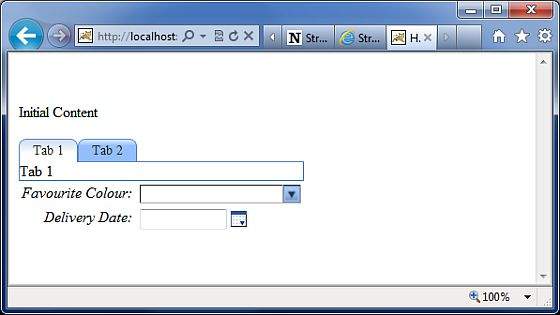
When we run the above example, we get the following output:
First thing to notice is the addition of a new tag library with the prefix sx. This (struts-dojo-tags) is the tag library specifically created for the ajax integration.
Then inside the HTML head we call the sx:head. This initializes the dojo framework and makes it ready for all AJAX invocations within the page. This step is important - your ajax calls will not work without the sx:head being initialized.
First we have the autocompleter tag. The autocompleter tag looks pretty much like a select box. It is populated with the values red, green and blue. But the different between a select box and this one is that it auto completes. That is, if you start typing in gr, it will fill it with "green". Other than that this tag is very much similar to the s:select tag which we covered earlier.
Next, we have a date time picker. This tag creates an input field with a button next to it. When the button is pressed, a popup date time picker is displayed. When the user selects a date, the date is filled into the input text in the format that is specified in the tag attribute. In our example, we have specified dd/MM/yyyy as the format for the date.
Next we create a url tag to the system.action file which we created in the earlier exercises. It doesn't have to be the system.action - it could be any action file that you created earlier. Then we have a div with the hyperlink set to the url and delay set to 2 seconds. What happens when you run this is, the "Initial Content" will be displayed for 2 seconds, then the div's content will be replaced with the contents from the hello.action execution.
Finally we have a simple tab panel with two tabs. The tabs are divs themseleves with the labels Tab 1 and Tab2.
It should be worth noting that the AJAX tag integration in Struts is still a work in progress and the maturity of this integration is slowly increasing with every release.


No comments:
Post a Comment