
The following example show how to write a simple web based
application using Spring MVC Framework, which can access static pages
along with dynamic pages with the help of <mvc:resources> tag. To
start with it, let us have working Eclipse IDE in place and follow the
following steps to develop a Dynamic Form based Web Application using
Spring Web Framework:
WebController.java
Following is the content of Spring view file WEB-INF/jsp/index.jsp. This will be a landing page, this page will send a request to access staticPage service method which will redirect this request to a static page available in WEB-INF/pages folder.
index.jsp
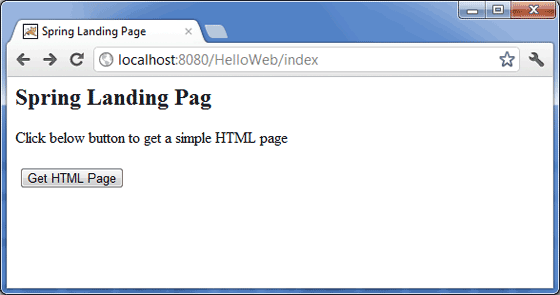
Now start your Tomcat server and make sure you are able to access other web pages from webapps folder using a standard browser. Now try to access the URL http://localhost:8080/HelloWeb/index. If everything is fine with your Spring Web Application, you should see the following result:
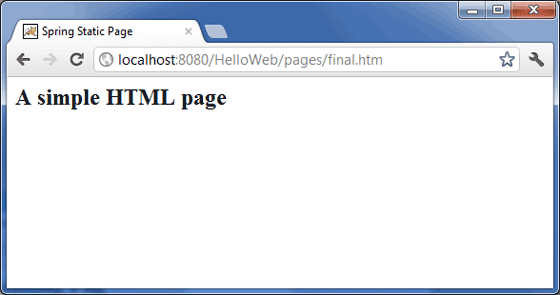
 Click on "Get HTML Page" button to access a static page mentioned in
staticPage service method. If everything is fine with your Spring Web
Application, you should see the following result:
Click on "Get HTML Page" button to access a static page mentioned in
staticPage service method. If everything is fine with your Spring Web
Application, you should see the following result:
| Step | Description |
|---|---|
| 1 | Create a project with a name HelloWeb under a package com.tutorialspoint as explained in the Spring MVC - Hello World Example chapter. |
| 2 | Create a Java class WebController under the com.tutorialspoint package. |
| 3 | Create a static file final.htm under jsp sub-folder. |
| 4 | Update Spring configuration file HelloWeb-servlet.xml under the WebContent/WEB-INF folder as mentioned below. |
| 4 | The final step is to create the content of all the source and configuration files and export the application as explained below. |
package com.tutorialspoint;

import org.springframework.stereotype.Controller;
import org.springframework.web.bind.annotation.RequestMapping;
import org.springframework.web.bind.annotation.RequestMethod;

@Controller
public class WebController {

   @RequestMapping(value = "/index", method = RequestMethod.GET)
   public String index() {
    return "index";
   }

   @RequestMapping(value = "/staticPage", method = RequestMethod.GET)
   public String redirect() {

      return "redirect:/pages/final.htm";
   }
}
HelloWeb-servlet.xml
<?xml version="1.0" encoding="UTF-8"?>
<beans xmlns="http://www.springframework.org/schema/beans"
 xmlns:xsi="http://www.w3.org/2001/XMLSchema-instance"
 xmlns:context="http://www.springframework.org/schema/context"
 xmlns:mvc="http://www.springframework.org/schema/mvc"
 xsi:schemaLocation="http://www.springframework.org/schema/beans
 http://www.springframework.org/schema/beans/spring-beans-2.5.xsd
 http://www.springframework.org/schema/mvc
 http://www.springframework.org/schema/mvc/spring-mvc-3.0.xsd
 http://www.springframework.org/schema/context
 http://www.springframework.org/schema/context/spring-context-3.0.xsd">

    <context:component-scan base-package="com.tutorialspoint" />

    <bean id="viewResolver" class="org.springframework.web.servlet.view.InternalResourceViewResolver">
    <property name="prefix" value="/WEB-INF/jsp/" />
    <property name="suffix" value=".jsp" />
    </bean>

    <mvc:resources mapping="/pages/**" location="/WEB-INF/pages/" />
    <mvc:annotation-driven/>

</beans>
Here <mvc:resources..../> tag is being used to map static pages. The mapping attribute must be an Ant pattern that specifies the URL pattern of an http requests. The location attribute must specify one or more valid resource directory locations having static pages including images, stylesheets, JavaScript, and other static content. Multiple resource locations may be specified using a comma-seperated list of values.
Following is the content of Spring view file WEB-INF/jsp/index.jsp. This will be a landing page, this page will send a request to access staticPage service method which will redirect this request to a static page available in WEB-INF/pages folder.
index.jsp
<%@taglib uri="http://www.springframework.org/tags/form" prefix="form"%>
<html>
<head>
    <title>Spring Landing Page</title>
</head>
<body>
<h2>Spring Landing Pag</h2>
<p>Click below button to get a simple HTML page</p>
<form:form method="GET" action="/HelloWeb/staticPage">
<table>
    <tr>
    <td>
    <input type="submit" value="Get HTML Page"/>
    </td>
    </tr>
</table>
</form:form>
</body>
</html>
final.htm
<html>
<head>
    <title>Spring Static Page</title>
</head>
<body>

<h2>A simple HTML page</h2>

</body>
</html>
Once you are done with creating source and configuration files, export your application. Right click on your application and use Export > WAR File option and save your HelloWeb.war file in Tomcat's webapps folder.
Now start your Tomcat server and make sure you are able to access other web pages from webapps folder using a standard browser. Now try to access the URL http://localhost:8080/HelloWeb/index. If everything is fine with your Spring Web Application, you should see the following result:
Click on "Get HTML Page" button to access a static page mentioned in
staticPage service method. If everything is fine with your Spring Web
Application, you should see the following result:

No comments:
Post a Comment