Spring - MVC Framework Overview
The Spring web MVC framework provides model-view-controller architecture and ready components that can be used to develop flexible and loosely coupled web applications. The MVC pattern results in separating the different aspects of the application (input logic, business logic, and UI logic), while providing a loose coupling between these elements.
- The Model encapsulates the application data and in general they will consist of POJO.
- The View is responsible for rendering the model data and in general it generates HTML output that the client's browser can interpret.
- The Controller is responsible for processing user requests and building appropriate model and passes it to the view for rendering.
The DispatcherServlet
The Spring Web model-view-controller (MVC) framework is designed around a
DispatcherServlet that handles all the HTTP requests and responses. The request processing workflow of the Spring Web MVC
DispatcherServlet is illustrated in the following diagram:
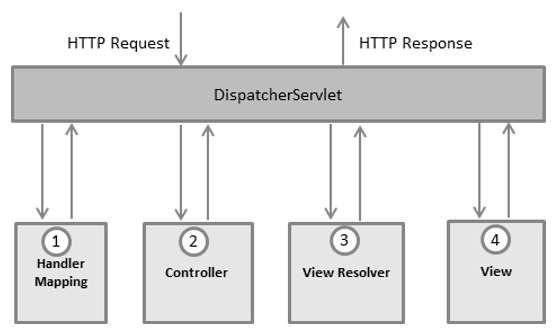
Following is the sequence of events corresponding to an incoming HTTP request to
DispatcherServlet:
- After receiving an HTTP request, DispatcherServlet consults the HandlerMapping to call the appropriate Controller.
- The Controller takes the request and calls the appropriate service methods based on used GET or POST method. The service method will set model data based on defined business logic and returns view name to the DispatcherServlet.
- The DispatcherServlet will take help from ViewResolver to pickup the defined view for the request.
- Once view is finalized, The DispatcherServlet passes the model data to the view which is finally rendered on the browser.
All the above mentioned components ie. HandlerMapping, Controller and ViewResolver are parts of
WebApplicationContext which is an extension of the plain
ApplicationContext with some extra features necessary for web applications.
Required Configuration
You need to map requests that you want the
DispatcherServlet to handle, by using a URL mapping in the
web.xml file. The following is an example to show declaration and mapping for
HelloWeb DispatcherServlet example:
<web-app id="WebApp_ID" version="2.4"
    xmlns="http://java.sun.com/xml/ns/j2ee"
    xmlns:xsi="http://www.w3.org/2001/XMLSchema-instance"
    xsi:schemaLocation="http://java.sun.com/xml/ns/j2ee
    http://java.sun.com/xml/ns/j2ee/web-app_2_4.xsd">

    <display-name>Spring MVC Application</display-name>

   <servlet>
      <servlet-name>HelloWeb</servlet-name>
      <servlet-class>
         org.springframework.web.servlet.DispatcherServlet
      </servlet-class>
      <load-on-startup>1</load-on-startup>
   </servlet>

   <servlet-mapping>
      <servlet-name>HelloWeb</servlet-name>
      <url-pattern>*.jsp</url-pattern>
   </servlet-mapping>

</web-app>


No comments:
Post a Comment