
Servlets are Java classes which service HTTP requests and implement the javax.servlet.Servlet
interface. Web application developers typically write servlets that
extend javax.servlet.http.HttpServlet, an abstract class that implements
the Servlet interface and is specially designed to handle HTTP
requests.
Assuming your environment is setup properly, go in ServletDevel directory and compile HelloWorld.java as follows:
This command line uses the built-in javac compiler that comes with the Sun Microsystems Java Software Development Kit (JDK). For this command to work properly, you have to include the location of the Java SDK that you are using in the PATH environment variable.
If everything goes fine, above compilation would produce HelloWorld.class file in the same directory. Next section would explain how a compiled servlet would be deployed in production.
If you have a fully qualified class name of com.myorg.MyServlet, then this servlet class must be located in WEB-INF/classes/com/myorg/MyServlet.class.
For now, let us copy HelloWorld.class into <Tomcat-installation-directory>/webapps/ROOT/WEB-INF/classes and create following entries in web.xml file located in <Tomcat-installation-directory>/webapps/ROOT/WEB-INF/
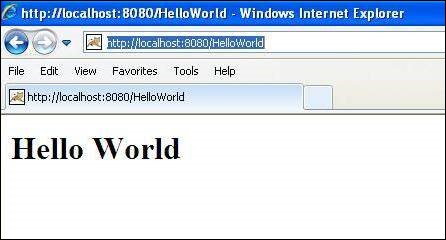
You are almost done, now let us start tomcat server using <Tomcat-installation-directory>\bin\startup.bat (on windows) or <Tomcat-installation-directory>/bin/startup.sh (on Linux/Solaris etc.) and finally type http://localhost:8080/HelloWorld in browser's address box. If everything goes fine, you would get following result:
Sample Code for Hello World:
Following is the sample source code structure of a servlet example to write Hello World:// Import required java libraries import java.io.*; import javax.servlet.*; import javax.servlet.http.*; // Extend HttpServlet class public class HelloWorld extends HttpServlet { private String message; public void init() throws ServletException { // Do required initialization message = "Hello World"; } public void doGet(HttpServletRequest request, HttpServletResponse response) throws ServletException, IOException { // Set response content type response.setContentType("text/html"); // Actual logic goes here. PrintWriter out = response.getWriter(); out.println("<h1>" + message + "</h1>"); } public void destroy() { // do nothing. } }
Compiling a Servlet:
Let us put above code if HelloWorld.java file and put this file in C:\ServletDevel (Windows) or /usr/ServletDevel (Unix) then you would need to add these directories as well in CLASSPATH.Assuming your environment is setup properly, go in ServletDevel directory and compile HelloWorld.java as follows:
$ javac HelloWorld.javaIf the servlet depends on any other libraries, you have to include those JAR files on your CLASSPATH as well. I have included only servlet-api.jar JAR file because I'm not using any other library in Hello World program.
This command line uses the built-in javac compiler that comes with the Sun Microsystems Java Software Development Kit (JDK). For this command to work properly, you have to include the location of the Java SDK that you are using in the PATH environment variable.
If everything goes fine, above compilation would produce HelloWorld.class file in the same directory. Next section would explain how a compiled servlet would be deployed in production.
Servlet Deployment:
By default, a servlet application is located at the path <Tomcat-installation-directory>/webapps/ROOT and the class file would reside in <Tomcat-installation-directory>/webapps/ROOT/WEB-INF/classes.If you have a fully qualified class name of com.myorg.MyServlet, then this servlet class must be located in WEB-INF/classes/com/myorg/MyServlet.class.
For now, let us copy HelloWorld.class into <Tomcat-installation-directory>/webapps/ROOT/WEB-INF/classes and create following entries in web.xml file located in <Tomcat-installation-directory>/webapps/ROOT/WEB-INF/
<servlet>
   <servlet-name>HelloWorld</servlet-name>
   <servlet-class>HelloWorld</servlet-class>
</servlet>

<servlet-mapping>
   <servlet-name>HelloWorld</servlet-name>
   <url-pattern>/HelloWorld</url-pattern>
</servlet-mapping>
Above entries to be created inside <web-app>...</web-app> tags available in web.xml file. There could be various entries in this table already available, but never mind.
You are almost done, now let us start tomcat server using <Tomcat-installation-directory>\bin\startup.bat (on windows) or <Tomcat-installation-directory>/bin/startup.sh (on Linux/Solaris etc.) and finally type http://localhost:8080/HelloWorld in browser's address box. If everything goes fine, you would get following result:


No comments:
Post a Comment