
This tutorial will teach you how to manage a web based project using version control system Maven. Here you will learn how to create/build/deploy and run a web application:
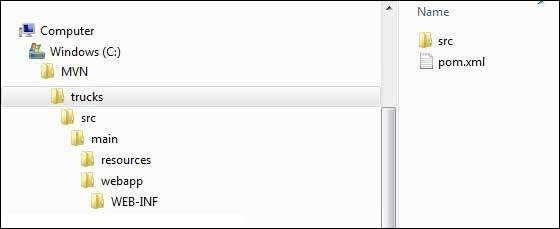 Maven uses a standard directory layout. Using above example, we can understand following key concepts
Open C:\ > MVN > trucks > src > main > webapp > folder, you will see index.jsp.
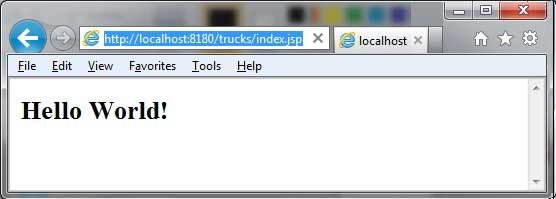
Verify the output.
Create Web Application
To create a simple java web application, we'll use maven-archetype-webapp plugin. So let's open command console, go the C:\MVN directory and execute the following mvn command.C:\MVN>mvn archetype:generate -DgroupId=com.companyname.automobile -DartifactId=trucks -DarchetypeArtifactId=maven-archetype-webapp -DinteractiveMode=falseMaven will start processing and will create the complete web based java application project structure.
[INFO] Scanning for projects...
[INFO]
[INFO] ------------------------------------------------------------------------
[INFO] Building Maven Stub Project (No POM) 1
[INFO] ------------------------------------------------------------------------
[INFO]
[INFO] >>> maven-archetype-plugin:2.4:generate (default-cli) > generate-sources
@ standalone-pom >>>
[INFO]
[INFO] <<< maven-archetype-plugin:2.4:generate (default-cli) < generate-sources
@ standalone-pom <<<
[INFO]
[INFO] --- maven-archetype-plugin:2.4:generate (default-cli) @ standalone-pom --
-
[INFO] Generating project in Batch mode
[WARNING] No archetype found in remote catalog. Defaulting to internal catalog
[INFO] -------------------------------------------------------------------------
---
[INFO] Using following parameters for creating project from Old (1.x) Archetype:
 maven-archetype-webapp:1.0
[INFO] -------------------------------------------------------------------------
---
[INFO] Parameter: groupId, Value: com.companyname.automobile
[INFO] Parameter: packageName, Value: com.companyname.automobile
[INFO] Parameter: package, Value: com.companyname.automobile
[INFO] Parameter: artifactId, Value: trucks
[INFO] Parameter: basedir, Value: C:\MVN
[INFO] Parameter: version, Value: 1.0-SNAPSHOT
[INFO] project created from Old (1.x) Archetype in dir: C:\MVN\trucks
[INFO] ------------------------------------------------------------------------
[INFO] BUILD SUCCESS
[INFO] ------------------------------------------------------------------------
[INFO] Total time: 19.016 s
[INFO] Finished at: 2015-09-27T17:47:56+05:30
[INFO] Final Memory: 16M/247M
[INFO] ------------------------------------------------------------------------
Now go to C:/MVN directory. You'll see a java application project created named trucks (as specified in artifactId).
Maven uses a standard directory layout. Using above example, we can understand following key concepts| Folder Structure | Description |
|---|---|
| trucks | contains src folder and pom.xml |
| src/main/webapp | contains index.jsp and WEB-INF folder. |
| src/main/webapp/WEB-INF | contains web.xml |
| src/main/resources | it contains images/properties files . |
POM.xml
<project xmlns="http://maven.apache.org/POM/4.0.0" xmlns:xsi="http://www.w3.org/2001/XMLSchema-instance"
   xsi:schemaLocation="http://maven.apache.org/POM/4.0.0 http://maven.apache.org/maven-v4_0_0.xsd">
   <modelVersion>4.0.0</modelVersion>
   <groupId>com.companyname.automobile</groupId>
   <artifactId>trucks</artifactId>
   <packaging>war</packaging>
   <version>1.0-SNAPSHOT</version>
   <name>trucks Maven Webapp</name>
   <url>http://maven.apache.org</url>
   <dependencies>
      <dependency>
         <groupId>junit</groupId>
         <artifactId>junit</artifactId>
         <version>3.8.1</version>
         <scope>test</scope>
       </dependency>
   </dependencies>
   <build>
      <finalName>trucks</finalName>
   </build>
</project>
If you see, Maven also created a sample JSP Source file
Open C:\ > MVN > trucks > src > main > webapp > folder, you will see index.jsp.
<html>
   <body>
      <h2>Hello World!</h2>
   </body>
</html>
Build Web Application
Let's open command console, go the C:\MVN\trucks directory and execute the following mvn command.C:\MVN\trucks>mvn clean packageMaven will start building the project.
[INFO] Scanning for projects...
[INFO]
[INFO] ------------------------------------------------------------------------
[INFO] Building trucks Maven Webapp 1.0-SNAPSHOT
[INFO] ------------------------------------------------------------------------
[INFO]
[INFO] --- maven-clean-plugin:2.5:clean (default-clean) @ trucks ---
[INFO] Deleting C:\MVN\trucks\target
[INFO]
[INFO] --- maven-resources-plugin:2.6:resources (default-resources) @ trucks ---

[WARNING] Using platform encoding (Cp1252 actually) to copy filtered resources,
i.e. build is platform dependent!
[INFO] Copying 0 resource
[INFO]
[INFO] --- maven-compiler-plugin:3.1:compile (default-compile) @ trucks ---
[INFO] No sources to compile
[INFO]
[INFO] --- maven-resources-plugin:2.6:testResources (default-testResources) @ tr
ucks ---
[WARNING] Using platform encoding (Cp1252 actually) to copy filtered resources,
i.e. build is platform dependent!
[INFO] skip non existing resourceDirectory C:\MVN\trucks\src\test\resources
[INFO]
[INFO] --- maven-compiler-plugin:3.1:testCompile (default-testCompile) @ trucks
---
[INFO] No sources to compile
[INFO]
[INFO] --- maven-surefire-plugin:2.12.4:test (default-test) @ trucks ---
[INFO] No tests to run.
[INFO]
[INFO] --- maven-war-plugin:2.2:war (default-war) @ trucks ---
[INFO] Packaging webapp
[INFO] Assembling webapp [trucks] in [C:\MVN\trucks\target\trucks]
[INFO] Processing war project
[INFO] Copying webapp resources [C:\MVN\trucks\src\main\webapp]
[INFO] Webapp assembled in [93 msecs]
[INFO] Building war: C:\MVN\trucks\target\trucks.war
[INFO] WEB-INF\web.xml already added, skipping
[INFO] ------------------------------------------------------------------------
[INFO] BUILD SUCCESS
[INFO] ------------------------------------------------------------------------
[INFO] Total time: 4.766 s
[INFO] Finished at: 2015-09-27T17:53:05+05:30
[INFO] Final Memory: 11M/247M
[INFO] ------------------------------------------------------------------------
Deploy Web Application
Now copy the trucks.war created in C:\ > MVN > trucks > target > folder to your webserver webapp directory and restart the webserver.Test Web Application
Run the web-application using URL : http://<server-name>:<port-number>/trucks/index.jspVerify the output.


No comments:
Post a Comment