পৃষ্ঠাসমূহ

Search Your Article

CS


Welcome to GoogleDG – your one-stop destination for free learning resources, guides, and digital tools.

At GoogleDG, we believe that knowledge should be accessible to everyone. Our mission is to provide readers with valuable ebooks, tutorials, and tech-related content that makes learning easier, faster, and more enjoyable.

What We Offer:

  • 📘 Free & Helpful Ebooks – covering education, technology, self-development, and more.

  • 💻 Step-by-Step Tutorials – practical guides on digital tools, apps, and software.

  • 🌐 Tech Updates & Tips – simplified information to keep you informed in the fast-changing digital world.

  • 🎯 Learning Support – resources designed to support students, professionals, and lifelong learners.

    Latest world News 


Our Vision

To create a digital knowledge hub where anyone, from beginners to advanced learners, can find trustworthy resources and grow their skills.

Why Choose Us?

✔ Simple explanations of complex topics
✔ 100% free access to resources
✔ Regularly updated content
✔ A community that values knowledge sharing

We are continuously working to expand our content library and provide readers with the most useful and relevant digital learning materials.

📩 If you’d like to connect, share feedback, or suggest topics, feel free to reach us through the Contact page.

Pageviews

Tuesday, October 22, 2024

Excel Formatting

 Formatting

Excel has many ways to format and style a spreadsheet.

Why format and style your spreadsheet?

  • Make it easier to read and understand
  • Make it more delicate

Styling is about changing the looks of cells, such as changing colors, font, font sizes, borders, number formats, and so on.

The most used styling functions are:

  • Colors
  • Fonts
  • Borders
  • Number formats
  • Grids

There are two ways to access the styling commands in Excel:

  1. The Ribbon
  2. Formatting menu, by right clicking cells

Read more about the Ribbon in the Excel overview chapter.


Styling Commands in Ribbon

The Ribbon can be expanded by clicking the arrow/caret-down icon on the right side. This gives access to more commands:



Styling Commands, Right Clicking Cells

You can also right-click on any cell to style it:
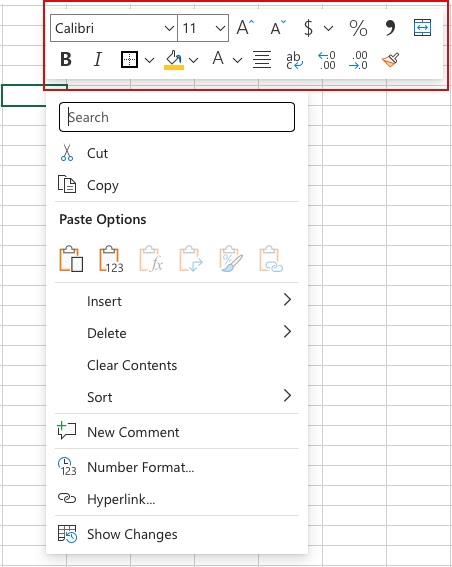
Styling commands can be accessed from both views.


Chapter summary

Formatting is used to make spreadsheets more readable. There are many ways to add styles. The most common ones are; Color, Font, Number format and Grids.

No comments:

Post a Comment